純 JavaScript + HTML 打造網頁版日曆(附完整程式碼)
編輯:關於JavaScript
很多時候我們只是想在頁面上擺一個簡單的月曆,卻不想為此引入龐大的日期插件。本文示範如何用原生 JavaScript 的 Date 物件加上 document.write,幾十行就拼出一張 HTML 表格月曆,非常適合當作入門練習。
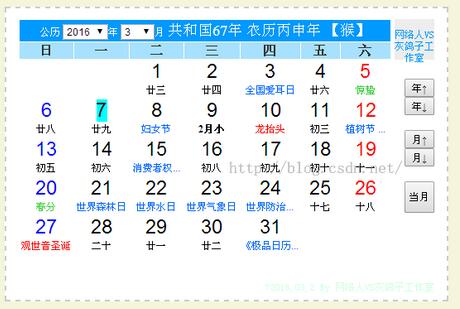
先看一下成品長什麼樣子:
實作程式碼
<html>
<head>
<link rel="stylesheet" type="text/css" href="Skin.css">
<style>
<!-- table{ text-align: center } -->
</style>
</head>
<body>
<div align="center">
<script language="javascript">
var my = new Date();
function showc() {
  var k = 1;
  var j = 1;
  var today;
  var tomonth;
  var theday = 1;      // 日期
  var max;
  var temp;
  var tempday;         // 這個月第一天的星期

  document.write("<b>" + my.getFullYear() + "-" + (my.getMonth() + 1) + "</b>");
  document.write("<table border='1' width='273' height='158'>");
  document.write("<tr>");
  document.write("<td height='23' width='39'><font color='red'>Sun</font></td>");
  document.write("<td height='23' width='39'>Mon</td>");
  document.write("<td height='23' width='39'>Tue</td>");
  document.write("<td height='23' width='39'>Wed</td>");
  document.write("<td height='23' width='39'>Thu</td>");
  document.write("<td height='23' width='39'>Fri</td>");
  document.write("<td height='23' width='39'>Sat</td>");
  document.write("</tr>");

  temp = my.getDate();
  my.setDate(1);              // 先把日期設為 1 號
  tempday = my.getDay();      // 取得 1 號是星期幾
  my.setDate(temp);           // 再還原回今天
  today = my.getDay();        // 今天星期幾

  switch ((my.getMonth() + 1)) {
    case 1: case 3: case 5: case 7:
    case 8: case 10: case 12:
      max = 31; break;
    case 4: case 6: case 9: case 11:
      max = 30; break;
    default:
      max = 29;   // 這裡沒有判斷閏年,二月一律當 29 天
  }

  for (k = 0; k < 6; k++) {
    document.write("<tr>");
    for (j = 0; j <= 6; j++) {
      document.write("<td height='23' width='39'>");
      if (j >= tempday) {
        tempday = 0;   // 歸零,等於取消這個判斷條件
        if (theday <= max) {
          document.write("<a title=" + my.getFullYear() + "-" + (my.getMonth() + 1) + "-" + theday
            + " target='_blank' href=detail.asp?date=" + theday + ">");
          if (theday == my.getDate())
            document.write("<font color='green'>[" + theday + "]</font></a>");
          else if (j == 0)
            document.write("<font color='red'>" + theday + "</font></a>");
          else
            document.write(theday + "</a>");
          theday++;
        }
      }
      document.write("</td>");
    }
    document.write("</tr>");
  }
  document.write("</table>");
}
showc();
</script>
</div>
</body>
</html>
幾個可以再加強的地方
這段程式有兩個很典型的可改進點。第一是閏年判斷:二月固定寫 29 天,遇到平年就會多顯示一天,正確做法是用 new Date(year, month + 1, 0).getDate() 直接問 Date 物件當月有幾天,閏年閏月一次搞定。第二是輸出方式:用 document.write 拼字串雖然直觀,但在頁面載入完成後呼叫會清空整個文件,實務上改成組出字串後寫進容器的 innerHTML,或用 DOM API 建立節點會安全得多。
以上就是本文的全部內容,希望能幫助你輕鬆做出自己的網頁版日曆。
- 上一篇文章: Bootstrap 多級導航欄(級聯導航)實現代碼大全
- 下一篇文章: 一道 JavaScript 變量作用域面試題,你真的看懂了嗎?