JavaScript 年/月/日/星期連動下拉選單實作
編輯:關於JavaScript
本文實作一個經典的日期選擇元件:年、月、日三個下拉選單彼此連動,選好日期後自動帶出對應的星期。核心技巧只有一個——用 Date 物件的「日期歸零」特性取得某個月有幾天。
效果示意
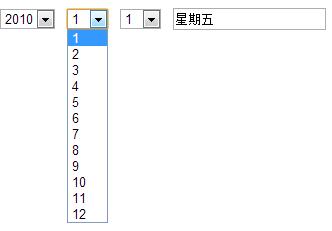
完整程式碼
<html>
<head>
<meta http-equiv="Content-Type" content="text/html; charset=GB2312">
<title>年月日星期級聯</title>
</head>
<body topmargin="10" leftmargin="0">
<form>
  <select id=year onchange="toDate();">
    <script>for(i=1970;i<=2010;i++)document.write("<option>"+i+"</option>")</script>
  </select>
  <select id=month onchange="toDate();">
    <script>for(i=1;i<=12;i++)document.write("<option>"+i+"</option>")</script>
  </select>
  <select id=day onchange="toDay();"></select>
  <input name=weekday>
</form>
<script type="text/javascript">
var arr = "日一二三四五六".split("");

function toDate(){
  with(document.all){
    vYear  = parseInt(year.options[year.selectedIndex].text);
    vMonth = parseInt(month.options[month.selectedIndex].text);
    day.length = 0;   // 先清空日選單
    // new Date(year, month, 0) 會得到「上個月的最後一天」,
    // 也就是當月的最後一天,getDate() 即為當月天數
    for(i = 0; i < (new Date(vYear, vMonth, 0)).getDate(); i++){
      day.options[day.length++].value = day.length;
      day.options[day.length-1].text  = day.length;
    }
  }
  toDay();
}

function toDay(){
  vDay = parseInt(document.all.day.options[document.all.day.selectedIndex].value);
  document.all("weekday").value =
    "星期" + arr[new Date(vYear, vMonth - 1, vDay).getDay()];
}

window.onload = toDate;
</script>
</body>
</html>
兩個關鍵原理
如何算出當月天數?new Date(year, month, 0) 中的第三個參數 0 代表「上個月的最後一天」,而這一天正好就是當月的最後一天,因此 getDate() 回傳的就是當月總天數。這一招同時自動處理了大小月與閏年,不必另外寫判斷。
如何取得星期?new Date(year, month - 1, day) 建立日期物件後呼叫 getDay(),會得到 0 到 6 的數字,對應週日到週六,用它去索引字串 "日一二三四五六" 即可。注意建構式的月份參數是從 0 開始,所以要減 1。
實務上的改進空間
這段程式用了 document.all 與 with,屬於較早期的寫法,現代的等效做法是改用 document.getElementById 並避免 with(with 在嚴格模式下已被禁用)。另外年份範圍寫死成 1970 到 2010,實戰中通常會改成以當前年份為基準動態產生前後若干年。最後,若搭配後端,記得把最終選擇的年月日組合成統一格式再送出,避免時區造成日期偏一天。
相關文章
-
JS 實現出生日期與星座的級聯顯示 JS 取得「今天往前七天」的日期陣列:Date 運算要點 JavaScript Date 物件全解:建構方式、靜態方法與各系列 API JavaScript Date 物件速查:建立方式與方法全整理 JavaScript 日期格式化筆記:Date 方法與自訂 format JavaScript Date 物件完整指南:建立、格式化與時間元件取值 JavaScript 取得時間與字串、時間戳互轉速查 JavaScript 引用類型透徹講解:Date 日期物件與 Array 陣列 用 JavaScript Date 生成最近七天的日期陣列 JavaScript 實現類淘寶訂單倒計時效果