解決 ligerUI 布局時 Center 區塊中 Tab 高度不對的問題
編輯:關於JavaScript
使用 ligerUI 做後台布局時,常見的困擾是 center 區域裡的 Tab 沒有撐滿可用高度。解法其實很直接:在布局初始化完成後,量出 center 的實際高度,再把它當成參數傳給 Tab。
1.0 引入 JS 與 CSS
 <link href="/Content/scripts/ligerUI/skins/Aqua/css/ligerui-all.css" rel="stylesheet" />
<link href="/Content/scripts/ligerUI/skins/ligerui-icons.css" rel="stylesheet" />
<script src="~/Scripts/jquery-1.8.2.js"></script>
<script src="/Content/scripts/ligerUI/js/ligerui.all.js"></script>
2.0 用 JS 設定布局與 Tab 高度
 <script>
var tab;
$(function () {
  $("#layout1").ligerLayout({
    leftWidth: 200,
    topHeight: 80
  });
  $("#accordion1").ligerAccordion({
    height: 300
  });
  //重要的代碼,設置新增加的tab的高度等於center div的高度.
  var height = $(".l-layout-center").height();
  tab = $("#tab1").ligerTab({
    height: height
  });
});

//可以動態增加一個tab標簽頁
function addTab(url, text, tabid) {
  tab.addTabItem({
    url: url,
    text: text,
    tabid: tabid
  });
}
</script>
3.0 基本樣式
 <style type="text/css">
body {
  padding: 10px;
  margin: 0;
}
#layout1 {
  width: 100%;
  margin: 40px;
  height: 400px;
  margin: 0;
  padding: 0;
}
#accordion1 {
  height: 270px;
}
h4 {
  margin: 20px;
}
#accordion1 ul li {
  font-size: 14px;
  margin-left: 15px;
}
a {
  color: black;
  text-decoration: none;
}
a:hover {
  color: #ff6a00;
}
</style>
4.0 body 中的內容
 <body style="padding:10px">
<div id="layout1">
  <div position="left" title="功能列表">
    <div id="accordion1">
      <div title="項目管理">
        <ul>
          <li><a href="javascript:void(0)" onclick="addTab( 'https://www.youku.com','指定隊伍', 1 )">指定隊伍</a></li>
          <li><a href="javascript:void(0)" onclick="addTab( 'https://www.jd.com','查看項目', 2 )">查看項目</a></li>
        </ul>
      </div>
      <div title="用戶管理">
        <ul>
          <li><a href="javascript:void(0)" onclick="addTab('https://www.baidu.com','用戶審核', 3 )">用戶審核</a></li>
          <li><a href="javascript:void(0)" onclick="addTab( 'https://www.sina.com','查看用戶', 4 )">查看用戶</a></li>
        </ul>
      </div>
      <div title="其他" style="padding:10px">
        其他內容
      </div>
    </div>
  </div>
  <div position="center" id="tab1"></div>
  <div position="top" style="line-height: 80px;">
    <span style="font-size: 28px;font-weight: bolder;font-family:楷體;">超級管理員後台</span>
    <span><a href='@Url.Action("LoginOut","Admin")' style="margin-right: 20px;font-size: 18px;color: #0000cd;float: right;">退出</a></span>
  </div>
  <div position="bottom"></div>
</div>
</body>
延伸:LigerUI 布局篇之自適應視窗高度
接著再看一個更精簡的 layout 範例,重點在於讓版面自動適應視窗高度。
 <!DOCTYPE html PUBLIC "-//W3C//DTD XHTML 1.0 Transitional//EN" "https://www.w3.org/TR/xhtml1/DTD/xhtml1-transitional.dtd">
<html xmlns="https://www.w3.org/1999/xhtml">
<head>
<title>布局實力篇之自動適應窗口 高度</title>
<link href="../lib/ligerUI/skins/Aqua/css/ligerui-all.css" rel="stylesheet" type="text/css" />
<!--<link href="../lib/ligerUI/skins/Gray/css/all.css" rel="stylesheet" type="text/css" />-->
<!--我添加了自定義的樣式-->
<link href="../style/site.css" rel="stylesheet" type="text/css" />
<script src="../lib/jquery/jquery-1.3.2.min.js" type="text/javascript"></script>
<script src="../lib/ligerUI/js/core/base.js" type="text/javascript"></script>
<script src="../lib/ligerUI/js/plugins/ligerLayout.js" type="text/javascript"></script>
<script type="text/javascript">
$(function () {
  $("#container").ligerLayout({
    leftWidth: 200
  });
  //這一句可是關鍵啊
});
</script>
</head>
<body>
<div id="top">
  其實俺和他們不是一起的,俺是獨立的一部分
</div>
<div id="container">
  <div position="left">
    這裡也要注意啊
  </div>
  <div position="center" title="標題">
    加個標題更好玩
  </div>
</div>
</body>
</html>
樣式檔:
 * {
  margin: 0px;
  padding: 0px;
}
body {
  padding: 5px;
  margin: 0;
  padding-bottom: 15px;
}
#top {
  height: 80px;
  margin-bottom: 3px;
  background-color:Lime
}
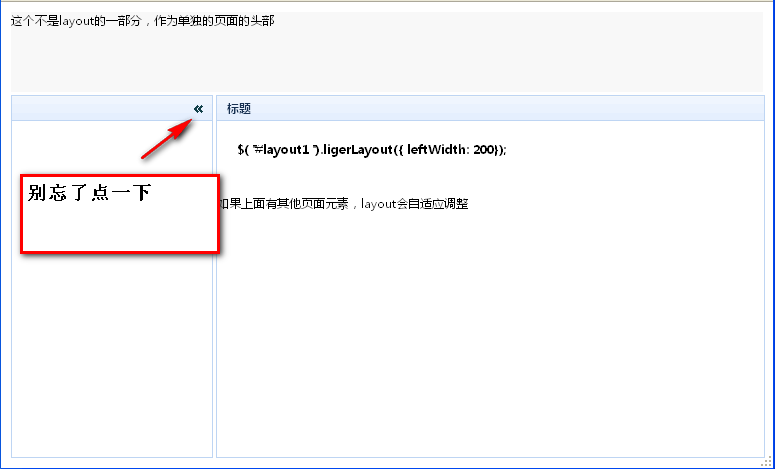
總結
兩個重點:一是把容器轉成 ligerLayout 物件,二是別忘了在子元素上標註 position 屬性。至於 Tab 高度對不上的問題,關鍵順序是「先初始化 layout,等 center 完成計算後再量高度並套給 Tab」,順序顛倒就會拿到 0。
- 上一篇文章: JS 取得陣列最大值、最小值與長度的方法
- 下一篇文章: 用 JS 實作圖片滑入高亮的展示效果