JavaScript 滑鼠移入浮動子選單效果實作
編輯:關於JavaScript
淘寶、京東那種「滑鼠移上去就展開一排分類」的效果,核心其實只有一個動作:切換 display。加上 onmouseover/onmouseout 兩個事件與適當的 CSS,就能做出來。
實作要點
- 用列表結構包裝,CSS 控制起來最省事;
- 用
<a>當觸發元素,滑鼠移上去時瀏覽器會自然給出 pointer 游標與 hover 狀態; - 把事件綁在
li而不是a上——這一點是成敗關鍵,下面會說明。
JavaScript
<script type="text/javascript">
function open1(node) {
  var nodes = node.getElementsByTagName("ul")[0];
  with (nodes.style) {
    display = (display == "block") ? "none" : "block";
  }
}
</script>
傳入 this(也就是目前的 li),往下找到它內部的子清單,再切換顯示。
HTML
<div id="news">
  <ul id="newsid1">
    <li onmouseover="open1(this)" onmouseout="open1(this)">
      <a href="javascript:void(0)">最新新聞</a>
      <ul>
        <li><a href="https://www.jb51.net">最新新聞內容摘要《機密》1</a></li>
        <li><a href="https://www.jb51.net">最新新聞內容摘要《機密》2</a></li>
        <li><a href="https://www.jb51.net">最新新聞內容摘要《機密》3</a></li>
      </ul>
    </li>
    <!-- 其他分類結構相同 -->
  </ul>
</div>
這裡有個實作上很值得記住的教訓:事件千萬不要綁在最外層的 a 上。滑鼠從標題移到展開的子項目時,會短暫離開 a 的範圍,onmouseout 立刻觸發把子清單收起來,使用者根本點不到下面的連結。把事件綁在包著兩者的 li 上,只要游標還在這一區塊內就不會收合。
CSS
<style type="text/css">
  #newsid1 { list-style: none; }

  #newsid1 li ul{
    list-style: none;
    margin: 0px;
    padding: 0px;
    display: none;   /* 預設全部隱藏 */
  }

  #newsid1 li{
    float: left;          /* 並排顯示 */
    width: 220px;
    text-align: center;
    background-color: #80ff00;
  }

  #newsid1 li a{
    color: #8080ff;
    text-decoration: none; /* 去掉底線 */
    text-align: center;
    line-height: 30px;
  }

  #newsid1 li a:hover{
    color: #400080;
    background-color: #ffffff;
  }

  #newsid1 li ul li{
    line-height: 30px;
    color: #ff8040;
    background-color: #808000;
  }
</style>
執行結果
滑鼠未移入時:

滑鼠移入後:
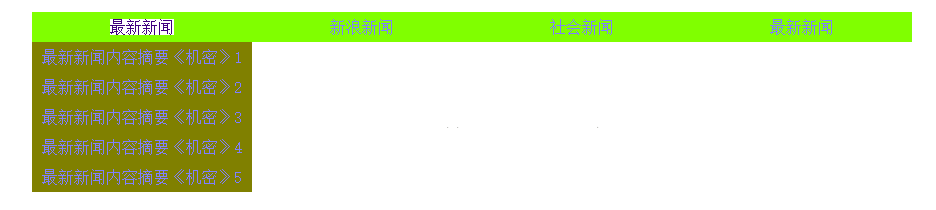
完整程式碼
<!DOCTYPE html>
<html>
<head>
<title>Menufloat.html</title>
<style type="text/css">
  #newsid1 { list-style: none; }
  #newsid1 li ul{ list-style: none; margin: 0px; padding: 0px; display: none; }
  #newsid1 li{
    float: left; width: 220px; text-align: center; background-color: #80ff00;
  }
  #newsid1 li a{
    color: #8080ff; text-decoration: none; text-align: center; line-height: 30px;
  }
  #newsid1 li a:hover{ color: #400080; background-color: #ffffff; }
  #newsid1 li ul li{ line-height: 30px; color: #ff8040; background-color: #808000; }
</style>
<script type="text/javascript">
  function open1(node) {
    var nodes = node.getElementsByTagName("ul")[0];
    nodes.style.display = (nodes.style.display == "block") ? "none" : "block";
  }
</script>
</head>
<body>
<div id="news">
  <ul id="newsid1">
    <li onmouseover="open1(this)" onmouseout="open1(this)">
      <a href="javascript:void(0)">最新新聞</a>
      <ul>
        <li><a href="https://www.jb51.net">最新新聞內容摘要《機密》1</a></li>
        <li><a href="https://www.jb51.net">最新新聞內容摘要《機密》2</a></li>
      </ul>
    </li>
    <li onmouseover="open1(this)" onmouseout="open1(this)">
      <a href="javascript:void(0)">新浪新聞</a>
      <ul>
        <li><a href="https://www.jb51.net">新浪新聞內容摘要1</a></li>
        <li><a href="https://www.jb51.net">新浪新聞內容摘要2</a></li>
      </ul>
    </li>
    <li onmouseover="open1(this)" onmouseout="open1(this)">
      <a href="javascript:void(0)">社會新聞</a>
      <ul>
        <li><a href="https://www.jb51.net">社會新聞內容摘要1</a></li>
        <li><a href="https://www.jb51.net">社會新聞內容摘要2</a></li>
      </ul>
    </li>
  </ul>
</div>
</body>
</html>
可以更好的地方
- 純 CSS 也能做到。用
li:hover > ul { display: block; }就不需要 JavaScript,效能與穩定度都更好,也少一層事件綁定。 - 用 visibility 或 opacity 保留佔位。display 會讓元素完全離開版面,若希望展開時不推擠其他內容,可以改用絕對定位。
- 鍵盤操作不可少。純 hover 對只用鍵盤的使用者不友善,加上
:focus-within或監聽 focus 事件才能讓 Tab 鍵 users 也開得起來。
這個練習真正想傳達的是:動態選單的难点從來不在切換 display,而在「游標從標題移到子項目時不要誤觸收合」。把事件綁對元素,問題就解決了大半。
- 上一篇文章: JavaScript 動態建立 table 表格的兩種做法
- 下一篇文章: JavaScript 嚴格模式完全指南:從原理到實踐