JavaScript 伸縮菜單欄實作:點標題收合清單
編輯:關於JavaScript
效果很單純:點擊某個標題時,先把它底下的清單顯示出來,同時把其他清單收起,做到同一時間只展開一區。
 <!doctype html>
<html lang="en">
<head>
<meta charset="UTF-8">
<title>Document</title>
<style type="text/css">
*{margin:0; padding:0; font-size:13px; list-style:none;}
.menu{width:210px; margin:50px auto; border:1px solid #ccc;}
.menu p{height:25px; line-height:25px; font-weight:bold; background:#eee; border-bottom:1px solid #ccc; cursor:pointer; padding-left:5px;}
.menu div ul{display:none;}
.menu li{height:24px; line-height:24px; padding-left:5px;}
</style>
<script type="text/javascript">
window.onload=function(){
  // 將所有點擊的標題和要顯示隱藏的列表取出來
  var ps = document.getElementsByTagName("p");
  var uls = document.getElementsByTagName("ul");

  // 遍歷所有要點擊的標題且給它們添加索引及綁定事件
  for(var i = 0, n = ps.length; i < n; i += 1){
    ps[i].id = i;
    ps[i].onclick = function(){
      for(var j = 0; j < n ; j += 1){
        uls[j].style.display = "none";
      }
      // 獲取點擊的標題上的索引屬性,根據該索引找到對應的列表
      uls[this.id].style.display = "block";
    }
  }
}
</script>
</head>
<body>
<div class="menu" id="menu">
  <div>
    <p>Web前端</p>
    <ul style="display:block">
      <li>JavaScript</li>
      <li>DIV+CSS</li>
      <li>jQuery</li>
    </ul>
  </div>
  <div>
    <p>後台腳本</p>
    <ul>
      <li>PHP</li>
      <li>ASP.net</li>
      <li>JSP</li>
    </ul>
  </div>
  <div>
    <p>前端框架</p>
    <ul>
      <li>Extjs</li>
      <li>Esspress</li>
      <li>YUI</li>
    </ul>
  </div>
</div>
</body>
</html>
關鍵技巧是給每個標題寫入索引 id,點擊時用 this.id 反查對應的清單。迴圈上限先存進 n,避免每次迭代都重算長度,這是小而實際的效能習慣。
另外注意 ps 與 uls 的索引是一一對應的——這份程式依賴標題與清單數量相同且順序一致。若日後 DOM 結構變複雜,建議改用 nextElementSibling 或 parentNode.querySelector 來定位,會比依賴全域索引穩健得多。
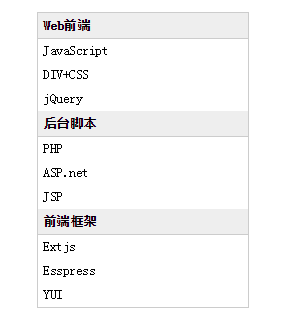
以上就是伸縮菜單欄的實作分享。
- 上一篇文章: 原生 JavaScript 打造圖片輪播(含完整程式碼)
- 下一篇文章: JavaScript 短信驗證碼倒數計時按鈕實作
相關文章
-
JavaScript 常用事件一覽:onclick、onmouseover、onfocus 等九種事件實戰 模仿 Flash 風格的伸縮式橫向導航菜單 用 DIV + CSS 改寫伸縮式廣告菜單:一個 showAds 搞定顯示切換 XHTML + CSS 二級導覽選單:伸縮式下拉實作 點擊 table 的列就變色:onclick 搭配背景色切換 用 JS 實作核取方塊的全選與取消全選 點擊輸入框自動全選內容的 JS 方法 jQuery 重設 onclick onclick 與 onmousedown 的差別,以及那個非用 onmousedown 不可的場合 JavaScript 事件驅動入門:八個最常打交道的表單與視窗事件