JS 實作仿 Windows 經典風格的選項卡 Tab 切換
編輯:關於JavaScript
本文為大家示範以 JS 實作的仿 Windows 經典風格選項卡,希望對學習中的朋友有所幫助。
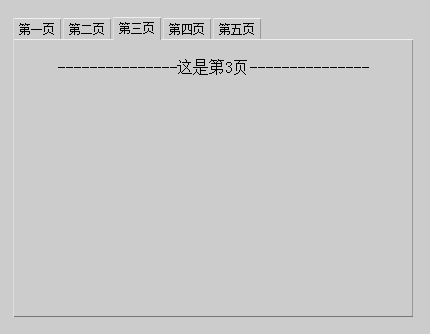
這款仿 Windows 風格的選項卡帶有灰色立體感,示例內容是用 JS 控制輸出,僅為演示功能,實際使用時完全可以去掉。
運行效果截圖如下:
線上演示網址如下:
https://demo.jb51.net/js/2015/js-f-windows-style-tab-demo/
具體程式碼如下:
<!DOCTYPE html PUBLIC "-//W3C//DTD XHTML 1.0 Transitional//EN" "https://www.w3.org/TR/xhtml1/DTD/xhtml1-transitional.dtd">
<html xmlns="https://www.w3.org/1999/xhtml">
<head>
<meta http-equiv="Content-Type" content="text/html; charset=gb2312" />
<title>選項卡</title>
<style type="text/css">
body{ background-color:#CCC; }
.tab{ margin:0; padding:0; position:absolute; }
.tab li{ float:left; list-style:none; }
.tab li span{ float:left; display:block; height:20px; line-height:20px; position:relative; border-style:solid; border-width:1px 1px 0 1px; border-color:#EEE #999 #777 #DDD; background-color:#CCC; margin:1px 2px 0 0; padding:0 5px 0 5px; font-size:12px; cursor:pointer; z-index:1; }
.tab li div{ display:none; position:absolute; top:22px; left:0px; background-color:#CCC; border:1px solid; border-color:#EEE #999 #777 #DDD; text-align:center; overflow:auto; }
.tab li.selected span{ margin-top:0; height:22px; }
.tab li.selected div{ display:block; }
</style>
<script type="text/javascript">
function CreateTab(tab_width,tab_height,parent_obj){
  var newtab=document.createElement("UL");
  newtab.className="tab";
  parent_obj.appendChild(newtab);
  Tab.call(newtab);
  newtab.style.width=tab_width+"px";
  newtab.style.height=tab_height+"px";
  return newtab;
}
function Tab(){
  var this_tab=this;
  this.selected_page;
  this.page_names=new Array();
  this.page_contents=new Array();
  this.Select=function(){
    this_tab.selected_page.className="";
    this.className="selected";
    this_tab.selected_page=this;
  }
  this.NewPage=function(page_name){
    var newpage=document.createElement("LI");
    newpage.onclick=this.Select;
    newpage.innerHTML="<span>"+page_name+"</span><div></div>";
    this.appendChild(newpage);
    newpage.lastChild.style.width=parseInt(this.style.width)-2+"px";
    newpage.lastChild.style.height=parseInt(this.style.height)-24+"px";
    this.page_names.push(newpage.firstChild);
    this.page_contents.push(newpage.lastChild);
    return newpage;
  }
  this.SetChecked=function(page_index){
    if(page_index>-1&&this.childNodes.length>page_index){
      this.selected_page=this.childNodes[page_index];
      this.selected_page.className="selected";
    }
  }
}
</script>
</head>
<body>
<script type="text/javascript">
var newtab=CreateTab(400,300,document.body);
newtab.NewPage("第一頁");
newtab.NewPage("第二頁");
newtab.NewPage("第三頁");
newtab.NewPage("第四頁");
newtab.NewPage("第五頁");
newtab.SetChecked(0);
newtab.style.top="100px";
newtab.style.left="200px";
for(var i=0;i<newtab.childNodes.length;i++){
  newtab.page_contents[i].innerHTML=function(number){
    var content_str="";
    for(var n=0;n<1;n++){
      content_str+="<br />---------------這是第"+number+"頁---------------";
    }
    return content_str;
  }(i+1);
}
</script>
</body>
</html>
希望本文所述能對大家的 JavaScript 程式設計有所幫助。
- 上一篇文章: JavaScript 實現狀態列文字動態顯示的方法
- 下一篇文章: JavaScript 實作的簡易煙火特效