拖曳時多一層「影子」:Div 的 Clone 拖放與自動置頂
編輯:關於JavaScript
這個小技巧很值得學:拖曳的不是方塊本身,而是一個半透明的複製品。真正的方塊只有在放開滑鼠那一刻才跳到新位置。這樣做的好處是——拖曳過程中版面不會被拉扯,而且視覺上很清楚「原本的位置在哪、要放到哪」。
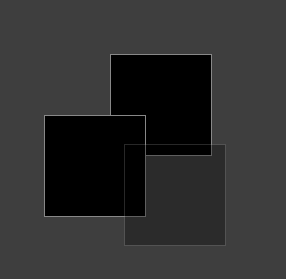
線上展示:https://demo.jb51.net/js/2015/js-draw-box-clone-style-codes/
拖曳主體
var zIndex = 1;

window.onload = function () {
    var oDrag1 = document.getElementById("drag1");
    var oDrag2 = document.getElementById("drag2");
    drag(oDrag1);
    drag(oDrag2);
};

function drag(oDrag) {
    var disX = disY = 0;
    oDrag.onmousedown = function (event) {
        var event = event || window.event;
        disX = event.clientX - this.offsetLeft;
        disY = event.clientY - this.offsetTop;

        // 建立半透明的替身
        var oTemp = document.createElement("div");
        oTemp.id = "temp";
        oTemp.style.left = this.currentStyle ? this.currentStyle["left"] : getComputedStyle(this, null)["left"];
        oTemp.style.top  = this.currentStyle ? this.currentStyle["top"]  : getComputedStyle(this, null)["top"];
        oTemp.style.zIndex = zIndex++;
        document.body.appendChild(oTemp);

        document.onmousemove = function (event) {
            var event = event || window.event;
            var iL = event.clientX - disX;
            var iT = event.clientY - disY;
            var maxL = document.documentElement.clientWidth  - oDrag.offsetWidth;
            var maxT = document.documentElement.clientHeight - oDrag.offsetHeight;
            iL <= 0 && (iL = 0);            iT <= 0 && (iT = 0);
            iL >= maxL && (iL = maxL);    iT >= maxT && (iT = maxT);
            oTemp.style.left = iL + "px";
            oTemp.style.top  = iT + "px";
            return false;
        };

        document.onmouseup = function () {
            document.onmousemove = null;
            document.onmouseup = null;
            oDrag.style.left   = oTemp.style.left;
            oDrag.style.top    = oTemp.style.top;
            oDrag.style.zIndex = oTemp.style.zIndex;   // 放開後取得最高層
            document.body.removeChild(oTemp);
            oDrag.releaseCapture && oDrag.releaseCapture();
        };
        this.setCapture && this.setCapture();
        return false;
    };
}
三個關鍵設計
邊界夾住。maxL/maxT 用視窗尺寸減去方塊自身寬高,再把座標夾在 0 到最大值之間。少了這一步,方塊會被拖到畫面外救不回來。
zIndex 遞增=自動置頂。每次按下方塊就配一個更大的 zIndex 給替身,放開後再轉移給本體。這就做到了「被操作的視窗永遠在最上層」,是多視窗介面必備的行為。
替身用 getComputedStyle 取初始位置。因為替身是新建立的元素,沒有 inline style 可繼承,必須主動讀出目前的位置。這裡同時用 currentStyle 與 getComputedStyle 做跨瀏覽器處理,是舊 IE 的標準寫法。
現代寫法
今天的首選是 Pointer Events:用 pointerdown/pointermove/pointerup 搭配 setPointerCapture(),同一份程式碼就能同時支援滑鼠、觸控與手寫筆,不必再分 mouse 與 touch 兩套事件。若你的需求是「排序清單」而非自由拖放,直接套用 HTML5 的 draggable 屬性或 SortableJS 這類成熟函式庫會更快也更穩。
另外記得為拖曳加上鍵盤替代方案(例如方向鍵移動),並在拖曳期間避免觸發文字選取(user-select: none),這兩個細節能省掉很多使用者抱怨。
- 上一篇文章: 寫一個能拖、能關的彈出層:遮罩、淡入與拖曳的完整實作
- 下一篇文章: 用正則判斷手機號碼屬於哪家電信:一個可讀性優先的寫法