原始碼下載:https://xiazai.jb51.net/201509/yuanma/drag_sort1(jb51.net).rar
這篇要記錄的是一個仿 Google+ 相簿的多圖拖曳排序實作,資料綁定與視圖更新是靠 avalon.js 這套 MVVM 函式庫完成的。


拖曳結合響應式版面:
需求條件
- 兩端對齊版面:圖片之間的間距一致,但左右兩側與容器邊界的間距不必等於圖片間距;需相容 IE7、IE8、Firefox、Chrome。
- 視窗尺寸變化時,大於門檻就自動增減每行圖片數並重算間距(此時每張圖固定 200×200px);小於門檻則固定每行數量(最少 3 欄),圖片改為等比縮放。
- 任何視窗尺寸下都能正常拖曳排序。
- 圖片與拖曳代理中的圖片一律等比、水平垂直居中。
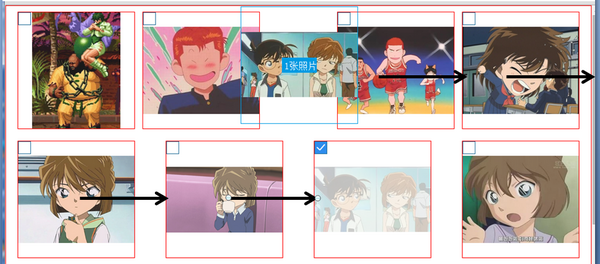
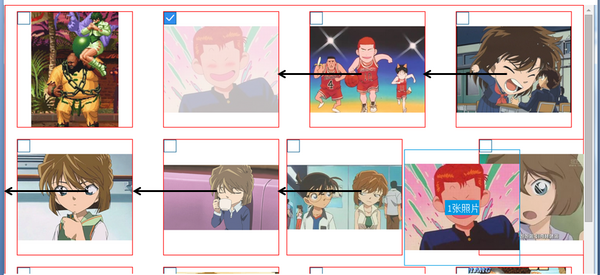
- 拖到目標位置時,左右相鄰圖片產生位移預告;若目標落在最左或最右,只需該行首張或末張圖片位移。
- 支援多選多圖一起拖。
版面:inline-block + flex-box + text-align:justify
<div id='wrap'>
 <ul class='justify'>
 <li>
 <a href="javascript:;" class="no_selected"></a>
 <div class='photo_mask'></div>
 <div><div class="dummy"></div><p><img><i></i></p></div>
 </li>
 <li class='justify_fix'></li>
 </ul>
</div>
為了顧及舊版瀏覽器,li 用 inline-block 排版,兩端對齊則走「舊版靠 text-align:justify、新版靠 flex-box」的雙軌策略。
為什麼不用 flex 的 align-content:space-around 就好?因為那樣就無法用 text-align:justify 回頭相容舊瀏覽器了。而 text-align:justify 的先天限制是:它不會自動幫最左、最右的元素調整與容器邊界的距離。即使在外層加上 padding:0 1% 看起來很完美,實際上 padding 是固定值,而 li 之間的 margin 只是「最小間距」——一旦一行內還有剩餘空白,這些空白會被平均分配,實際間距就會大於設定值。
li{
  list-style-type:none; display:inline-block; *display:inline; zoom:1;
  max-width:200px; max-height:200px; width:28%;
  border:1px solid red; position:relative; overflow:hidden;
  margin:10px 2%;
}
li[class='justify_fix']{ border:none; }
.justify {
  display:flex; align-items:flex-start; flex-flow:row wrap;
  justify-content:space-between;
  text-align:justify; text-justify:inter-ideograph; *zoom:1;
  -moz-text-align-last:justify; -webkit-text-align-last:justify; text-align-last:justify;
}
@media (-webkit-min-device-pixel-ratio:0) {
  .justify:after { content:""; display:inline-block; width:100%; }
}
加上 max-width / max-height 是必要之惡:因為格子內部全用百分比,必須在外層鎖死上限,否則圖片會被撐開。
多選:點方框切換狀態
Google+ 是按住 Ctrl 點圖片,這裡改成點每格左上角的方框 <a class='no_selected'>。點擊後把 index 丟進 selected_index 陣列,不存在就加入、已存在就移除,方框樣式再依陣列內容決定。
<div id='wrap' ms-controller='photo_sort'>
 <ul class='justify'>
 <li ms-repeat='photo_list'>
 <a href="javascript:;" class="no_selected"
    ms-class-selected_icon='selected_index.indexOf($index)>-1'
    ms-click='select($index)'></a>
 ...
 </li>
 <li class='justify_fix'></li>
 </ul>
</div>

var photo_sort = avalon.define({
  selected_index: [],
  select: function(i){
    var selected_index = photo_sort.selected_index;
    if (selected_index.indexOf(i) == -1) photo_sort.selected_index.ensure(i);
    else photo_sort.selected_index.remove(i);
  }
});
mousedown:起手式
每格上面蓋了一層遮罩,拖曳事件綁在遮罩上,這樣點擊方框與拖曳就不會互相干擾。
<div class='photo_mask'
     ms-class-photo_maskon='drag_flag&&selected_index.indexOf($index)>-1'
     ms-mousedown='start_drag($event,$index)'></div>

start_drag: function(e, index){
  if (photo_sort.selected_index.size()){
    photo_sort.target_index = index;      // 使用者可能只是點一下沒拖
    photo_sort.cell_size = this.clientWidth;
    var xx = e.clientX - photo_sort.cell_size/2,
        yy = e.clientY - photo_sort.cell_size/2;
    $('drag_proxy').style.top  = yy + avalon(window).scrollTop() + 'px';
    $('drag_proxy').style.left = xx + 'px';
    $('drag_proxy').style.width  = photo_sort.cell_size + 'px';
    $('drag_proxy').style.height = photo_sort.cell_size + 'px';

    drag_proxy.select_num = photo_sort.selected_index.length;
    if (drag_proxy.select_num > 0){
      var drag_img = photo_sort.photo_list[photo_sort.selected_index[drag_proxy.select_num-1]];
      drag_proxy.src = drag_img.src;      // 用最後一張當代理封面
      photo_sort.drag_flag = true;
      $('drag_proxy').style.display = 'block';
    }

    // 算出間距與欄數
    var wrap_width  = avalon($('wrap')).width(),
        wrap_offset = $('wrap').offsetLeft,
        first_left  = $('wrap_photo0').offsetLeft,
        second_left = $('wrap_photo1').offsetLeft,
        first_gap   = first_left - wrap_offset,
        cell_gap    = second_left - first_left;
    photo_sort.col_num = Math.round(
      (wrap_width - 2*first_gap + (cell_gap - photo_sort.cell_size)) / cell_gap);

    for (var i=0; i<photo_sort.col_num; i++)
      photo_sort.sort_array.push(first_gap + cell_gap*i + photo_sort.cell_size/2);

    var target = this.parentNode;
    avalon.bind(document, 'mouseup', function(e){ onMouseUp(target); });
    if (isIE) target.setCapture();
    e.stopPropagation(); e.preventDefault();
  }
}
mousemove:算出目標位置
drag_move: function(e){
  if (photo_sort.drag_flag){
    var xx = e.clientX, yy = e.clientY,
        offset = avalon($('wrap')).offset(),
        offsetX = xx - offset.left,
        offsetY = yy - offset.top;
    photo_sort.sort_array.push(offsetX);
    photo_sort.sort_array.sort(function(a,b){
      return parseInt(a) - parseInt(b);   // 必須轉數字,否則 '1234' < '333'
    });
    var x_index = photo_sort.sort_array.indexOf(offsetX),
        y_index = Math.floor(offsetY / (photo_sort.cell_size + 20)),
        size    = photo_sort.photo_list.size();
    photo_sort.x_index = x_index;
    photo_sort.target_index = photo_sort.col_num * y_index + x_index;
    if (photo_sort.target_index > size) photo_sort.target_index = size;
    photo_sort.sort_array.remove(offsetX);   // 清掉自己,留給下次事件
    $('drag_proxy').style.top  = avalon(window).scrollTop() + yy - photo_sort.cell_size/2 + 'px';
    $('drag_proxy').style.left = xx - photo_sort.cell_size/2 + 'px';
  }
  e.stopPropagation();
}
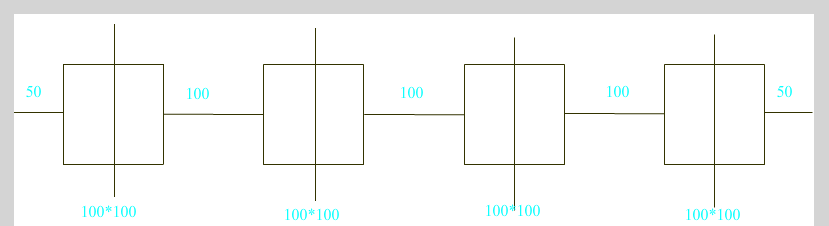
判斷位置的關鍵在圖中那些豎線:每條豎線把一行切成兩半,n 條豎線就把一行切成 n+1 段,滑鼠的 e.clientX 落在哪一段,就是哪個插入點。實作上把每條豎線的 x 座標與當前滑鼠 x 座標一起丟進 sort_array、排序、再用 indexOf 找出滑鼠落在第幾位,就得到水平方向的目標 index。
如果不排序,程式碼會變成巢狀 if 的噩夢:
var target;
if (x > 50+50){
  if (x > 3*100+3*100+50+50){ target = 4; }
  else { target = (x-50-50)/(50+100+50); }
} else target = 0;
左右位移預告
.prev{ right:40px; }
.next{ left:40px; }

<li ms-repeat='photo_list' ms-attr-id='wrap_photo{{$index}}'
    ms-class-prev='$index==target_index-1'
    ms-class-next='$index==target_index'>
但這裡有個坑:因為版面是 inline-block,當代理拖到最左或最右時,目標位置所在行的「上一行最後一格」或「下一行第一格」也會跟著偏移。

解法是額外記一個 x_index(格子的水平 index),加樣式時多一層條件判斷:
<li ms-repeat='photo_list' ms-attr-id='wrap_photo{{$index}}'
    ms-class-prev='$index==target_index-1&&x_index>0'
    ms-class-next='$index==target_index&&x_index<col_num'>
mouseup:真正重排資料
function onMouseUp(target){
  if (photo_sort.drag_flag){
    for (var i=0, len=photo_sort.selected_index.size(); i<len; i++){
      var item_index = photo_sort.selected_index[i],
          data = photo_sort.photo_list,
          target_index = photo_sort.target_index, temp;
      if (item_index < target_index){
        temp = data[item_index].src;
        for (var j=item_index; j<target_index; j++) data[j].src = data[j+1].src;
        data[target_index-1].src = temp;
      } else {
        temp = data[item_index].src;
        for (var j=item_index; j>target_index; j--) data[j].src = data[j-1].src;
        data[target_index].src = temp;
      }
    }
    photo_sort.target_index = -1;
    photo_sort.sort_array = [];
    photo_sort.col_num = 0;
    photo_sort.x_index = -1;
    photo_sort.selected_index = [];
    $('drag_proxy').style.display = 'none';
    photo_sort.drag_flag = false;
    avalon.unbind(document, 'mouseup');
    if (isIE) target.releaseCapture();
  }
}
目標在選中圖片之前:先把原圖暫存到 temp,再將目標位置到原位置前一格的所有圖片「往後搬一格」,最後把 temp 放回目標點。目標在選中圖片之後則相反,全體往前搬一格。
一個容易踩的雷
不能寫成 data[j] = data[j+1]。avalon 不支援單筆轉換偵測,若要讓視圖更新,必須整個子 VM 重新指派新物件:宣告一個 arr,從頭把 model 塞進去,然後 photo_sort.photo_list.clear() 清空、再 photo_sort.photo_list = arr 重新賦值,視圖才會重繪。
後記
相較之下,Google+ 官方版本還多做兩件事:一是框選多張圖片,二是當有捲軸且拖曳位置即將超出視窗時,頁面會自動上下滾動。這兩點原理並不複雜,有興趣的人可以自行補上。
- 上一篇文章: 用 JS + CSS 打造滑鼠懸停即自動滾動的動態導覽列
- 下一篇文章: JS + CSS 手寫簡易滑動門(Tab 側欄)完整示範