不規則造型的菱形 TAB 選項卡:JavaScript 實作與原理
編輯:關於JavaScript
選項卡做久了容易千篇一律,本文這款刻意把方正的邊角換成菱形斜切,視覺立刻跳脱出制式框架。實作上完全用原生 JavaScript,透過 display 與 color 的切換控制面板顯示,邏輯相當好懂。
執行結果如下:
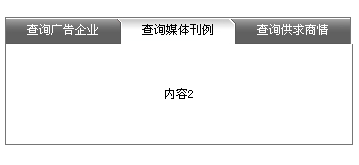
線上展示:https://demo.jb51.net/js/2015/js-bgz-tab-cha-style-codes/
視覺是怎麼做出來的
所謂「不規則」其實不是靠 CSS 3 的 clip-path,而是三張 tab01.jpg、tab02.jpg、tab03.jpg 的背景圖。每張圖自帶斜切輪廓,容器 .xixi1/.xixi2/.xixi3 只負責換背板,文字層 .tab1~.tab3 則用寬度 115px 浮動排成一行,並以 color 切換深淺。這種做法在只支援 IE6 的年代是最實際的方案。
切換函式怎麼寫
setTab03Syn(i) 只是 selectTab03Syn(i) 的一層包裝,真正的判斷在 switch 裡:每個 case 明確指定三個內容層的 display,以及三個文字 id 的 color。雖然看起來囉嗦,但優點是每一種狀態都寫死、可讀性高,除錯時一眼就知道哪個 case 出問題。
完整程式碼
<html>
<head>
<meta http-equiv="Content-Type" content="text/html; charset=gb2312" />
<title>不規則TAB選項卡效果</title>
<style type="text/css">
body,td{font-size:12px;}
.tab{margin-top:100px}
#TabTab03Con1,#TabTab03Con2,#TabTab03Con3{
  width:346px;height:100px;line-height:100px;
  border-left:#757575 1px solid;border-bottom:#757575 1px solid;border-right:#757575 1px solid;}
.xixi1{width:346px;height:27px;line-height:27px;background-image:url(images/tab01.jpg);cursor:pointer;}
.xixi2{width:346px;height:27px;line-height:27px;background-image:url(images/tab02.jpg);cursor:pointer;}
.xixi3{width:346px;height:27px;line-height:27px;background-image:url(images/tab03.jpg);cursor:pointer;}
.tab1{width:115px;height:27px;line-height:27px;float:left;text-align:center;cursor:pointer;}
.tab2{width:115px;height:27px;line-height:27px;float:left;text-align:center;cursor:pointer;color:#FFFFFF;}
.tab3{width:115px;height:27px;line-height:27px;float:left;text-align:center;cursor:pointer;color:#FFFFFF;}
</style>
</head>
<body style="text-align:center">
<script type="text/javascript">
function setTab03Syn(i){ selectTab03Syn(i); }
function selectTab03Syn(i){
  switch(i){
    case 1:
      document.getElementById("TabTab03Con1").style.display="block";
      document.getElementById("TabTab03Con2").style.display="none";
      document.getElementById("TabTab03Con3").style.display="none";
      document.getElementById("font1").style.color="#000000";
      document.getElementById("font2").style.color="#ffffff";
      document.getElementById("font3").style.color="#ffffff";
      break;
    case 2:
      document.getElementById("TabTab03Con1").style.display="none";
      document.getElementById("TabTab03Con2").style.display="block";
      document.getElementById("TabTab03Con3").style.display="none";
      document.getElementById("font1").style.color="#ffffff";
      document.getElementById("font2").style.color="#000000";
      document.getElementById("font3").style.color="#ffffff";
      break;
    case 3:
      document.getElementById("TabTab03Con1").style.display="none";
      document.getElementById("TabTab03Con2").style.display="none";
      document.getElementById("TabTab03Con3").style.display="block";
      document.getElementById("font1").style.color="#ffffff";
      document.getElementById("font2").style.color="#ffffff";
      document.getElementById("font3").style.color="#000000";
      break;
  }
}
</script>
<div class="tab">
 <div id="bg" class="xixi1">
  <div id="font1" class="tab1" onMouseOver="setTab03Syn(1);document.getElementById('bg').className='xixi1'">查詢廣告企業</div>
  <div id="font2" class="tab2" onMouseOver="setTab03Syn(2);document.getElementById('bg').className='xixi2'">查詢媒體刊例</div>
  <div id="font3" class="tab3" onMouseOver="setTab03Syn(3);document.getElementById('bg').className='xixi3'">查詢供求商情</div>
 </div>
 <div id="TabTab03Con1">不規則TAB選項卡效果</div>
 <div id="TabTab03Con2" style="display:none">內容2</div>
 <div id="TabTab03Con3" style="display:none">內容3</div>
</div>
</body>
</html>
想再進一階的話
三個 case 的內容高度重複,實務上可以改成傳入索引後用迴圈一次處理:先把所有面板設為 none、所有標籤設為白字,再只把第 i 個設為 block、黑字。這樣要擴充到五、六個分頁時就不用再複製貼上。若網站已全面支援現代瀏覽器,斜切造型也可以改用 CSS 的 transform: skew 或 clip-path 取代背景圖,省下三張圖的載入量。