樹形菜單最適合放在網站側邊,用來收納層級較深的類目。本文這份 CSS TreeMenu 以「資料夾開闔」為視覺隱喻,摺疊時顯示闔起的資料夾圖示,展開後換成開啟狀態,並用虛線串起子項目,看起來清爽又不失結構感。
執行結果如下:
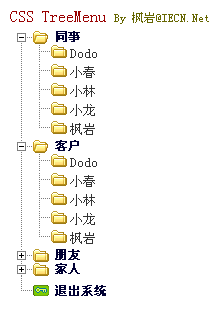
線上展示:https://demo.jb51.net/js/2015/js-css-treemenu-2l-menu-codes/
用 class 而非 style 做切換
整份腳本其實只有兩個函式。ExChgClsName 負責在兩個 class 名稱之間互換,showMenu 則呼叫它並傳入 MenuBox 與 MenuBox2。這代表「展開」與「收合」的所有視覺差異都寫在 CSS 裡:.MenuBox .txtBox 是 display 顯示,.MenuBox2 .txtBox 則是 display:none,同時 h3 的背景圖也換成闔起的資料夾。
這種「狀態交給 CSS、邏輯只切 class」的分工,比直接操作 element.style 乾淨得多,也是後來所有元件庫的通用做法。
線條與圖示的細節
子清單的 ul 用 line_y.gif 以 repeat-y 方式鋪出一條垂直虛線,每個 li 再用 t.gif 補上橫向的短枝,最後一項改用 t_lst.gif 收掉尾端。三張小圖拼出一棵樹的骨架,完全不需要 SVG。第一項與最後一項另外用 .Fst、.Lst 修飾背景位置,讓整棵樹的轉折看起來自然。
完整程式碼
<!doctype html public "-//W3C//DTD XHTML 1.0 Strict//EN" "https://www.w3.org/TR/xhtml1/DTD/xhtml1-strict.dtd">
<html xmlns="https://www.w3.org/1999/xhtml" lang="gb2312">
<head>
<title>二級樹形菜單示例:CSS TreeMenu</title>
<style type="text/css" media="all">
a,a:visited {color:#333;text-decoration:none;}
a:hover {color:#f60;}
body,td {font:13px "Geneva","宋體","Arial","Helvetica",sans-serif;}
ul,li {margin:0;padding:0;list-style:none;}
h1,h2,h3,h4,h5,h6 {margin:0;padding:0;}
h1 {padding:5px;color:#900;font:16px bold "Geneva","宋體","Arial","Helvetica",sans-serif;}
h1 small {font-size:11px;font-weight:normal;color:#660;}
.TreeWrap {width:200px;}
.MenuBox .titBox a, .MenuBox2 .titBox a {margin-left:10px;padding-left:40px;color:#003;
  font-size:12px;display:block;}
.MenuBox .titBox h3 a {background:url(images/ico_folder_open.gif) no-repeat 0 40%;}
.MenuBox .titBox h3.Fst a {background:url(images/ico_folder_open_fst.gif) no-repeat 0 40%;}
.MenuBox .titBox h3.Lst a {background:url(images/ico_folder_open_lst.gif) no-repeat 0 40%;}
.MenuBox2 .titBox h3 a {background:url(images/ico_folder.gif) no-repeat 0 40%;}
.MenuBox2 .titBox h3.Fst a {background:url(images/ico_folder_fst.gif) no-repeat 0 40%;}
.MenuBox2 .titBox h3.Lst a {line-height:250%;background:url(images/icon_exit.gif) no-repeat 0 0;}
.MenuBox2 .txtBox {display:none;}
.MenuBox .txtBox ul li {padding-left:65px;line-height:150%;
  background:url(images/t.gif) no-repeat 28px 50%;}
.MenuBox .txtBox ul {background:url(images/line_y.gif) repeat-y 16px 0;}
.MenuBox .txtBox ul li.Lst {background:url(images/t_lst.gif) no-repeat 28px 50%;}
.MenuBox .txtBox .num {color:#e00;}
</style>
<script type="text/javascript">
function ExChgClsName(Obj, NameA, NameB){
  var o = document.getElementById(Obj) ? document.getElementById(Obj) : Obj;
  o.className = (o.className == NameA) ? NameB : NameA;
}
function showMenu(iNo){ ExChgClsName("Menu_" + iNo, "MenuBox", "MenuBox2"); }
</script>
</head>
<body>
<h1>CSS TreeMenu <small>By 楓巖@IECN.Net</small></h1>
<div class="TreeWrap">
 <div class="MenuBox" id="Menu_0">
  <div class="titBox"><h3 class="Fst"><a href="javascript:showMenu(0);">同事</a></h3></div>
  <div class="txtBox">
   <ul>
    <li><a href="#">Dodo</a></li><li><a href="#">小春</a></li>
    <li><a href="#">小林</a></li><li><a href="#">小龍</a></li>
    <li class="Lst"><a href="#">楓巖</a></li>
   </ul>
  </div>
 </div>
 <div class="MenuBox2" id="Menu_1">
  <div class="titBox"><h3><a href="javascript:showMenu(1);">客戶</a></h3></div>
  <div class="txtBox">
   <ul>
    <li><a href="#">Dodo</a></li><li><a href="#">小春</a></li>
    <li><a href="#">小林</a></li><li><a href="#">小龍</a></li>
    <li class="Lst"><a href="#">楓巖</a></li>
   </ul>
  </div>
 </div>
 <div class="MenuBox2" id="Menu_2">
  <div class="titBox"><h3><a href="javascript:showMenu(2);">朋友</a></h3></div>
  <div class="txtBox"><ul><li><a href="#">Dodo</a></li></ul></div>
 </div>
 <div class="MenuBox2" id="Menu_3">
  <div class="titBox"><h3><a href="javascript:showMenu(3);">家人</a></h3></div>
  <div class="txtBox"><ul><li><a href="#">Dodo</a></li></ul></div>
 </div>
 <div class="MenuBox2">
  <div class="titBox"><h3 class="Lst"><a href="#">退出系統</a></h3></div>
 </div>
</div>
</body>
</html>
延伸建議
目前一次只能展開一個節點,若要改成多開,只要讓 showMenu 不去動其他 Menu 的 class 即可。另外 ExChgClsName 裡的 eval 與三元判斷在今日可以直接寫成 document.getElementById(Obj),語意更清楚;若想支援鍵盤操作,替 a 標籤加上 onfocus 觸發同一個函式就能讓 Tab 鍵也能開闔選單。