本文分享的是一個帶介紹功能的 Select 列表菜單。嚴格說它不是導航菜單,而是表單中常用的多選下拉列表——菜單名稱與鏈接都可以自行修改,特別之處在於每個 option 都掛了一個 title 屬性作為說明,當用戶點擊列表中的某項時,會浮動顯示該條目的介紹,同時下方文本框的內容也會跟着改變。
運行效果截圖如下:
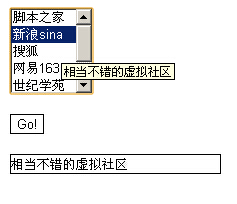
在線演示地址:
https://demo.jb51.net/js/2015/js-info-select-menu-codes/
實現原理
兩個函數配合完成全部交互:
textValue 綁在 select 的 onChange 上,通過 selectedIndex 拿到當前選中項的序號,再用這個序號去讀 options[stationInteger].title,把說明文字寫進文本框。這裡的巧思是把描述信息藏在 title 屬性裡,既不必額外維護數組,也不會污染頁面結構。
herfto 綁在 Go 按鈕上,用一長串 if-else 判斷哪個 option 被選中,然後給 window.location.href 賦值完成跳轉。
完整代碼如下:
<html> <head> <title>帶有說明的導航欄</title> </head> <body> <script language="JavaScript"> <!-- function herfto(){ if (document.stationform.refsel.options[0].selected){ //根據用戶選定的項目 window.location.href = "https://www.jb51.net";} //改變本窗口的地址 else if (document.stationform.refsel.options[1].selected) { window.location.href = "https://www.sina.com.cn";} else if (document.stationform.refsel.options[2].selected) { window.location.href = "https://www.sohu.com";} else if (document.stationform.refsel.options[3].selected) { window.location.href = "https://www.163.com";} else if (document.stationform.refsel.options[4].selected) { window.location.href = "https://www.5dcentury.com";} else if (document.stationform.refsel.options[5].selected) { window.location.href = "https://www.chinaren.com";} else if (document.stationform.refsel.options[6].selected) { window.location.href = "https://cn.yahoo.com";} //根據可選條目,這裡應該相應的增減。 return true; } function textValue(){ var stationInteger, stationString stationInteger=document.stationform.refsel.selectedIndex //取得選定項目的編號 stationString=document.stationform.refsel.options[stationInteger].title //根據編號取得相應說明 document.stationform.stationtext.value = stationString } //將說明顯示出來 //--> </script> <form name="stationform"> <select name="refsel" onChange="textValue()" multiple size="5"> <option title="一個提供優質腳本代碼的網站"> <option title="相當不錯的虛擬社區">新浪sina <option title="不用說,要搜索來這裡就對了">搜狐 <option title="提供免費個人主頁空間">網易163 <option title="一個優秀的學生網站">世紀學苑 <option title="首創同學錄,中國學生的聚會場所">中國人 <option title="世界聞名的搜索巨頭">雅虎yahoo </select> <p> <input type="button" name="stationbutton" value="Go!" onClick="herfto()" style="background-color: #FFFFFF; border: 1 solid #000000"> <p><input type="text" name="stationtext" value="" size="30" maxlength="35" style="border: 1 solid #000000"> </form> </body> </html>
代碼中的幾個問題
這份示例有多處需要修正,否則無法正常工作:
第一,select 標籤寫成了 <select name="refsel" onChange="textValue()" multiple size="5"> 後缺少一個右括號,瀏覽器解析會出錯。
第二,多選列表(multiple)下 selectedIndex 只反映「最後一次點擊的那一項」,如果用戶按住 Ctrl 多選,這個值就不可靠了。若只需要單選,去掉 multiple 更合適;若確實要多選,則應遍歷 options 收集所有 selected 為 true 的項。
第三,herfto 用長串 if-else 硬編碼 URL,每加一個站點就得改 JS。更好的做法是把地址也放進 option 的 value 屬性裡,直接讀 options[selectedIndex].value 跳轉,代碼能縮短到一行。
第四,用 document.stationform 這種靠 name 掛全局的方式取值並非標準,建議改用 document.forms 或 getElementById。
以上就是這個帶說明提示的 Select 列表菜單的完整實現與分析,希望對大家的 JavaScript 開發有所幫助。
- 上一篇文章: JavaScript 可自訂日期的倒數計時器
- 下一篇文章: JS 點擊按鈕動態增加表單輸入框的極簡實現
相關文章
-
原生 JavaScript 操作 select 下拉框的完整用法 JavaScript 取得 DropDownList 選中項的 value 與 text JS 與 jQuery 取得 select 選中值的兩種方式(含索引、文字與 value) JS 獲取下拉列表選中項的 TEXT 與 Value 下拉選單當站內導航:三個步驟做出「Go!」跳轉與新視窗開啟 讓 title 屬性的提示文字換行顯示 img 標籤中 title 與 alt 屬性的區別 用 jQuery 獲取與設定 title 屬性 JavaScript 操作 select 下拉選單:新增、刪除、取值、改值八個常用動作 jQuery 操作 Select:讀取與設定選項的常用語法整理