純手寫 JS + CSS 打造自訂下拉選單
編輯:關於JavaScript
本文示範一個完全不依賴 jQuery 的自製下拉選單:執行時把原生 select 隱藏起來,動態產生一組 div 與 ul 作為替身,選完再把值同步回真正的 select。程式碼量偏多,但每一步都在眼前,很適合當作理解這類元件的教材。
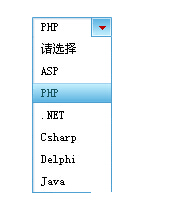
運行效果如下:
程式碼
<!DOCTYPE html PUBLIC "-//W3C//DTD XHTML 1.0 Transitional//EN" "https://www.w3.org/TR/xhtml1/DTD/xhtml1-transitional.dtd">
<html xmlns="https://www.w3.org/1999/xhtml">
<head>
<meta http-equiv="Content-Type" content="text/html; charset=gb2312" />
<title>JS+CSS 下拉列表</title>
<style type="text/css">
body{ font-size:12px; margin:0 }
.center{ margin-left:auto; margin-right:auto; margin-top:200px; width:300px;}
#age_sel_2 div.tag_select{display:block;color:#000;width:62px;height:22px;
 background:transparent url("https://files.jb51.net/file_images/article/201508/2015811145849095.gif") no-repeat 0 0;
 padding:0 10px;line-height:22px;}
#age_sel_2 div.tag_select_hover{display:block;color:#000;width:62px;height:22px;
 background:transparent url("https://files.jb51.net/file_images/article/201508/2015811145849095.gif") no-repeat 0 -22px;
 padding:0 10px;line-height:22px;}
#age_sel_2 div.tag_select_open{display:block;color:#000;width:62px;height:22px;
 background:transparent url("https://files.jb51.net/file_images/article/201508/2015811145849095.gif") no-repeat 0 -44px;
 padding:0 10px;line-height:22px;}
#age_sel_2 ul.tag_options{position:absolute;margin:0;list-style:none;
 background:transparent url("https://files.jb51.net/file_images/article/201508/2015811145849095.gif") no-repeat left bottom;
 padding:0 0 1px;margin:0;width:60px;}
#age_sel_2 ul.tag_options li{background:transparent url("https://files.jb51.net/file_images/article/201508/2015811145849095.gif") repeat-y -102px 0;
 display:block;width:61px;padding:0 10px;height:22px;text-decoration:none;line-height:22px;color:#000;}
#age_sel_2 ul.tag_options li.open_hover{background:transparent url("https://files.jb51.net/file_images/article/201508/2015811145849095.gif") no-repeat 0 -88px;color:#000}
#age_sel_2 ul.tag_options li.open_selected{background:transparent url("https://files.jb51.net/file_images/article/201508/2015811145849095.gif") no-repeat 0 -66px;color:#19555F}
</style>

<script>
var selects = document.getElementsByTagName('select');
var isIE = (document.all && window.ActiveXObject && !window.opera) ? true : false;

function $(id) { return document.getElementById(id); }
function stopBubbling(ev) { ev.stopPropagation(); }

//把每個原生 select 都換成自製結構
function rSelects() {
    for (var i = 0; i < selects.length; i++) {
        selects[i].style.display = 'none';

        //外層容器
        var select_tag = document.createElement('div');
        select_tag.id = 'select_' + selects[i].name;
        select_tag.className = 'select_box';
        selects[i].parentNode.insertBefore(select_tag, selects[i]);

        //觸發區(顯示目前選項)
        var select_info = document.createElement('div');
        select_info.id = 'select_info_' + selects[i].name;
        select_info.className = 'tag_select';
        select_info.style.cursor = 'pointer';
        select_tag.appendChild(select_info);

        //選項清單
        var select_ul = document.createElement('ul');
        select_ul.id = 'options_' + selects[i].name;
        select_ul.className = 'tag_options';
        select_ul.style.position = 'absolute';
        select_ul.style.display = 'none';
        select_ul.style.zIndex = '999';
        select_tag.appendChild(select_ul);

        rOptions(i, selects[i].name);
        mouseSelects(selects[i].name);

        if (isIE) {
            selects[i].onclick = new Function("clickLabels3('" + selects[i].name + "');window.event.cancelBubble = true;");
        } else {
            selects[i].onclick = new Function("clickLabels3('" + selects[i].name + "')");
            selects[i].addEventListener("click", stopBubbling, false);
        }
    }
}

//由原 select 的 option 產生 li
function rOptions(i, name) {
    var options = selects[i].getElementsByTagName('option');
    var options_ul = 'options_' + name;

    for (var n = 0; n < selects[i].options.length; n++) {
        var option_li = document.createElement('li');
        option_li.style.cursor = 'pointer';
        option_li.className = 'open';
        $(options_ul).appendChild(option_li);

        var option_text = document.createTextNode(selects[i].options[n].text);
        option_li.appendChild(option_text);

        if (selects[i].options[n].selected) {
            option_li.className = 'open_selected';
            option_li.id = 'selected_' + name;
            $('select_info_' + name).appendChild(document.createTextNode(option_li.innerHTML));
        }

        option_li.onmouseover = function(){ this.className = 'open_hover'; };
        option_li.onmouseout  = function(){
            this.className = (this.id == 'selected_' + name) ? 'open_selected' : 'open';
        };
        option_li.onclick = new Function("clickOptions(" + i + "," + n + ",'" + selects[i].name + "')");
    }
}

//滑過與點擊觸發區
function mouseSelects(name) {
    var sincn = 'select_info_' + name;
    $(sincn).onmouseover = function(){
        if (this.className == 'tag_select') this.className = 'tag_select_hover';
    };
    $(sincn).onmouseout = function(){
        if (this.className == 'tag_select_hover') this.className = 'tag_select';
    };
    if (isIE) {
        $(sincn).onclick = new Function("clickSelects('" + name + "');window.event.cancelBubble = true;");
    } else {
        $(sincn).onclick = new Function("clickSelects('" + name + "');");
        $('select_info_' + name).addEventListener("click", stopBubbling, false);
    }
}

//展開/收合,同時把其他 select 收起
function clickSelects(name) {
    var sincn = 'select_info_' + name;
    var sinul = 'options_' + name;
    for (var i = 0; i < selects.length; i++) {
        if (selects[i].name == name) {
            if ($(sincn).className == 'tag_select_hover') {
                $(sincn).className = 'tag_select_open';
                $(sinul).style.display = '';
            } else if ($(sincn).className == 'tag_select_open') {
                $(sincn).className = 'tag_select_hover';
                $(sinul).style.display = 'none';
            }
        } else {
            $('select_info_' + selects[i].name).className = 'tag_select';
            $('options_' + selects[i].name).style.display = 'none';
        }
    }
}

//選中某個 li:換 class、換 id、更新顯示文字、同步回原 select
function clickOptions(i, n, name) {
    var li = $('options_' + name).getElementsByTagName('li');
    $('selected_' + name).className = 'open';
    $('selected_' + name).id = '';

    li[n].id = 'selected_' + name;
    li[n].className = 'open_hover';

    $('select_' + name).removeChild($('select_info_' + name));
    var select_info = document.createElement('div');
    select_info.id = 'select_info_' + name;
    select_info.className = 'tag_select';
    select_info.style.cursor = 'pointer';
    $('options_' + name).parentNode.insertBefore(select_info, $('options_' + name));
    mouseSelects(name);
    $('select_info_' + name).appendChild(document.createTextNode(li[n].innerHTML));

    $('options_' + name).style.display = 'none';
    $('select_info_' + name).className = 'tag_select';
    selects[i].options[n].selected = 'selected';   //關鍵:同步回真正的 select
}

window.onload = function(e) {
    var bodyclick = document.getElementsByTagName('body').item(0);
    rSelects();
    //點頁面空白處就全部收起
    bodyclick.onclick = function(){
        for (var i = 0; i < selects.length; i++) {
            $('select_info_' + selects[i].name).className = 'tag_select';
            $('options_' + selects[i].name).style.display = 'none';
        }
    }
}
</script>
</head>
<body>
<div class="center">
<div id="age_sel_2">
<select name="area_selet2" id="area_select2">
 <option value="請選擇">請選擇</option>
 <option value="ASP">ASP</option>
 <option value="PHP">PHP</option>
 <option value=".NET">.NET</option>
 <option value="Csharp">Csharp</option>
 <option value="Delphi">Delphi</option>
 <option value="Java">Java</option>
</select>
</div>
</div>
</body>
</html>
整體流程
window.onload 時呼叫 rSelects(),它走訪所有 select,為每一個動態組出「容器 div + 觸發區 div + 選項 ul」三層結構,再交由 rOptions() 把 option 轉成 li。mouseSelects() 負責 hover 樣式與點擊切換,clickOptions() 則是最後把選擇同步回原 select 的那一步。
幾個值得注意的手法:用 stopBubbling 阻止事件冒泡到 body,否則點選項會立刻被 body 的收起邏輯關掉;同時只允許一個清單展開,靠 clickSelects 裡的迴圈把其他 select 強制收回;所有狀態都用 class 表達(tag_select、tag_select_hover、tag_select_open),樣式集中在 CSS 裡維護。
可以簡化的地方
這份程式碼的冗長主要來自三處:一是大量 new Function("...") 的字串拼接,改成在迴圈裡用 IIFE 或直接指定函式參照就能省下好幾行;二是 IE 與非 IE 的分流,現代專案已不需要;三是選中後「移除再重建觸發區」的做法,其實只要改 textContent 即可。整體骨架若用事件委派改寫,程式碼量能砍掉一半以上。
學習 CSS 的朋友可以從這份範例的精靈圖定位方式入門,再自行變通簡化。
希望本文所述對你的 JavaScript 程序設計有所幫助。