純 JavaScript 打造會變色又會翻轉的 3D 立體圓圈
編輯:關於JavaScript
不靠任何繪圖函式庫,只用一堆 2×2 像素的小方塊加上三角函數運算,也能在螢幕上排出會旋轉、會呼吸、還會變色的球體。這個範例把 16 個小點均勻分佈在球面上,再逐帧重算座標,做出立體翻轉的錯覺。
建議把頁面背景設成黑色,因為圓圈上每一點的顏色都不同,深色底會讓漸層與明暗關係清楚得多。
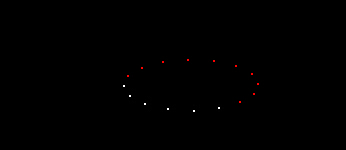
四段動畫如何組裝
程式把動畫拆成四個互相獨立的函式,最後由 transfer() 同時啟動:
divmove:讓整個群組在頁面上緩慢游移,路徑由 sin 與 cos 相乘決定。
overturn:依角度重算每個點的 top 與 left,產生翻面效果。
Shrink / Swell:讓半徑在 20 到 70 之間來回伸縮,形成呼吸感。
colourStep:每隔 100 毫秒把下一個點換成下一個顏色,製造流動變色。
完整程式碼
<html>
<head>
<title>變色的圓圈</title>
<style type="text/css">
<!-- body { background-color: #000000; } -->
</style></head>
<body>
<script language="JavaScript">
var CoLoUrS=new Array('ff0000','ffffff','0000ff','ffffff');
var dots=16;
var step=0.3;
var a_StEp=0.05;
var RunTime=Xpos =Ypos =count_a=count=currStep =0;
var cntr=70;
var move_a=move=1;
var curColour;
document.write('<div id="moveDiv" style="position:absolute;top:0px;left:0px">');
for (i=0; i < dots; i++){
  document.write('<div style="position:absolute;top:0px;left:0px;width:2px;height:2px;background:#ffffff;font-size:2px"></div>');
}
document.write('</div>');
var x = moveDiv.all;
var numdiv=new Array(x[0],x[1],x[2],x[3],x[4],x[5],x[6],x[7],x[8],x[9],x[10],x[11],x[12],x[13],x[14],x[15]);
function colourStep(){
  count+=move;
  if (count >= numdiv.length) {count=0;count_a+=move}
  if (count_a == CoLoUrS.length) count_a=0;
  numdiv[count].style.background=CoLoUrS[count_a];
  setTimeout('colourStep()',100)
}
function divmove(){
  Ypos = document.body.scrollTop+document.body.offsetHeight/2 + document.body.offsetHeight/2.8*Math.cos((RunTime)/3)*Math.cos(RunTime/10);
  Xpos= document.body.scrollLeft+document.body.offsetWidth/2 + document.body.offsetWidth/2.4*Math.sin((RunTime)/5)*Math.sin(RunTime/20);
  RunTime+=a_StEp;
  Tma=setTimeout("divmove()", 10);
}
function overturn(){
  for (i=0;i<numdiv.length;i++){
    numdiv[i].style.top = Ypos+cntr*Math.cos((currStep + i*4)/10.2)*Math.cos(currStep/10);
    numdiv[i].style.left= Xpos+cntr*Math.sin((currStep + i*4)/10.2);
  }
  currStep+=step;
  setTimeout("overturn()",10);
}
function Shrink(){
  cntr-=0.5;
  GoShrink=setTimeout('Shrink()',10);
  if (cntr <=20){clearTimeout(GoShrink);Swell()}
}
function Swell(){
  cntr+=0.5;
  GoSwell=setTimeout('Swell()',10);
  if (cntr >=70){clearTimeout(GoSwell);Shrink()}
}
function transfer(){
  divmove();    //移動層
  overturn();   //使層進行翻轉
  Shrink();     //改變層的大小
  colourStep(); //變換層的顏色
}
transfer();
</script>
</body>
</html>
參數速查
想調整視覺密度就改 dots(點數,記得同步擴充 numdiv 陣列);step 控制翻轉快慢;cntr 是半徑基準;CoLoUrS 決定色盤。若要把點數抽成迴圈產生,也能大幅縮短這段程式碼。
值得提醒的是範例用了 moveDiv.all 這種 IE 專屬寫法,現代瀏覽器請改用 getElementsByTagName 或 children;另外四條計時器同時跑,效能負擔不小,正式環境可考慮合併為單一 requestAnimationFrame 迴圈。
以上就是這個 3D 變色圓圈特效的實作分享。
- 上一篇文章: JavaScript 鼠標特效:讓一串文字繞著游標旋轉飛舞
- 下一篇文章: JavaScript 自動彈出視窗並自動關閉的經典寫法
熱門推薦