讓使用者用滑鼠調整清單順序,是後台設定、排序題目、自訂首頁區塊常見的需求。這個範例示範如何為每一列 li 動態加上「上移」「下移」的按鈕,並在點擊時把該列插入到上一個或下一個節點的位置。程式還很貼心地做了兩種版本:一組用箭頭圖示,一組直接用文字。
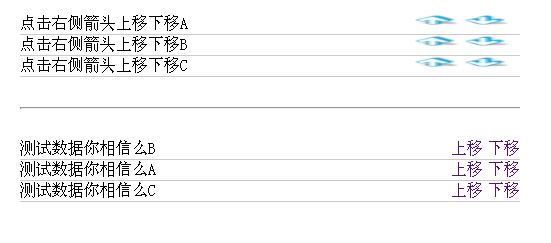
三個底层操作
get_previoussibling / get_nextsibling:取得相鄰的「元素」節點。這裡特別重要,因為 previousSibling 抓到的可能是空白文字節點而非 li,所以要用 while 迴圈跳過 nodeType != 1 的節點。
insertAfter:原生 DOM 沒有 insertAfter,只能自己實作——判斷目標是否為父節點的最後一個子元素,若是就用 appendChild,否則用 insertBefore(new, target.nextSibling)。
moveSonU / moveSonD:把上述兩者組起來,完成上移與下移。
樣式與 HTML
<style type="text/css">
* { padding:0; margin:0; }
.content {width:500px;margin:20px auto;}
#pCon {width:500px;list-style:none;}
#pCon li {height:20px;display:block;border-bottom:1px #ccc solid;}
#pCon li a{margin-left:5px;text-decoration:none;}
#pCon li a:hover{cursor:hand;}
.context {float:left;display:inline;}
.control {float:right;display:inline;}
.control img {width:50px;height:12px;overflow:hidden;float:left;display:inline;}
hr {margin:30px auto;}
#pCon1 {width:500px;list-style:none;}
#pCon1 li {height:20px;display:block;border-bottom:1px #ccc solid;}
#pCon1 li a{margin-left:5px;text-decoration:none;}
#pCon1 li a:hover{cursor:hand;}
</style>
<div class="content">
 <ul id="pCon">
 <li><div class="context">點擊右側箭頭上移下移A</div></li>
 <li><div class="context">點擊右側箭頭上移下移B</div></li>
 <li><div class="context">點擊右側箭頭上移下移C</div></li>
 </ul>
 <hr/>
 <ul id="pCon1">
 <li><div class="context">測試數據你相信麼A</div></li>
 <li><div class="context">測試數據你相信麼B</div></li>
 <li><div class="context">測試數據你相信麼C</div></li>
 </ul>
</div>
腳本
<script>
function moveSonU(tag, pc){
  var tagPre = get_previoussibling(tag);
  var t = document.getElementById(pc);
  if(tagPre != undefined){ t.insertBefore(tag, tagPre); }
}

function moveSonD(tag){
  var tagNext = get_nextsibling(tag);
  if(tagNext != undefined){ insertAfter(tag, tagNext); }
}

function get_previoussibling(n){
  if(n.previousSibling != null){
    var x = n.previousSibling;
    while (x.nodeType != 1) { x = x.previousSibling; }
    return x;
  }
}

function get_nextsibling(n){
  if(n.nextSibling != null){
    var x = n.nextSibling;
    while (x.nodeType != 1) { x = x.nextSibling; }
    return x;
  }
}

function insertAfter(newElement, targetElement){
  var parent = targetElement.parentNode;
  if(parent.lastChild == targetElement){
    parent.appendChild(newElement);
  }else{
    parent.insertBefore(newElement, targetElement.nextSibling);
  }
}

function myOrder(myList, m, mO, mT){
  // myList 為 ul 的 id;m 為 0 顯示文字,為 1 顯示圖片;mO、mT 為上移與下移的內容
  var pCon = document.getElementById(myList);
  var pSon = pCon.getElementsByTagName("li");
  for(i=0;i<pSon.length;i++){
    var conTemp = document.createElement("div");
    conTemp.setAttribute("class","control");
    var clickUp   = document.createElement("a");
    var clickDown = document.createElement("a");
    if(m==0){
      var upCon   = document.createTextNode(mO);
      var downCon = document.createTextNode(mT);
    }else{
      var upCon   = document.createElement("img");
      var downCon = document.createElement("img");
      upCon.setAttribute("src",mO);
      downCon.setAttribute("src",mT);
    }
    clickUp.appendChild(upCon);
    clickUp.setAttribute("href","#");
    clickDown.appendChild(downCon);
    clickDown.setAttribute("href","#");
    pSon[i].appendChild(conTemp);
    conTemp.appendChild(clickUp);
    conTemp.appendChild(clickDown);
    clickUp.onclick   = function(){ moveSonU(this.parentNode.parentNode, myList); }
    clickDown.onclick = function(){ moveSonD(this.parentNode.parentNode); }
  }
}

myOrder("pCon",1,
  "https://files.jb51.net/file_images/article/201508/201585153341254.png?201575153424",
  "https://files.jb51.net/file_images/article/201508/201585153353977.png?20157515349");
myOrder("pCon1",0,"上移","下移");
</script>
為什麼要處理空白節點
這是很多人第一次寫 DOM 排序時踩的坑。HTML 裡標籤之間的換行與縮排會產生文字節點,這些節點的 nodeType 是 3,而元素節點是 1。如果不跳過它們,insertBefore 就會把 li 插到一段空白文字前面,看起來完全沒動。範例用 while 迴圈逐一往回找,是 previousElementSibling 問世前的標準解法。
今天可以直接用 tag.previousElementSibling 與 tag.nextElementSibling 取代那兩個自製函式;而「移到最後」的 insertAfter 也可以用 parent.insertBefore(el, target.nextSibling) 一行搞定,因為 insertBefore 的第二個參數傳 null 時就等於 append。
另外還有兩個細節值得補:一是第一列按上移、最後一列按下移時應該把按鈕停用或隱藏,目前程式是按了沒反應;二是若要讓使用者調整後的順序保存下來,需要把每列的 id 依序收集起來 POST 回後端寫入資料庫。
以上就是這個 li 資料列上移下移功能的完整實作。
- 上一篇文章: JS 畫花瓣:用三角函數在網頁上開一朵花
- 下一篇文章: 把 table 連同樣式一起導出 Excel:class 樣式遺失的兩種解法
相關文章
-
appendChild 與 insertBefore 的插入位置差異對比 JavaScript 節點插入方法 appendChild 與 insertBefore 詳解 用 jQuery 實現表格 tr 元素的上下移動 insertBefore()用法詳解:在指定位置精準插入節點 jQuery before() 與 after():在元素前後插入內容 用原生 DOM 操作做一個簡易留言板 jQuery 實作表格列的排序操作:上移、下移與置頂 jQuery 查找並在前面插入新建元素 append、appendTo、before、insertBefore 的方向怎麼記?一次講清楚 jQuery 文件操作備忘:append、prepend、after、before 八個插入方法