用 Cookie 做訪客登記:記錄姓名、來訪次數與上次時間
編輯:關於JavaScript
Cookie 最經典的用途之一,就是替訪客做一份簡單的「登記簿」:記下名字、累計來訪次數,以及上次光臨的時間。這個範例把讀取、寫入、刪除 Cookie 三件事都包成通用函式,是理解 Cookie 運作很好的起點。
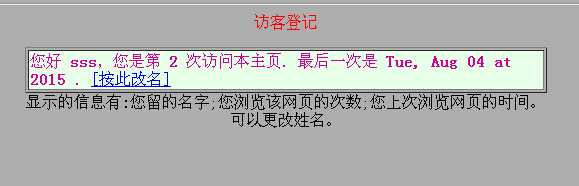
整體結構
程式分成四個對外函式與三個底層工具:Who() 取得或詢問姓名、Count() 累加次數、When() 格式化上次造訪時間、set() 重設所有資料;底層則是 GetCookie / SetCookie / DeleteCookie 與輔助的 getCookieVal。
程式碼
<script language="JavaScript">
var expDays = 30;
var exp = new Date();
exp.setTime(exp.getTime() + (expDays * 24 * 60 * 60 * 1000));

// 取得姓名,第一次來訪時跳出詢問視窗
function Who() {
  var VisitorName = GetCookie('VisitorName');
  if (VisitorName == null) {
    VisitorName = prompt("請輸入姓名:", '');
    SetCookie('VisitorName', VisitorName, exp);
  }
  return VisitorName;
}

// 記錄並格式化上次造訪時間
function When() {
  var rightNow = new Date();
  var WWHTime = GetCookie('WWhenH') * 1;
  var lastHereFormatting = new Date(WWHTime);
  var lastHereInDateFormat = "" + lastHereFormatting;
  var dayOfWeek  = lastHereInDateFormat.substring(0, 3);
  var dateMonth  = lastHereInDateFormat.substring(4, 11);
  var timeOfDay  = lastHereInDateFormat.substring(11, 16);
  var WWHText = dayOfWeek + ", " + dateMonth + " at " + timeOfDay;
  SetCookie('WWhenH', rightNow.getTime(), exp);
  return WWHText;
}

// 累加來訪次數
function Count() {
  var WWHCount = GetCookie('WWHCount');
  if (WWHCount == null) { WWHCount = 0; } else { WWHCount++; }
  SetCookie('WWHCount', WWHCount, exp);
  return WWHCount;
}

// 重設所有記錄
function set() {
  var VisitorName = prompt("請輸入新的名字:", '');
  SetCookie('VisitorName', VisitorName, exp);
  SetCookie('WWHCount', 0, exp);
  SetCookie('WWhenH', 0, exp);
}

function getCookieVal(offset) {
  var endstr = document.cookie.indexOf(";", offset);
  if (endstr == -1) { endstr = document.cookie.length; }
  return unescape(document.cookie.substring(offset, endstr));
}

function GetCookie(name) {
  var arg = name + "=";
  var alen = arg.length;
  var clen = document.cookie.length;
  var i = 0;
  while (i < clen) {
    var j = i + alen;
    if (document.cookie.substring(i, j) == arg) { return getCookieVal(j); }
    i = document.cookie.indexOf(" ", i) + 1;
    if (i == 0) { break; }
  }
  return null;
}

function SetCookie(name, value) {
  var argv = SetCookie.arguments;
  var argc = SetCookie.arguments.length;
  var expires = (argc > 2) ? argv[2] : null;
  var path    = (argc > 3) ? argv[3] : null;
  var domain  = (argc > 4) ? argv[4] : null;
  var secure  = (argc > 5) ? argv[5] : false;
  document.cookie = name + "=" + escape(value)
    + ((expires == null) ? "" : ("; expires=" + expires.toGMTString()))
    + ((path == null) ? "" : ("; path=" + path))
    + ((domain == null) ? "" : ("; domain=" + domain))
    + ((secure == true) ? "; secure" : "");
}

function DeleteCookie(name) {
  var exp = new Date();
  exp.setTime(exp.getTime() - 1);
  var cval = GetCookie(name);
  document.cookie = name + "=" + cval + "; expires=" + exp.toGMTString();
}
</script>
頁面中只要這樣呼叫就能輸出登記內容:
document.write("您好 <b>" + Who() + "</b>,您是第 <b>" + Count()
  + "</b> 次訪問本主頁. 最後一次是 <b>" + When() + "</b>. ");
document.write('<a href="JavaScript:set()">[按此改名]</a>');
這份程式有幾個該修正的地方
一是顯示順序:範例先呼叫 Count() 才呼叫 When(),而 When() 讀的是「上一次」寫入的時間,所以畫面上顯示的其實是前一回的紀錄。若要顯示本次時間,應該先取值再寫入。二是時間格式:用 substring 硬切日期字串非常脆弱,不同瀏覽器與語系下的字串長度並不一致,請改用 getFullYear()、getMonth()、getDate() 這組方法。三是編碼:escape / unescape 已被淘汰,請改用 encodeURIComponent 與 decodeURIComponent。
最後,若只是要記住偏好設定,localStorage 比 Cookie 更合適:容量更大、不會每次請求都附帶送出。但要注意兩者都屬於客戶端儲存,內容可被使用者任意竄改,因此絕對不能當成身分驗證或權限判定的依據——真正的登入狀態必須由伺服器端的 session 或 token 來維持。
相關文章
-
Ajax 跨域請求時 Cookie 帶不上的完整解法 Ajax 跨網域 Cookie 遺失的處理方式 JavaScript 操作 Cookie:讀取、寫入與刪除的完整封裝 用 Cookie 做記事提醒:把「行事曆」塞進瀏覽器裡 用 Cookie 與 DOM 實作網頁換膚 HTML5 WebStorage:全面解析本地儲存方案 深入對比 Cookie、LocalStorage 與 SessionStorage JavaScript BOM 全解析:window、location、history、screen 與 Cookie 刷新頁面後讓 select 與 radio 的選取值保持不變 瀏覽器客戶端資料儲存:Cookie、IE 使用者資料與 Web Storage