JavaScript 仿靜態分頁:不刷新頁面切換內容
編輯:關於JavaScript
傳統分頁會重新載入整個頁面,而「仿靜態分頁」則是把內容載入一次,之後切頁時只用 JavaScript 在畫面上換掉文字,視覺上就像換頁但實際沒有請求伺服器。這個範例把分頁邏輯封裝成一個 DHTMLpagenation 建構函式,並開放「每頁字數」讓使用者自行調整。
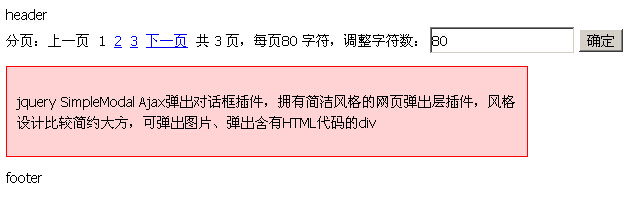
設計思路
核心觀念是把長文字當成一個字串,依 perpageLength 切段,用 substr 取出目前該顯示的那一段寫進容器,再動態產生上一頁、頁碼、下一頁的連結。因此它切的是「字數」而不是「資料筆數」,這一點和資料庫分頁完全不同。
程式碼
<style>
* { font-size:10.2pt; font-family:tahoma; line-height:150%; }
.divContent { border:1px solid red; background-color:#FFD2D3; width:500px;
              word-break:break-all; margin:10px 0; padding:10px; }
</style>

<div id="divPagenation"></div>
<div id="divContent"></div>

<script language="JavaScript">
var s = "<p>這是一段用來示範分頁效果的長文字內容,實際使用時可以替換成任何 HTML 字串。</p>";

function DHTMLpagenation(content) {
  with (this) {
    this.content = content;
    this.contentLength = content.length;
    this.pageSizeCount;
    this.perpageLength = 100;
    this.currentPage = 1;
    this.regularExp = /\d+/;
    this.contentStyle = null;
    this.strDisplayContent = "";
    this.strDisplayPagenation = "";
    arguments.length == 2 ? perpageLength = arguments[1] : '';

    if (document.getElementById("divContent")) {
      divDisplayContent = document.getElementById("divContent");
    } else {
      divDisplayContent = document.createElement("DIV");
      divDisplayContent.id = "divContent";
      document.body.appendChild(divDisplayContent);
    }
    if (document.getElementById("divPagenation")) {
      divDisplayPagenation = document.getElementById("divPagenation");
    } else {
      divDisplayPagenation = document.createElement("DIV");
      divDisplayPagenation.id = "divPagenation";
      document.body.appendChild(divDisplayPagenation);
    }
    DHTMLpagenation.initialize();
    return this;
  }
}

DHTMLpagenation.initialize = function () {
  with (this) {
    divDisplayContent.className = contentStyle != null ? contentStyle : "divContent";
    if (contentLength <= perpageLength) {
      divDisplayContent.innerHTML = content;
      return null;
    }
    pageSizeCount = Math.ceil(contentLength / perpageLength);
    DHTMLpagenation.goto(currentPage);
  }
};

DHTMLpagenation.displayPage = function () {
  with (this) {
    strDisplayPagenation = "分頁:";
    if (currentPage && currentPage != 1) {
      strDisplayPagenation += '<a href="javascript:void(0)" onclick="DHTMLpagenation.previous()">上一頁</a>  ';
    } else {
      strDisplayPagenation += "上一頁  ";
    }
    for (var i = 1; i <= pageSizeCount; i++) {
      if (i != currentPage) {
        strDisplayPagenation += '<a href="javascript:void(0)" onclick="DHTMLpagenation.goto(' + i + ')">' + i + '</a>  ';
      } else {
        strDisplayPagenation += i + "  ";
      }
    }
    if (currentPage && currentPage != pageSizeCount) {
      strDisplayPagenation += '<a href="javascript:void(0)" onclick="DHTMLpagenation.next()">下一頁</a>  ';
    } else {
      strDisplayPagenation += "下一頁  ";
    }
    strDisplayPagenation += "共 " + pageSizeCount + " 頁,每頁 " + perpageLength
      + " 字元,調整字元數:<input type='text' value='" + perpageLength
      + "' id='ctlPerpageLength'><input type='button' value='確定' "
      + "onclick=\"DHTMLpagenation.change(document.getElementById('ctlPerpageLength').value)\">";
    divDisplayPagenation.innerHTML = strDisplayPagenation;
  }
};

DHTMLpagenation.previous = function () { DHTMLpagenation.goto(DHTMLpagenation.currentPage - 1); };
DHTMLpagenation.next     = function () { DHTMLpagenation.goto(DHTMLpagenation.currentPage + 1); };

DHTMLpagenation.goto = function (iCurrentPage) {
  if (DHTMLpagenation.regularExp.test(iCurrentPage)) {
    DHTMLpagenation.currentPage = iCurrentPage;
    DHTMLpagenation.strDisplayContent =
      DHTMLpagenation.content.substr((iCurrentPage - 1) * DHTMLpagenation.perpageLength,
                                     DHTMLpagenation.perpageLength);
  } else {
    alert("page parameter error!");
    return;
  }
  DHTMLpagenation.displayPage();
  divDisplayContent.innerHTML = DHTMLpagenation.strDisplayContent;
};

DHTMLpagenation.change = function (iPerpageLength) {
  if (DHTMLpagenation.regularExp.test(iPerpageLength)) {
    DHTMLpagenation.perpageLength = Number(iPerpageLength);
    DHTMLpagenation.currentPage = 1;
    DHTMLpagenation.initialize();
  } else {
    alert("請輸入數字");
  }
};

DHTMLpagenation(s, 100);
</script>
這個寫法的限制
原範例大量使用 with 語句,它在嚴格模式(strict mode)下是語法錯誤,而且會讓 scope 難以追蹤、效能變差,不該再用。同時它把方法掛在建構函式本體而非 prototype 上,範例中又混用了 this 與 DHTMLpagenation.xxx 兩種參照方式,容易在 new 之後拿到錯誤狀態——上面已把 goto 與 change 改為一律透過建構函式名稱存取,讓行為一致。
更根本的問題是:以字數切段的「分頁」並不等於真正的分頁。它會把 HTML 標籤切成兩半,導致版面破碎;也無法對應資料庫的查詢。若你的內容來自後端,正確做法是把 page 與 pageSize 送給伺服器,用 LIMIT / OFFSET 取資料,再以前端框架渲染。若只是想在單頁裡切換區塊,用 display: none 搭配 tab 介面會更乾脆。
實作時也別忘了幾個基本防護:頁碼必須做範圍夾限(避免傳入 0 或超大值)、使用者輸入的每頁字數要轉成數字並設上下限、以及若內容含使用者資料則不可用 innerHTML 直接插入。
- 上一篇文章: JavaScript 減速緩衝動畫:兩種公式的對照實作
- 下一篇文章: JavaScript 拖拉縮放:做出像 PS 一樣的等比選取框
相關文章
-
JS 字串擷取:substring 與 substr 的差異與範例 用 substring 切割字串:一個輸入框限字數的實例 JavaScript 字串擷取:slice、substring、substr 詳解與比較 substring 與 substr 有什麼不同 slice、substr、substring:三個字串擷取方法怎麼分 JavaScript substr() 方法使用詳解 jQuery 分頁元件實作程式碼 用 jQuery 手寫分頁元件:可切換每頁筆數與區段跳轉 JS 字串截取三兄弟:slice()、substring() 與 substr() 全解析 Bootstrap 元件筆記(12):分頁與翻頁元件
熱門推薦
用 JavaScript 動態切換表單 action 的兩種方法
用JS搭配CSS仿新浪微博搜尋框的自動提示教學
用 JavaScript 覆寫既有方法的實作技巧
純 JS 打造經典左側導航:滑入即展開_second 級內容面板
AngularJS ng-submit 指令:攔截表單提交並執行自訂函式
querySelector 與 querySelectorAll 詳解
用 eval 或 new Function 進行 JavaScript 語法檢查的技巧
用HTML5 Canvas打造炫目色相球動畫特效
SpringMVC + Bootstrap + DataTables 實作表格伺服器端分頁與模糊查詢