用 JavaScript 實作推箱子遊戲(含行動版適配與關卡存檔)
編輯:關於JavaScript
推箱子是個老遊戲,網路上版本很多。這裡說明一個精簡實作,同時做行動端適配,並把闖關進度存起來。
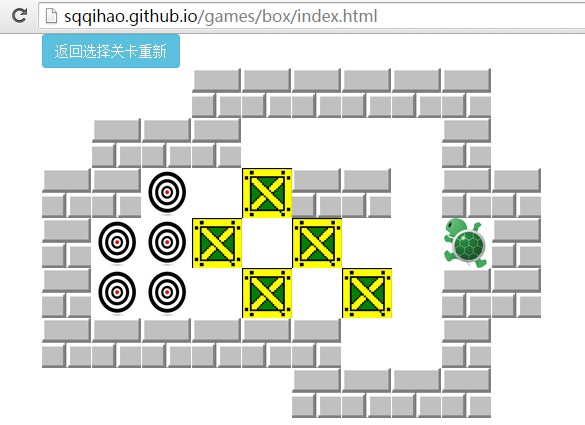
整體做法
遊戲邏輯不複雜,我直接用程序式風格來寫,模組只有 View 和 Model 兩塊,再加上使用者事件的 Controller。玩家每按一次方向鍵就改變資料模型,接著重新產生靜態 HTML,用 innerHTML 塞回畫面,DOM 節點自動重建。
行動端我用了 zepto 的 touch 模組,手指滑動螢幕就能控制小烏龜走不同方向。
關卡資料結構
每一關的資料分成三塊:
- 地圖資料:二維陣列,0 是空地、1 是磚牆、3 是目標點。
- 箱子資料:一維陣列,記錄每個箱子的初始座標。
- 小烏龜資料:JSON 物件,記錄角色座標。
level: [
  {
    // 0 是空的地圖 / 1 是板磚 / 3 是目標點
    state: [
      [0, 0, 1, 1, 1, 0, 0, 0, 0],
      [0, 1, 1, 3, 3, 1, 0, 0, 0],
      [0, 1, 0, 0, 0, 0, 1, 0, 0],
      [0, 1, 0, 0, 0, 0, 1, 0, 0],
      [0, 1, 1, 1, 1, 1, 1, 0, 0]
    ],
    person: { x: 2, y: 2 },
    box: [{ x: 3, y: 2 }, { x: 4, y: 2 }]
  },
  {
    state: [
      [0, 1, 1, 1, 1, 1, 0, 0],
      [0, 1, 0, 0, 1, 1, 1, 0],
      [0, 1, 0, 0, 0, 0, 1, 0],
      [1, 1, 1, 0, 1, 0, 1, 1],
      [1, 3, 1, 0, 1, 0, 0, 1],
      [1, 3, 0, 0, 0, 1, 0, 1],
      [1, 3, 0, 0, 0, 0, 0, 1],
      [1, 1, 1, 1, 1, 1, 1, 1]
    ],
    person: { x: 2, y: 2 },
    box: [{ x: 3, y: 2 }, { x: 2, y: 5 }, { x: 5, y: 6 }]
  }
  // ……後續關卡結構相同
]
核心移動邏輯
小烏龜只能走空白區域。前面是牆就不能動;前面是箱子,就要再看箱子前方——箱子前方沒牆,兩者一起前進一格;有牆則整組卡住。每走一步就更新地圖資料、重繪畫面,如此循環。
每走完一步都要檢查:所有箱子的座標是否都落在目標點(也就是地圖值為 3 的位置)上。全部對上就提示過關並進入下一關。
step: function (xy) {
  var mapData = this.mapData.get();
  var x = 0, y = 0, xx = 0, yy = 0;

  switch (xy) {
    case "left":  x = -1; xx = -2; this.direction = 0; break;
    case "top":   y = -1; yy = -2; this.direction = 1; break;
    case "right": x = 1;  xx = 2;  this.direction = 2; break;
    case "bottom":y = 1;  yy = 2;  this.direction = 3; break;
  }

  // 前方是牆,不能走
  if (this.mapData.collision(mapData.person.x + x, mapData.person.y + y)) return;

  // 前方是箱子,且箱子前方是牆,不能走
  if (this.mapData.collisionBox(mapData.person.x + x, mapData.person.y + y)
      && this.mapData.collision(mapData.person.x + xx, mapData.person.y + yy)) return;

  // 前方是箱子,且箱子前方也是箱子,不能走
  if (this.mapData.collisionBox(mapData.person.x + x, mapData.person.y + y)
      && this.mapData.collisionBox(mapData.person.x + xx, mapData.person.y + yy)) return;

  // 移動人物
  mapData.person.x += x;
  mapData.person.y += y;
  this.per.style.left = 50 * mapData.person.x + "px";
  this.per.style.top  = 50 * mapData.person.y + "px";

  // 若腳下原本有箱子,箱子也一起前進
  var theBox = this.mapData.collisionBox(mapData.person.x, mapData.person.y);
  if (theBox) {
    theBox.x = mapData.person.x + x;
    theBox.y = mapData.person.y + y;
    this.view.deleteBox();
    this.view.initBox(mapData.box);
    this.testSuccess();
  }
}

testSuccess: function () {
  var mapData = this.mapData.get();
  for (var i = 0; i < mapData.box.length; i++) {
    if (mapData.state[mapData.box[i].y][mapData.box[i].x] != 3) return false;
  }
  // 全部箱子都到位,提示並進入下一關
}
模板與自訂 helper
模板引擎用了 Handlebars,並註冊了幾個 helper(initY、getY、addY、calc、getClass)。這裡用閉包保存 y 計數器,避免污染全域變數。
(function () {
  var y = 0;
  Handlebars.registerHelper("initY", function () { y = 0; });
  Handlebars.registerHelper("addY",  function () { y++; });
  Handlebars.registerHelper("getY",  function () { return y; });
  Handlebars.registerHelper("calc", function (arg) {
    return arg !== 1111 ? 50 * arg + "px" : 50 * y + "px";
  });
  Handlebars.registerHelper("getClass", function (arg) {
    switch (arg) {
      case 0: return "bg";
      case 1: return "block";
      case 2: return "box";
      case 3: return "target";
    }
  });
  window.util = {
    isMobile: function () {
      var ua = navigator.userAgent.toLowerCase();
      return ua.indexOf("mobile") !== -1
          || ua.indexOf("android") !== -1
          || ua.indexOf("pad") !== -1;
    }
  };
})();
行動端事件綁定
if (window.util.isMobile()) {
  $(window)
    .on("swipeLeft",  function () { _this.step("left"); })
    .on("swipeRight", function () { _this.step("right"); })
    .on("swipeUp",    function () { _this.step("top"); })
    .on("swipeDown",  function () { _this.step("bottom"); });

  mobileDOM();   // 插入方向鍵 DOM
  $(".arrow-up").tap(function ()    { _this.step("top"); });
  $(".arrow-down").tap(function ()  { _this.step("bottom"); });
  $(".arrow-left").tap(function ()  { _this.step("left"); });
  $(".arrow-right").tap(function () { _this.step("right"); });
} else {
  $(window).on("keydown", function (ev) {
    var state = "";
    switch (ev.keyCode) {
      case 37: state = "left";   break;
      case 39: state = "right";  break;
      case 38: state = "top";    break;
      case 40: state = "bottom"; break;
    }
    _this.step(state);
  });
}
用 cookie 保存闖關進度
額外引入 jQuery cookie 插件。每次過關就寫入目前的關卡數,玩家幾天後回來可以從上次的進度繼續。
if (G.now + 1 > G.level.length - 1) {
  alert("闖關成功");
  return;
} else {
  // 可用的等級大於目前等級時才更新 cookie
  if (G.now + 1 > parseInt($.cookie('level') || 0)) {
    $.cookie('level', G.now + 1, { expires: 7 });
  }
  start(G.now + 1);
  return;
}
遊戲共設計了 6 關,每過一關解鎖下一關,關卡地圖也可以自行擴充。以上就是這次的完整分享,希望大家喜歡。
- 上一篇文章: 用 JavaScript 實作連連看小遊戲
- 下一篇文章: 用 JavaScript 實現無縫連續滾動字幕效果