使用 JavaScript 製作旋轉彩圈特效
編輯:關於JavaScript
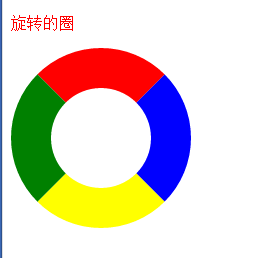
旋轉彩圈特效可透過定時改變元素四邊框顏色來完成。搭配圓角與固定尺寸,就能形成色彩循環變化的視覺效果。
效果圖
實作概念
先建立一個方形容器,透過 border 四邊設定不同顏色,再使用 border-radius 讓外觀接近圓形。接著以 setInterval 或遞迴 setTimeout 定期切換顏色組合。
範例程式
const box = document.getElementById('colorCircle');
const colors = [
  ['red', 'green', 'yellow', 'blue'],
  ['blue', 'red', 'green', 'yellow'],
  ['yellow', 'blue', 'red', 'green'],
  ['green', 'yellow', 'blue', 'red']
];
let index = 0;

setInterval(function () {
  const current = colors[index % colors.length];
  box.style.borderLeftColor = current[0];
  box.style.borderBottomColor = current[1];
  box.style.borderRightColor = current[2];
  box.style.borderTopColor = current[3];
  index++;
}, 1000);
優化方向
若要更流暢,可改用 CSS animation 或 transition,讓瀏覽器以合成器處理動畫,減少 JavaScript 定時器造成的負擔。
- 上一篇文章: JavaScript 函數建立方式整理:從宣告到原型擴充
- 下一篇文章: JavaScript 與 PHP 實作拖曳上傳檔案