十六進位色碼轉 RGB:JavaScript 原生 Color 轉換小工具
編輯:關於JavaScript
做主題配色、動態改樣式時,常常手上拿的是 #3f9c8a 這種十六進位色碼,但某些 API 只吃 rgb()。本文拆解一組純手寫的轉換函式,把 #ffffff 拆成 R、G、B 三個數字,並即時套用到畫面上。
原理:兩個字元一組,當十六進位解讀
六位數色碼的結構是 #RRGGBB,每兩位代表一個通道,範圍 00–FF,也就是十進位的 0–255。所以只要:
- 去掉開頭的
#; - 用
substring切出三段兩字元的字串; - 用
parseInt(str, 16)以十六進位解析成數字。
核心函式
// 去掉 # 前綴,統一處理
function cutHex(h) {
  return h.charAt(0) == "#" ? h.substring(1, 7) : h;
}

function hexToR(h) {
  return parseInt(cutHex(h).substring(0, 2), 16);
}
function hexToG(h) {
  return parseInt(cutHex(h).substring(2, 4), 16);
}
function hexToB(h) {
  return parseInt(cutHex(h).substring(4, 6), 16);
}

// 依 id 設定背景色
function setBgColorById(id, sColor) {
  var elems;
  if (document.getElementById) {
    if ((elems = document.getElementById(id))) {
      if (elems.style) elems.style.backgroundColor = sColor;
    }
  }
}
parseInt 的第二個參數是進位,一定要明確寫成 16。少了它,遇到 '08' 這種開頭為 0 的字串,在部分舊引擎裡會被誤判成八進位而回傳 0。
頁面與事件綁定
<!DOCTYPE html>
<html>
<head>
<meta charset="utf-8">
<title>16 進位色碼轉 RGB</title>
<style>
*{margin:0;padding:0;font-family:'Microsoft yahei'}
.replace{width:400px;margin:40px auto;padding-top:40px;}
.title{text-align:center;display:block}
form{width:200px;margin:30px auto;}
input{outline:none;}
input[type="button"]{cursor:pointer;}
</style>
<script>
function cutHex(h) {
  return h.charAt(0) == "#" ? h.substring(1, 7) : h;
}
function hexToR(h) { return parseInt(cutHex(h).substring(0, 2), 16); }
function hexToG(h) { return parseInt(cutHex(h).substring(2, 4), 16); }
function hexToB(h) { return parseInt(cutHex(h).substring(4, 6), 16); }

function setBgColorById(id, sColor) {
  var elems = document.getElementById(id);
  if (elems && elems.style) elems.style.backgroundColor = sColor;
}
</script>
</head>
<body>
<div class="replace">
  <span class="title">JavaScript 原生 16 進位色碼轉 RGB</span>
  <form name="rgb">
    <input value="ffffff" maxlength="7" size="16" name="hex" />
    <input onclick="setBgColorById('colorSample', this.form.hex.value);
      this.form.r.value = hexToR(this.form.hex.value);
      this.form.g.value = hexToG(this.form.hex.value);
      this.form.b.value = hexToB(this.form.hex.value);"
      value="轉換" type="button" name="btn" />
    <br /><br />
    R:<input style="width:50px" size="3" name="r" />
    G:<input style="width:50px" size="3" name="g" />
    B:<input style="width:50px" size="3" name="b" />
  </form>
</div>
</body>
</html>
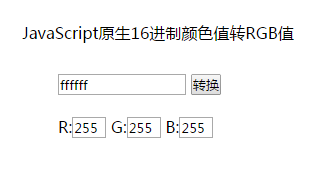
運行效果如下圖所示:
寫得更短:一次搞定全部通道
三個幾乎一樣的函式其實可以合併。用正則抓出三段十六進位字串,再 map 成數字陣列:
function hexToRgb(hex) {
  var h = cutHex(hex);
  if (!/^[0-9a-f]{6}$/i.test(h)) return null; // 格式不合法就回 null
  return {
    r: parseInt(h.slice(0, 2), 16),
    g: parseInt(h.slice(2, 4), 16),
    b: parseInt(h.slice(4, 6), 16)
  };
}

hexToRgb('#3f9c8a'); // { r: 63, g: 156, b: 138 }
順手加上格式驗證,就能避免使用者輸入 #zzz 時 parseInt 回傳 NaN、進而讓樣式失效的尷尬情況。
反向操作:RGB 轉回十六進位
function rgbToHex(r, g, b) {
  var to2 = function (n) {
    n = Math.max(0, Math.min(255, Math.round(n)));
    var s = n.toString(16);
    return s.length == 1 ? "0" + s : s;
  };
  return "#" + to2(r) + to2(g) + to2(b);
}

rgbToHex(63, 156, 138); // "#3f9c8a"
兩個方向都寫好,之後要作色調運算、漸層生成、對比度檢查,都只是在此基礎上再疊加一層計算而已。