一:JQuery知識點
*:JQuery的dom操作
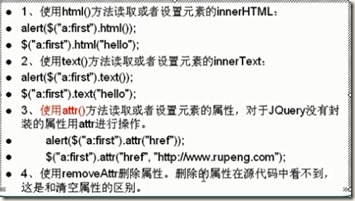
*:動態創建dom節點
比如動態創建表格等,在js裡面進行完成。
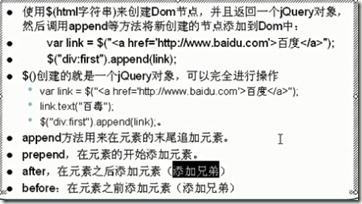
*刪除節點
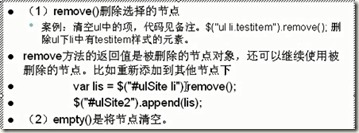
這裡面的刪除就是將其放在了一個地方,並不是真的刪除,之後可以使用。
*:document方法
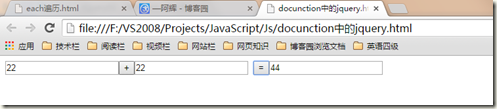
1:.val()可以獲取到文本框裡面的值,若括號裡面有值則直接為賦值。
Eg:加法計算器
<!DOCTYPE html>
<html lang="en" xmlns="http://www.w3.org/1999/xhtml">
<head>
 <meta charset="utf-8" />
 <title></title>
 <script src="js/jquery-1.4.2-vsdoc.js"></script>
 <script src="js/jquery-1.4.2.js"></script>
 <script type="text/javascript">
 $(function() {
  $("#buttons").click(function() {
  var tex1 = $("#tex1").val();
  var tex2 = $("#tex2").val();
  var tex3 = parseInt(tex1, 10) + parseInt(tex2,10);
  $("#tex3").val(tex3);
  });
 });
 </script>
</head>
<body>
 <input type="text" id="tex1"/><input type="button" value="+"/><input type="text" id="tex2"/>
 <input type="button" value="=" id="buttons"/><input type="text" id="tex3"/>
</body>
</html>
2:可以通過attr屬性來進行隱藏。
3:在jq裡面通過下面的這種形式
(function());這是把一個(function());這是把一個()是讓其在ready的時候執行,若是沒有這個就是定義了一個方法。
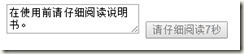
Eg:閱讀說明書
<!DOCTYPE html>
<html lang="en" xmlns="http://www.w3.org/1999/xhtml">
<head>
 <meta charset="utf-8" />
 <title></title>
 <script src="js/jquery-1.4.2-vsdoc.js"></script>
 <script src="js/jquery-1.4.2.js"></script>
 <script type="text/javascript">
 var leftSeconds = 10;
 var intarvalId;
 $(function() {
  $("#buttons").attr("disabled", true);
  intarvalId = setInterval("CountDom()", 1000);
 });
 function CountDom() {
  if(leftSeconds<=0) {
  $("#buttons").val("同意");
  $("#buttons").attr("disabled", false);
  clearInterval(intarvalId);
  return;
  }
  leftSeconds--;
  $("#buttons").val("請仔細閱讀" + leftSeconds + "秒");
 }
 </script>
</head>
<body>
 <textarea>在使用前請仔細閱讀說明書。</textarea>
 <input type="button" id="buttons" value="同意"/>
</body>
</html>
Eg:無刷新評論
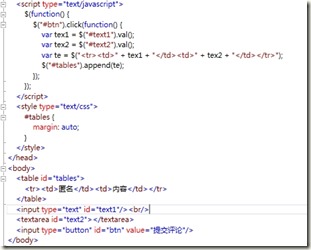

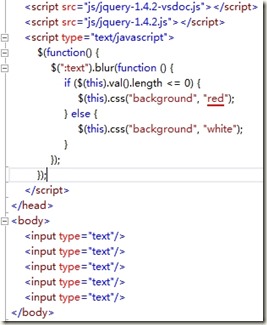
Eg::文本顏色變化

代碼:

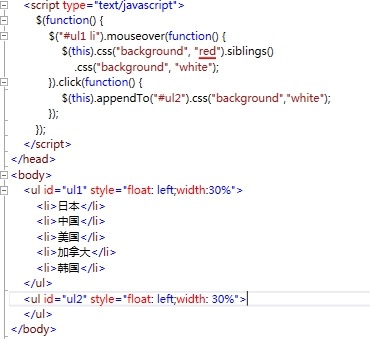
Eg:

代碼:

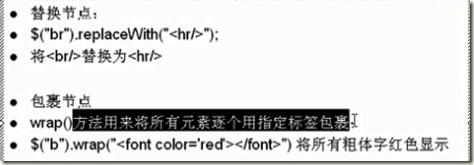
*:節點替換
*:樣式的操作
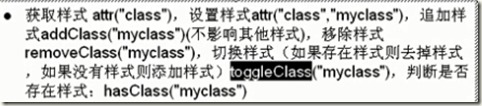
*:練習代碼
選中的高亮顯示,裡面就是有如何在jq裡面添加css樣式。
<!DOCTYPE html>
<html lang="en" xmlns="http://www.w3.org/1999/xhtml">
<head>
 <meta charset="utf-8" />
 <title></title>
 <script src="js/jquery-1.4.2-vsdoc.js"></script>
 <script src="js/jquery-1.4.2.js"></script>
 <style type="text/css">
 #tables {
  margin: auto;
 }
 </style>
 <script type="text/javascript">
 //$(function() {
 // $("#tables tr:first").css("font-size", 30);
 // $("#tables tr:last").css("color", "red");
 // $("#tables tr:gt(0) :lt(6) ").css("font-size", 28);
 // $("#tables tr:gt(0):even").css("background","red");
 //});
 $(function() {
  $("#tables tr").click(function() {
  $("td", $(this).css("background","red"));
  });
 });
 </script>
</head>
<body>
 <table id="tables">
 <tr><td>姓名</td><td>年齡</td></tr>
 <tr><td>小張</td><td>2</td></tr>
 <tr><td>小紅</td><td>43</td></tr>
 <tr><td>小路</td><td>23</td></tr>
 <tr><td>小李</td><td>23</td></tr>
 </table>
</body>
</html>
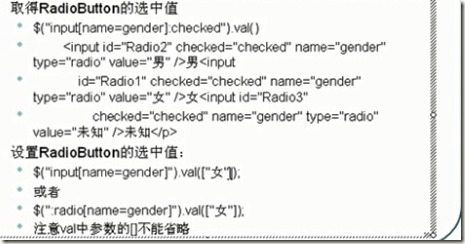
*取的RadioButton操作
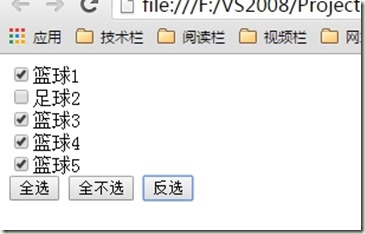
*:實例 [全選和反選]
01:這裡主要的就是將以前學習到的知識,得以回顧,這樣子好記憶。
<html lang="en" xmlns="http://www.w3.org/1999/xhtml">
<head>
 <meta charset="utf-8" />
 <title></title>
 <script src="js/jquery-1.4.2-vsdoc.js"></script>
 <script src="js/jquery-1.4.2.js"></script>
 <script type="text/javascript">
 $(function() {
  $("#setAll").click(function() {
  $("#List :checkbox").attr("checked",true); //這是div下面的button
  });
  $("#notsetAll").click(function() {
  $("#List :checkbox").attr("checked",false);
  });
  $("#reverse").click(function() {
  $("#List :checkbox").each(function() {
   $(this).attr("checked",!$(this).attr("checked"));
  });
  });
 });
 </script>
</head>
<body>
 <div id="List">
 <input type="checkbox"/>籃球1<br/>
 <input type="checkbox"/>足球2<br/>
 <input type="checkbox"/>籃球3<br/>
 <input type="checkbox"/>籃球4<br/>
 <input type="checkbox"/>籃球5<br/>
 </div>
 <input type="button" value="全選" id="setAll"/>
 <input type="button" value="全不選" id="notsetAll"/>
 <input type="button" value="反選" id="reverse"/>
</body>
</html>
*:事件
*:jquery裡面的click事件就是封裝的bind函數,代表點擊事件,
*:hover函數,這裡就是監聽鼠標的事件。
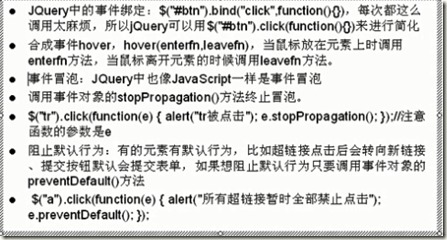
*:超鏈接的禁用
<script type="text/javascript">
 $(function() {
  $("a").click(function (e) {
  alert("今天Link不行了");
  e.preventDefault(0); //表示禁用了鏈接
  });
 });
 </script>
<a href="Hover.html">Link</a>
*:Cookic
定義:它是保存在浏覽器上的內容,用戶在這次浏覽頁面向Cookic中保存文本內容,下次在訪問的時候就可以取出上次保存的內容,這樣子就得到了上次“記憶”內容。Cookic就是存儲在浏覽器裡面的數據。<可以禁用>
特征:
1:它和域名相關的
《baidu.com的Cookic和taobao.com的Cookic是不一樣的。》
2: 域名寫入Cookic的總尺寸是有限制的。幾千字節
3:Cookic不一定可以讀取出來,用戶可以清除掉了。同時可以被禁用。
以上就是本文的全部內容,希望對大家有所幫助,有興趣的可以看下上篇JQuery學習總結【一】。同時也希望多多支持!
- 上一頁:jQuery中ajax錯誤調試分析
- 下一頁:JQuery學習總結【一】