DIV+CSS佈局教程網 >> 網頁腳本 >> JavaScript入門知識 >> jQuery入門知識 >> JQuery入門技巧 >> BootStrap網頁中代碼顯示<code><pre>用法詳解
BootStrap網頁中代碼顯示<code><pre>用法詳解
編輯:JQuery入門技巧
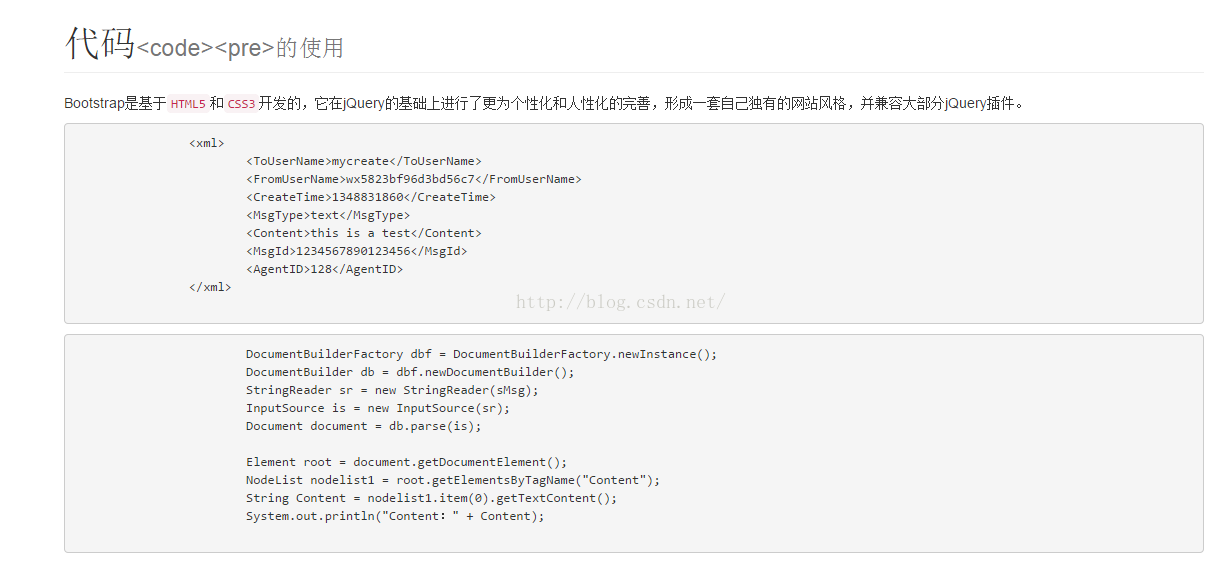
網頁中代碼的顯示,包括行中代碼顯示;成段的代碼顯示,效果圖如下
<!DOCTYPE html PUBLIC "-//W3C//DTD HTML 4.01 Transitional//EN" "http://www.w3.org/TR/html4/loose.dtd">
<html>
<%
String path = request.getContextPath();
String basePath = request.getScheme()+"://"+request.getServerName()+":"+request.getServerPort()+path+"/";
%>
<head>
<!-- 新 Bootstrap 核心 CSS 文件 -->
<link rel="stylesheet" href="//cdn.bootcss.com/bootstrap/3.3.5/css/bootstrap.min.css">
<!-- 可選的Bootstrap主題文件(一般不用引入) -->
<link rel="stylesheet" href="//cdn.bootcss.com/bootstrap/3.3.5/css/bootstrap-theme.min.css">
<!-- jQuery文件。務必在bootstrap.min.js 之前引入 -->
<script src="//cdn.bootcss.com/jquery/1.11.3/jquery.min.js"></script>
<!-- 最新的 Bootstrap 核心 JavaScript 文件 -->
<script src="//cdn.bootcss.com/bootstrap/3.3.5/js/bootstrap.min.js"></script>
<meta http-equiv="Content-Type" content="text/html; charset=UTF-8">
<title>質量錄入</title>
</head>
<body>
<form action="<%=basePath %>rest/wx" method="post">
<div class="container">
<h1 class="page-header">代碼<small><code><pre>的使用</small></h1>
<p>Bootstrap是基於<code>HTML5</code>和<code>CSS3</code>開發的,它在jQuery的基礎上進行了更為個性化和人性化的完善,形成一套自己獨有的網站風格,並兼容大部分jQuery插件。</p>
<pre>
<xml>
<ToUserName>mycreate</ToUserName>
<FromUserName>wx5823bf96d3bd56c7</FromUserName>
<CreateTime>1348831860</CreateTime>
<MsgType>text</MsgType>
<Content>this is a test</Content>
<MsgId>1234567890123456</MsgId>
<AgentID>128</AgentID>
</xml>
</pre>
<pre>
DocumentBuilderFactory dbf = DocumentBuilderFactory.newInstance();
DocumentBuilder db = dbf.newDocumentBuilder();
StringReader sr = new StringReader(sMsg);
InputSource is = new InputSource(sr);
Document document = db.parse(is);
Element root = document.getDocumentElement();
NodeList nodelist1 = root.getElementsByTagName("Content");
String Content = nodelist1.item(0).getTextContent();
System.out.println("Content:" + Content);
</pre>
</div>
</form>
</body>
</html>
以上所述是小編給大家介紹的BootStrap網頁中代碼顯示<code><pre>用法,希望對大家有所幫助,如果大家有任何疑問請給我留言,小編會及時回復大家的。在此也非常感謝大家對網站的支持!
小編推薦
熱門推薦