jQuery+正則+文本框只能輸入數字的實現方法
編輯:JQuery入門技巧
網站中的一個小功能:要求用戶只能輸入16位數字。
試過javascript的方法:
如:一種方法:
//只允許輸入數字
     function checkkey2(value, e) {
       var key = window.event ? e.keyCode : e.which;
       if ((key > 95 && key < 106) || (key > 47 && key < 60)) {

       }
       else if (key != 8) {
         if (window.event) //IE
         {
           e.returnValue = false;
         }
         else //Firefox
         {
           e.preventDefault();
         }
       };
     };
另一種方法:
用正則表達式限制只能輸入數字:
onkeyup="value=value.replace(/[^/d] /g,'') "onbeforepaste="clipboardData.setData('text',clipboardData.getData('text').replace(/[^/d]/g,''))"
上面的兩種方法我均用過,但多少都會出現一些問題,比如浏覽器的兼容性問題,不能達到想要的效果等,所以,最後還是考慮用正則來自己寫。
直接貼代碼了,很簡單的正則表達式:
<head>
  <meta http-equiv="x-ua-compatible" content="IE=EmulateIE7" />
  <title></title>
  <!-- http://www.cnblogs.com/babycool -->
  <script src="../js/jquery-1.7.2.min.js" type="text/javascript"></script>
  <script type="text/javascript">
    $(function () {
      $("#xxxxxx").keyup(function () {
        //如果輸入非數字,則替換為'',如果輸入數字,則在每4位之後添加一個空格分隔
        this.value = this.value.replace(/[^\d]/g, '').replace(/(\d{4})(?=\d)/g, "$1 ");
      })
    });
  </script>
</head>
<body>
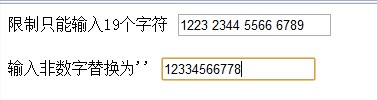
  限制只能輸入19個字符
  <input id="xxxxxx" type="text" name="name" value="" maxlength="19" />
  <br />

  <br />
  輸入非數字替換為''
  <input type="text" name="name" value="" onkeyup="value=value.replace(/[^\d]/g,'')" />
  <br />
  <br />
</body>
頁面效果:
浏覽器的兼容性:
我在IE7.8.9.10下,firefox,chrome下測試均可以。
以上就是小編為大家帶來的jQuery+正則+文本框只能輸入數字的實現方法全部內容了,希望大家多多支持~
小編推薦
熱門推薦