DIV+CSS佈局教程網 >> 網頁腳本 >> JavaScript入門知識 >> jQuery入門知識 >> JQuery入門技巧 >> Easyui Datagrid自定義按鈕列(最後面的操作列)
Easyui Datagrid自定義按鈕列(最後面的操作列)
編輯:JQuery入門技巧
做項目的時候因為需求,要在表格的最後添加一列操作列,easyUI貌似沒有提供這種功能,不過沒關系,我們可以自定義來實現
版本:jQuery easyUI 1.3.2
這裡我的實現方式是采用HTML形式,js方式暫時還沒用到
首先是HTML部分
<table id="dg" title="學生信息" class="easyui-datagrid"
      url="${ctx}listStudent.do"
      toolbar="#toolbar" pagination="true"
      rownumbers="false" fitColumns="true" singleSelect="true">
    <thead>
      <tr>
        <th data-options="field:'stuNo',sortable:true,width:20">學號</th>
        <th data-options="field:'name',width:20">姓名</th>
        <th data-options="field:'gender',width:20,formatter:formatGender">性別</th>
        <th data-options="field:'nationality',width:20">名族</th>
        <th data-options="field:'address',width:50,formatter:formatAddr">家庭地址</th>
        <th data-options="field:'mobile',width:20">手機號</th>
        <th data-options="field:'birthday',width:20">出生日期</th>
        <th data-options="field:'registDate',sortable:true,width:20">入學時間</th>
        <th data-options="field:'_operate',width:80,align:'center',formatter:formatOper">操作</th>
      </tr>
    </thead>
  </table>
<th data-options="field:'_operate',width:80,align:'center',formatter:formatOper">操作</th>
注意紅色部分,就是我們的操作列,field的名字隨便取,我這裡是_operate,關鍵是formatOper函數
function formatOper(val,row,index){
  return '<a href="#" rel="external nofollow" onclick="editUser('+index+')">修改</a>';
}
formatOper()函數中有三個參數,val指當前單元格的值,row,當前行對象,index當前行的索引.這裡我們就需要這個index
我把這個index傳入了一個叫editUser的函數中,為什麼要傳這個index呢,我們在來看下這個editUser函數
function editUser(index){
  $('#dg').datagrid('selectRow',index);// 關鍵在這裡
  var row = $('#dg').datagrid('getSelected');
  if (row){
    $('#dlg').dialog('open').dialog('setTitle','修改學生信息');
    $('#fm').form('load',row);
    url = '${ctx}updateStudent.do?id='+row.id;
  }
}
翻閱easyUI文檔可以發現datagrid有一個方法叫selectRow
selectRow index Select a row, the row index start with 0.
它的作用就是手動選中表格的行,參數就是index值,從0開始
這樣,我們就能實時獲取到鼠標點擊行所對應的數據了
$('#dg').datagrid('selectRow',index);
var row = $('#dg').datagrid('getSelected');
這兩句話就是獲取選中的行
具體效果如圖
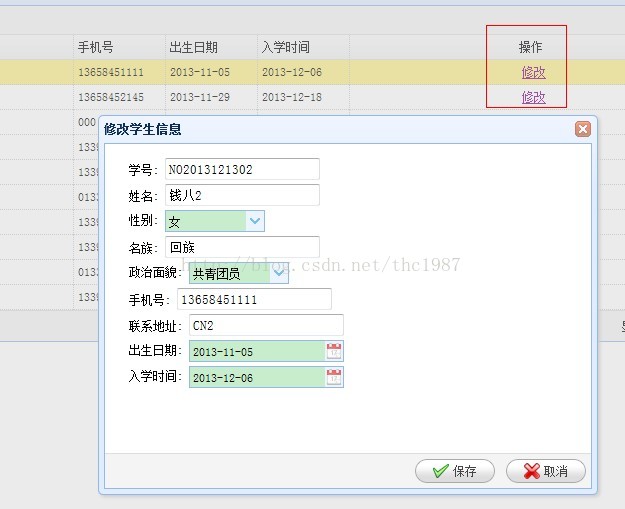
以上所述是小編給大家介紹的Easyui Datagrid自定義按鈕列(最後面的操作列),希望對大家有所幫助,如果大家有任何疑問請給我留言,小編會及時回復大家的。在此也非常感謝大家對網站的支持!
小編推薦
熱門推薦