只用 jQuery 就能搞定:前端分頁的完整實作(含後端 Servlet 範例)
編輯:JQuery入門技巧
做過 jQuery 分頁的人都知道,當後端只能透過某個 JS 介面取一次資料、無法再分次查詢時,分頁就得完全在前端解決。最近看到有人問「一次傳回上萬筆資料怎麼辦」,正好趁這個機會把整套實作梳理成一篇文章。
效果展示:
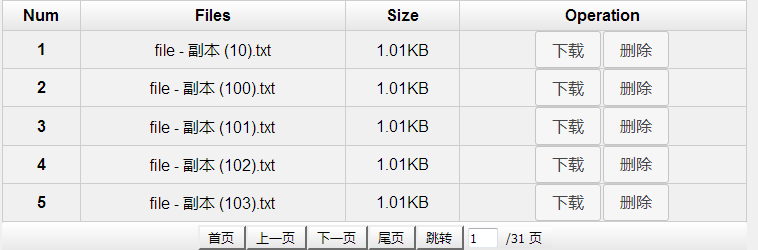
因為重點在前端 jQuery,為了讓 demo 簡單,後端就用 Servlet 走訪本機目錄下的檔案來模擬一批待分頁的資料。
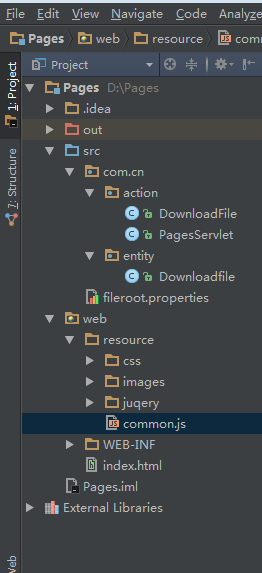
專案目錄結構:
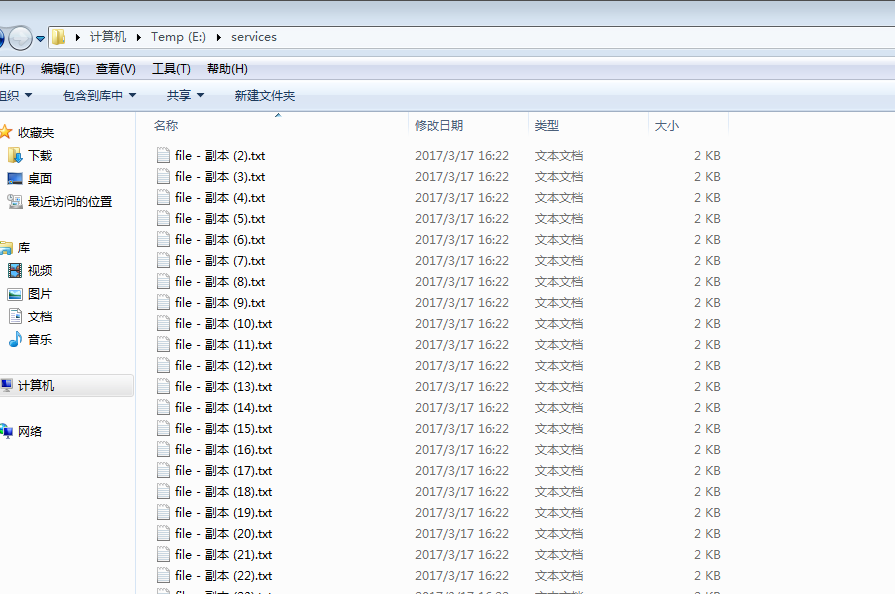
被走訪的本機資料夾:
回傳列表資料的 Servlet
package com.cn.action;

import com.alibaba.fastjson.JSON;
import com.cn.entity.Downloadfile;

import javax.servlet.ServletException;
import javax.servlet.http.HttpServlet;
import javax.servlet.http.HttpServletRequest;
import javax.servlet.http.HttpServletResponse;
import java.io.*;
import java.util.ArrayList;
import java.util.List;
import java.util.Properties;

public class PagesServlet extends HttpServlet {

    protected void doGet(HttpServletRequest req, HttpServletResponse resp)
            throws ServletException, IOException {
        doPost(req, resp);
    }

    protected void doPost(HttpServletRequest req, HttpServletResponse resp)
            throws ServletException, IOException {
        Properties props = new Properties();
        InputStream in = new BufferedInputStream(new FileInputStream(
                this.getClass().getResource("/fileroot.properties").getPath()));
        props.load(in);
        String rootPath = props.getProperty("Root");

        List fileList = new ArrayList();
        File file = new File(rootPath);
        File[] files = file.listFiles();
        Downloadfile df = new Downloadfile();

        for (File f : files) {
            df.setName(f.getName());
            df.setFilesize(Long.toString(f.length()));
            fileList.add(JSON.toJSONString(df));
        }

        resp.setHeader("content-type", "text/html;charset=UTF-8");
        resp.getWriter().print(JSON.toJSONString(fileList));
    }
}
處理下載請求的 Servlet
package com.cn.action;

import javax.servlet.ServletException;
import javax.servlet.ServletOutputStream;
import javax.servlet.http.HttpServlet;
import javax.servlet.http.HttpServletRequest;
import javax.servlet.http.HttpServletResponse;
import java.io.*;
import java.util.Properties;

public class DownloadFile extends HttpServlet {

    @Override
    protected void doPost(HttpServletRequest req, HttpServletResponse resp)
            throws ServletException, IOException {
        doGet(req, resp);
    }

    @Override
    protected void doGet(HttpServletRequest req, HttpServletResponse resp)
            throws ServletException, IOException {
        Properties props = new Properties();
        InputStream in = new BufferedInputStream(new FileInputStream(
                this.getClass().getResource("/fileroot.properties").getPath()));
        props.load(in);
        String rootPath = props.getProperty("Root");

        String name = req.getParameter("filename");
        name = new String(name.getBytes("ISO8859-1"), "UTF-8");

        File f = new File(rootPath + "\\" + name);
        if (f.exists()) {
            FileInputStream fis = new FileInputStream(f);
            String filename = java.net.URLEncoder.encode(f.getName(), "utf-8");
            byte[] b = new byte[fis.available()];
            fis.read(b);

            resp.setContentType("application/x-msdownload");
            // 中文檔名轉碼,避免下載後變成亂碼
            resp.setHeader("Content-Disposition",
                    "attachment;filename=" + new String(filename.getBytes("utf-8"), "ISO-8859-1"));

            ServletOutputStream out = resp.getOutputStream();
            out.write(b);
            out.flush();
            out.close();
        }
    }
}
web.xml 設定
<?xml version="1.0" encoding="UTF-8"?>
<web-app xmlns="https://xmlns.jcp.org/xml/ns/javaee"
         xmlns:xsi="https://www.w3.org/2001/XMLSchema-instance"
         xsi:schemaLocation="https://xmlns.jcp.org/xml/ns/javaee https://xmlns.jcp.org/xml/ns/javaee/web-app_3_1.xsd"
         version="3.1">
  <servlet>
    <servlet-name>PageServlet</servlet-name>
    <servlet-class>com.cn.action.PagesServlet</servlet-class>
  </servlet>
  <servlet-mapping>
    <servlet-name>PageServlet</servlet-name>
    <url-pattern>/doPages</url-pattern>
  </servlet-mapping>

  <servlet>
    <servlet-name>DownServlet</servlet-name>
    <servlet-class>com.cn.action.DownloadFile</servlet-class>
  </servlet>
  <servlet-mapping>
    <servlet-name>DownServlet</servlet-name>
    <url-pattern>/download</url-pattern>
  </servlet-mapping>
</web-app>
前端完整 HTML
<html>
<head>
<meta http-equiv="Content-Type" content="text/html; charset=UTF-8">
<link href="/resource/juqery/css/base/jquery-ui-1.9.2.custom.css" rel="external nofollow" rel="stylesheet">
<link href="/resource/css/css.css" rel="external nofollow" rel="stylesheet">
<script type="application/javascript" src="/resource/juqery/js/jquery-1.8.3.js"></script>
<script type="application/javascript" src="/resource/juqery/js/jquery-ui-1.9.2.custom.js"></script>
</head>
<script type="application/javascript">
// 只請求一次資料,存進 JS 變數,確保全程只發一個請求
var datas;

jQuery(function () {
    $.ajax({
        type: "POST",
        url: "/doPages",
        data: "{}",
        dataType: 'json',
        success: function (data) {
            datas = data;
            getPages(1, 5);
        }
    });
});

// 頁碼跳轉
function jumPage(totalPage, psize) {
    var cpage = jQuery("#page_no").val();
    if (0 < cpage && cpage <= totalPage) {
        getPages(cpage, psize);
    } else {
        alert("Out of range");
    }
}

function getPages(pno, psize) {
    var num;                 // 總行數
    var totalPage = 0;       // 總頁數
    var pageSize = psize;    // 每頁顯示筆數
    var currentPage = pno;   // 當前頁

    num = parseInt(datas.length);
    if (num / pageSize > parseInt(num / pageSize)) {
        totalPage = parseInt(num / pageSize) + 1;
    } else {
        totalPage = parseInt(num / pageSize);
    }

    var startRow = (currentPage - 1) * pageSize + 1;
    var endRow = currentPage * pageSize;
    endRow = (endRow > num) ? num : endRow;

    var tbody = jQuery("#list_data>tbody");
    tbody.empty();

    jQuery.each(datas, function (i, n) {
        var file = JSON.parse(n);
        if (startRow <= parseInt(i + 1) && parseInt(i + 1) <= endRow) {
            var row = createRow().appendTo(tbody);
            createColumn().text(i + 1).appendTo(row);
            createColumn().text(file.name).appendTo(row);
            createColumn().text(getSize(file.filesize)).appendTo(row);
            var operationColumn = createColumn().appendTo(row);
        }

        // 每次分頁前先清掉上一次的 onclick,避免重複綁定
        jQuery("#last_page").removeAttr("onclick");
        jQuery("#next_page").removeAttr("onclick");

        if (currentPage > 1) {
            jQuery("#last_page").attr("onclick",
                "getPages(" + (parseInt(currentPage) - 1) + "," + psize + ")");
        }
        if (currentPage < totalPage) {
            jQuery("#next_page").attr("onclick",
                "getPages(" + (parseInt(currentPage) + 1) + "," + psize + ")");
        }

        jQuery("#end_page").attr("onclick", "getPages(" + totalPage + "," + psize + ")");
        jQuery("#first_page").attr("onclick", "getPages(1," + psize + ")");
        jQuery("#jump_page").attr("onclick", "jumPage(" + totalPage + "," + psize + ")");
        jQuery("#total_page").val("/" + totalPage + " 頁");
        jQuery("#page_no").val(currentPage);

        var btnDownload = jQuery("<button class='btn_download'>下載</button>");
        var btnDelete = jQuery("<button class='btn_delete'>刪除</button>");

        btnDownload.click(function () {
            location.href = "/download?filename=" + file.name;
        });
        btnDelete.click(function () {
            var dialogDiv = jQuery("<div></div>");
            dialogDiv.dialog({
                autoOpen: false,
                modal: true,
                width: 500,
                position: { my: "center", at: "center", of: jQuery(".content_wrapper_hidden") },
                title: "文件刪除",
                buttons: [
                    { text: "確認", click: function () {
                        jQuery.post("/delete", file.name, function () { location.reload(); });
                        jQuery(this).dialog("close");
                    }},
                    { text: "取消", click: function () { jQuery(this).dialog("close"); } }
                ]
            });
            dialogDiv.text("確認刪除 " + file.name + "?").dialog("open");
        });

        btnDownload.appendTo(operationColumn);
        btnDelete.appendTo(operationColumn);
    });

    jQuery(".btn_download,.btn_delete").button();
}

function getSize(length) {
    var len, unit;
    if (length == 0) { len = 0; unit = "B"; }
    else if (length < 1024) { len = length; unit = "B"; }
    else if (length < (1024 * 1024)) { len = length / 1024; unit = "KB"; }
    else { len = length / 1024 / 1024; unit = "MB"; }
    return new Number(len).toFixed(2) + unit;
}
</script>

<body>
<div class="main_wrapper">
  <div class="content_wrapper_hidden">
    <div class="ui_wrapper">
      <table id="list_data" class="data" border="0" cellspacing="0" cellpadding="0" style="width: 100%">
        <thead>
          <tr><th>Num</th><th>Files</th><th>Size</th><th>Operation</th></tr>
        </thead>
        <tbody></tbody>
      </table>

      <table class="ui-corner-all grey" style="width: 100%">
        <tbody align="center" valign="middle">
          <tr><td>
            <div id="pagination">
              <input type="button" id='first_page' value="首頁">
              <input type="button" id='last_page' value="上一頁">
              <input type="button" id='next_page' value="下一頁">
              <input type="button" id='end_page' value="尾頁">
              <input type="button" id='jump_page' value="跳轉">
              <input autocomplete="off" id="page_no" style="height:20px;width:30px">
              <input type="button" id='total_page' value="0 頁">
            </div>
          </td></tr>
        </tbody>
      </table>
    </div>
  </div>
</div>
</body>
</html>
自己寫的 DOM 小工具
為了產生前端表格方便,專案裡另外整理了一組產生元素的小函式:
function createColumn() { return jQuery("<td></td>"); }
function createRow()    { return jQuery("<tr></tr>"); }
function createEle(tag) { return jQuery("<" + tag + "></" + tag + ">"); }
function reload() { window.location.reload(); }
function toURL(url) { window.location.href = url; }
function isString(obj) { return typeof (obj) == "string"; }
function isObject(obj) { return typeof (obj) == "object"; }

function fillSelect(select, data, valueKey, textKey) {
    var $select = isString(select) ? jQuery(select) : select;
    $select.empty();
    jQuery.each(data, function (i, item) {
        var value = (!isString(item)) ? item[valueKey] : item;
        var text  = (!isString(item)) ? item[textKey] : item;
        var $op = createEle("option").appendTo($select);
        $op.text(text).val(value);
    });
}
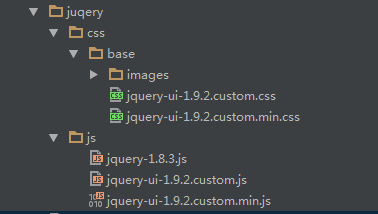
為了讓畫面好看一些,範例另外引進了 jQuery UI,用它的 dialog() 做刪除確認框、button() 美化按鈕:
原始碼 GitHub:
https://github.com/Wenchaozou/JqueryForPages
百度雲:https://pan.baidu.com/s/1dE5Cj5n
這種做法的代價
前端分頁的關鍵只有一句話:資料先全部抓回來存在陣列裡,每次翻頁只是重新計算 startRow 到 endRow 的區間,再把符合的資料渲染進 tbody。程式碼不長,邏輯也直白。
但它有明確的天花板。資料量一大,第一次請求就會拖垮網路與瀏覽器記憶體,上萬筆 JSON 的解析足以讓低階手機卡住數秒。因此前端分頁適合的是「資料量有限且變動不頻繁」的場景,例如設定頁、字典表;一旦資料規模可預期地成長,就該改成後端分頁,讓每次只回傳當前頁所需的片段。
以上就是本文的全部內容,希望對你的學習或工作有所幫助。
熱門推薦
bind() 已經過時了:全面改用 on() 的理由與事件代理實戰
bind、live、delegate、on 的區別:jQuery 事件綁定四種方式全解析
搞懂 jQuery 的 eq() 與 DOM 的 element[] 差在哪
jQuery 打造經典圖片放大展示:縮圖列表搭配大圖幻燈片
修復 fancybox 在 IE 下關閉按鈕不顯示的問題
EasyUI TreeGrid 查詢功能實現:loadData 的正確用法
jQuery 輕鬆實作無縫輪播:animate 加上 appendTo 的巧妙組合
JSON 定義詳解與 jQuery 操作 JSON 的常見方法
jQuery.validationEngine 表單驗證插件使用指南