jQuery動態創建html元素的常用方法教程匯總
編輯:JQuery特效代碼
本文實例講述了jQuery動態創建html元素的常用方法,在使用jQuery進行WEB程序設計的時候非常有用。分享給大家供大家參考。具體方法如下:
一般來說,可以通過以下幾種方式動態創建html元素:
1、使用jQuery創建元素的語法
2、把動態內容存放到數組中,再遍歷數組動態創建html元素
3、使用模版
1.使用jQuery動態創建元素追加到jQuery對象上。
 <meta http-equiv="Content-Type" content="text/html; charset=utf-8"/>
   <title></title>
   <script src="Scripts/jquery-1.10.2.js"></script>
   <script type="text/javascript">
     $(function() {
       $('<input />', {
         id: 'cbx',
         name: 'cbx',
         type: 'checkbox',
         checked: 'checked',
         click: function() {
           alert("點我了~~");
         }
       }).appendTo($('#wrap'));
     });
   </script>
 </head>
 <body>
   <div id="wrap"></div>
 </body>
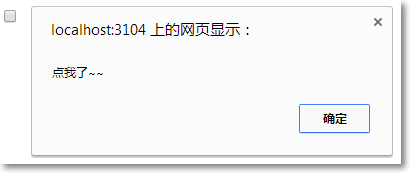
運行效果如下圖所示:
2.先把內容放到數組中,然後遍歷數組拼接成html
 <head>
 <meta http-equiv="Content-Type" content="text/html; charset=utf-8"/>
   <title></title>
   <script src="Scripts/jquery-1.10.2.js"></script>
   <style type="text/css">
     table {
       border: solid 1px red;
       border-collapse: collapse;
     }

     td {
       border: solid 1px red;
     }
   </style>
   <script type="text/javascript">
     $(function () {
       var data = ["a", "b", "c", "d"];
       var html = '';
       for (var i = 0; i < data.length; i ++) {
         html += "<td>" + data[i] + "</td>";
       }
       $("#row").append(html);
     });
   </script>
 </head>
 <body>
   <table>
     <tr id="row"></tr>
   </table>
 </body>
 </html>
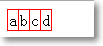
運行效果如下圖所示:
3.使用模版生成html
 <meta http-equiv="Content-Type" content="text/html; charset=utf-8"/>
   <title></title>
   <script src="Scripts/jquery-1.10.2.js"></script>
   <script type="text/javascript">
     $(function () {
       var a = buildHTML("a", "我是由模版生成的", {
         id: "myLink",
         href: "http://www.baidu.com"
       });

       $('#wrap1').append(a);

       var input = buildHTML("input", {
         id: "myInput",
         type: "text",
         value: "我也是由模版生成的~~"
       });

       $('#wrap2').append(input);
     });

     buildHTML = function(tag, html, attrs) {
       // you can skip html param
       if (typeof (html) != 'string') {
         attrs = html;
         html = null;
       }
       var h = '<' + tag;
       for (attr in attrs) {
         if (attrs[attr] === false) continue;
         h += ' ' + attr + '="' + attrs[attr] + '"';
       }
       return h += html ? ">" + html + "</" + tag + ">" : "/>";
     };
   </script>
 </head>
 <body>
   <div id="wrap1"></div>
   <div id="wrap2"></div>
 </body>
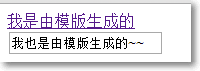
運行效果如下圖所示:
相信本文所述對大家使用jQuery進行WEB程序設計有一定的借鑒價值。
小編推薦
熱門推薦