jQueryMobile知識總結
編輯:JQuery特效代碼
1、jQueryMobile與jQuery的區別
jQueryMobile是一個為觸控優化的框架,用於創建移動Web應用程序;構建於jQuery之上,適用於流行的智能手機和平板
基於jQuery的手機網頁制作工具,jQuery Mobile的網站上包含了網頁的設計工具、主題設計工具。另外jQuery Mobile的js插件包含了換頁、事件等的多項功能
- Android 和 Blackberry 用 Java 編寫
- iOS 用 Objective C 編寫
- Windows Phone 用 C# 和 .net 編寫
jQuery Mobile 解決了這個問題,因為它只用 HTML、CSS 和 JavaScript,這些技術都是所有移動 web 浏覽器的標准
2、data-role
- data-role="page" 是顯示在浏覽器中的頁面
- data-role="header" 創建頁面上方的工具欄(常用於標題和搜索按鈕)
- data-role="content" 定義頁面的內容,比如文本、圖像、表單和按鈕,等等
- data-role="footer" 創建頁面底部的工具欄
在這些容器中,您可以添加任意 HTML 元素 - 段落、圖像、標題、列表等等。
提示:HTML5 data-* 屬性用於通過 jQuery Mobile 為移動設備創建“對觸控友好的”交互外觀。
3、對話框
如需在用戶點擊(輕觸)鏈接時創建一個對話框(對話框是用來顯示信息或請求輸入的視窗類型。),請向該鏈接添加 data-rel="dialog"
<!DOCTYPE html>
<html>
<head>
    <link rel="stylesheet" href="http://code.jquery.com/mobile/1.3.2/jquery.mobile-1.3.2.min.css">
    <script src="http://code.jquery.com/jquery-1.8.3.min.js"></script>
    <script src="http://code.jquery.com/mobile/1.3.2/jquery.mobile-1.3.2.min.js"></script>
</head>
<body>

<div data-role="page" id="pageone">

    <div data-role="header">
        <h1>歡迎光臨</h1>
    </div>
    <br/>

    <!--hello-->
    <!--<div date-role="content">-->
        <!--<a href="#pagetwo" >跳轉到頁面2</a>-->
    <!--</div>-->

    hello
    <br/>

    <div date-role="content">
        <a href="#pagetwo" data-rel="dialog">以對話框的形式跳轉到頁面2</a>
    </div>


    <div data-role="footer">
        <h1> 尾部 </h1>
    </div>
</div>

<div data-role="page" id="pagetwo">

    <div data-role="header">
        <h1>頁面2標題欄</h1>
    </div>
    <br/>
    world
    <br/>
    <div date-role="content">
        <a href="#pageone">跳轉到頁面1</a>
    </div>
    <div data-role="footer">
        <h1>頁面2 尾部 </h1>
    </div>
</div>

</body>
</html>
4、過渡
jQuery Mobile 包含了允許您選擇頁面打開方式的 CSS 效果。如需實現過渡效果,浏覽器必須支持 CSS3 3D 轉換:
fade是默認效果,如果想反著來,需要指定:data-direction="reverse
 <!DOCTYPE html>
 <html>
 <head>
     <link rel="stylesheet" href="http://code.jquery.com/mobile/1.3.2/jquery.mobile-1.3.2.min.css">
     <script src="http://code.jquery.com/jquery-1.8.3.min.js"></script>
     <script src="http://code.jquery.com/mobile/1.3.2/jquery.mobile-1.3.2.min.js"></script>
 </head>
 <body>

 <div data-role="page" id="pageone">

     <div data-role="header">
         <h1>歡迎光臨</h1>
     </div>
     <br/>

     hello
     <div date-role="content">
         <a href="#pagetwo" data-transition="slide">跳轉到頁面2</a>
     </div>


     <div data-role="footer">
         <h1> 尾部 </h1>
     </div>
 </div>

 <div data-role="page" id="pagetwo">

     <div data-role="header">
         <h1>頁面2標題欄</h1>
     </div>
     <br/>
     world
     <br/>

     <div date-role="content">
         <a href="#pageone" data-transition="slide" data-direction="reverse">跳轉到頁面1</a>
     </div>
     <div data-role="footer">
         <h1>頁面2 尾部 </h1>
     </div>
 </div>

 </body>
 </html>
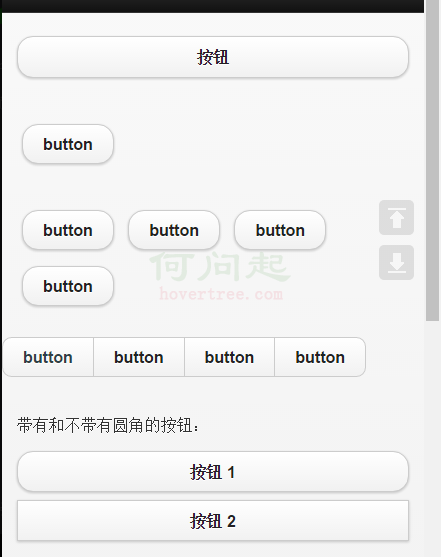
5、按鈕
 <!DOCTYPE html>
 <html>
 <head>
     <link rel="stylesheet" href="http://code.jquery.com/mobile/1.3.2/jquery.mobile-1.3.2.min.css">
     <script src="http://code.jquery.com/jquery-1.8.3.min.js"></script>
     <script src="http://code.jquery.com/mobile/1.3.2/jquery.mobile-1.3.2.min.js"></script>
     <script src="demo.js"></script>
 </head>
 <body>

 <div data-role="page" id="pageone">
     <div data-role="header">
         <h1>按鈕</h1>
     </div>

     <div data-role="content" data-inline="true">
         <button>按鈕</button>
     </div>

     <div data-role="content">
         <input type="button" value="button" data-inline="true"></input>
     </div>

     <div data-role="content">
         <a href="#" data-role="button" data-corner="true" data-inline="true">button</a>
         <a href="#" data-role="button" data-corner="false" data-inline="true">button</a>
         <a href="#" data-role="button" data-inline="true">button</a>
         <a href="#" data-role="button" data-inline="true">button</a>
     </div>

     <div data-role="controlgroup" data-type="horizontal">
         <a href="#pagetwo" data-role="button" id="button1">button</a>
         <a href="#" data-role="button" >button</a>
         <a href="#" data-role="button" data-corner="false">button</a>
         <a href="#" data-role="button">button</a>


     </div>

     <div data-role="content">
         <p>帶有和不帶有圓角的按鈕:</p>
         <a href="#" data-role="button">按鈕 1</a>
         <a href="#" data-role="button" data-corners="false">按鈕 2</a>
         <br>
     </div>

     <div data-role="content">
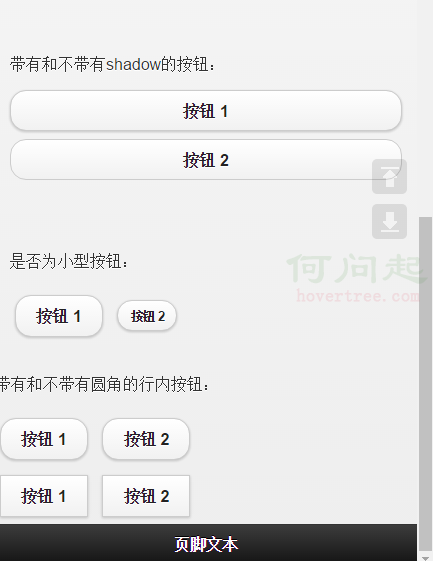
         <p>帶有和不帶有shadow的按鈕:</p>
         <a href="#" data-role="button">按鈕 1</a>
         <a href="#" data-role="button" data-shadow="false">按鈕 2</a>
         <br>
     </div>


     <div data-role="content">
         <p>是否為小型按鈕:</p>
         <a href="#" data-inline="true" data-role="button">按鈕 1</a>
         <a href="#" data-inline="true" data-role="button" data-mini="true">按鈕 2</a>
         <br>
     </div>


     <p>帶有和不帶有圓角的行內按鈕:</p>
     <a href="#" data-role="button" data-inline="true">按鈕 1</a>
     <a href="#" data-role="button" data-inline="true">按鈕 2</a>
     <br>
     <a href="#" data-role="button" data-inline="true" data-corners="false">按鈕 1</a>
     <a href="#" data-role="button" data-inline="true" data-corners="false">按鈕 2</a>


     <div data-role="footer">
     <h1>頁腳文本</h1>
 </div>
 </div>

 <>
 <div data-role="page" id="pagetwo">

     <div data-role="header">header</div>
     <div data-role="content">
         <a href="#" data-role="button" data-rel="back" >後退</a>
     </div>
     <div data-role="footer">footer</div>
 </div>


 </body>
 </html>
小編推薦
熱門推薦