jQuery 組合輸入框
編輯:JQuery常見問題
組合輸入框常用於手機號、銀行帳號等需要分組輸入的場景,例如 3-4-4 或 4-4-4-4。

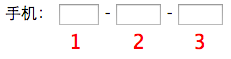
實作概念
每個輸入框設定 maxlength,輸入達標後自動跳到下一個;在後方輸入框按倒退鍵且內容為空時,回到上一個輸入框。
(function($) {
  $.fn.combineinput = function(target) {
    return this.each(function() {
      if (this.tagName == 'INPUT') {
        var $tt = $(this);
        $(this).keyup(function() {
          if ($(this).attr('maxlength') == $(this).val().length) {
            $(target).focus();
          }
        });
        $(target).keydown(function(e) {
          if (e.keyCode == 8 && $(this).val() == '') {
            $tt[0].focus();
          }
        }).focus(function() {
          if ($tt.attr('maxlength') > $tt.val().length) {
            $tt[0].focus();
          }
        });
      }
    });
  };
})(jQuery);
這裡使用 $tt[0].focus() 而非 $tt.focus(),是為了避免 jQuery focus 行為在某些情境下中斷,導致焦點無法回到上一個未完成輸入框。
- 上一篇文章: jQuery 收藏本頁
- 下一篇文章: jQuery 向上彈出導航選單