前言
imagepool 是一款用於管理圖片加載的 JS 工具,透過它可以控制圖片的並發加載數量。
對於圖片加載,最原始的方式就是直接寫一個 img 標籤,比如 <img src="圖片url" />。經過不斷優化,出現了圖片延遲加載方案:這回圖片的 URL 不再直接寫在 src 屬性中,而是寫在某個自定義屬性上,比如 <img src="" data-src="圖片url" />。這樣瀏覽器就不會自動加載圖片,等到合適的時機,再用 JS 把 data-src 中的 URL 放到 img 的 src 屬性上,或讀出 URL 後用 JS 去加載,加載完成再設置 src 顯示出來。
這看似已經控制得很好了,但依然存在問題:雖然能做到只加載一部分圖片,但這一部分仍可能是一個相當大的數量級。對 PC 端來說或許無傷大雅,但在移動端,並發加載的圖片數量過多,極有可能引起應用崩潰。
因此,我們迫切需要一種圖片緩衝機制來控制圖片加載的並發——類似於後端的資料庫連接池,既不會建立過多連接,又能充分複用每一個連接。至此,imagepool 便誕生了。
原理示意圖
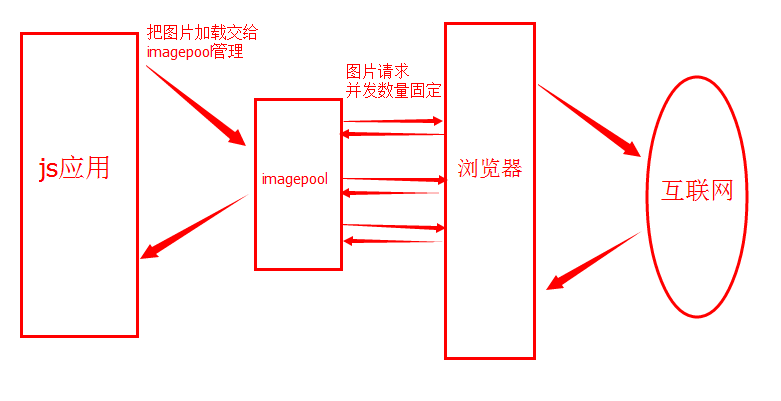
使用說明
首先要初始化連接池:
var imagepool = initImagePool(5);
initImagePool 是全域方法,任何地方都可以直接使用,作用是建立一個連接池,並可指定連接池的最大連接數(可選,預設為 5)。
在同一個頁面中,多次呼叫 initImagePool 均返回同一個核心實例,永遠是第一個,有點單例的感覺。比如:
var imagepool1 = initImagePool(3); var imagepool2 = initImagePool(7);
此時 imagepool1 和 imagepool2 的最大連接數均為 3,內部使用的是同一個核心實例。注意,是內部的核心相同,並不是說 imagepool1 === imagepool2。
初始化之後,就可以放心大膽地加載圖片了。最簡單的呼叫方式如下:
var imagepool = initImagePool(10); imagepool.load("圖片url",{ success: function(src){ console.log("success:::::"+src); }, error: function(src){ console.log("error:::::"+src); } });直接在實例上呼叫 load 方法即可。load 方法有兩個參數:第一個是需要加載的圖片 URL,第二個是各種選項,包含成功、失敗的回調,回調時會傳入圖片 URL。
這樣寫只能傳入一張圖片,因此也可以寫成如下形式,傳入一個圖片 URL 陣列來批量加載:
var imagepool = initImagePool(10); imagepool.load(["圖片1url","圖片2url"],{ success: function(src){ console.log("success:::::"+src); }, error: function(src){ console.log("error:::::"+src); } });每一個圖片加載成功(或失敗),都會呼叫 success(或 error)方法,並傳入對應的圖片 URL。
但有時候我們並不需要如此頻繁的回調,而是希望傳入一個圖片 URL 陣列後,等這個陣列中所有圖片都處理完成,再統一回調。只需多加一個選項即可:
var imagepool = initImagePool(10); imagepool.load(["圖片1url","圖片2url"],{ success: function(sArray, eArray, count){ console.log("sArray:::::"+sArray); console.log("eArray:::::"+eArray); console.log("count:::::"+count); }, error: function(src){ console.log("error:::::"+src); }, once: true });透過在選項中加一個 once 屬性並設為 true,即可實現只回調一次。這一次回調必然回調 success 方法,此時 error 方法會被忽略。此時回調 success 時,不再傳入單個圖片 URL,而是傳入三個參數,分別為:成功的 URL 陣列、失敗的 URL 陣列、總共處理的圖片個數。
此外,還有一個方法可以獲取連接池的內部狀態:
var imagepool = initImagePool(10); console.log(imagepool.info());
透過呼叫 info 方法,可以得到當前時刻連接池的內部狀態,資料結構如下:
Object.task.count:連接池中等待處理的任務數量
Object.thread.count:連接池最大連接數
Object.thread.free:連接池空閒連接數
建議不要頻繁呼叫此方法。
最後需要說明的是,如果圖片加載失敗,最多會嘗試 3 次,若最終仍加載失敗,才會回調 error 方法;嘗試次數可在原始碼中修改。
還要強調的是,讀者可以盡情地往連接池中 push 圖片,完全不必擔心並發過多的問題,imagepool 會有條不紊地幫你加載這些圖片。而且,imagepool 理論上不會降低圖片加載速度,只不過是讓加載過程更為平緩。
原始碼
(function(exports){ //單例 var instance = null; var emptyFn = function(){}; //初始默認配置 var config_default = { //線程池"線程"數量 thread: 5, //圖片加載失敗重試次數 //重試2次,加上原有的一次,總共是3次 "try": 2 }; //工具 var _helpers = { //設置dom屬性 setAttr: (function(){ var img = new Image(); //判斷浏覽器是否支持HTML5 dataset if(img.dataset){ return function(dom, name, value){ dom.dataset[name] = value; return value; }; }else{ return function(dom, name, value){ dom.setAttribute("data-"+name, value); return value; }; } }()), //獲取dom屬性 getAttr: (function(){ var img = new Image(); //判斷浏覽器是否支持HTML5 dataset if(img.dataset){ return function(dom, name){ return dom.dataset[name]; }; }else{ return function(dom, name){ return dom.getAttribute("data-"+name); }; } }()) }; /** * 構造方法 * @param max 最大連接數。數值。 */ function ImagePool(max){ //最大並發數量 this.max = max || config_default.thread; this.linkHead = null; this.linkNode = null; //加載池 //[{img: dom,free: true, node: node}] this.pool = []; } /** * 初始化 */ ImagePool.prototype.initPool = function(){ var i,img,obj,_s; _s = this; for(i = 0;i < this.max; i++){ obj = {}; img = new Image(); _helpers.setAttr(img, "id", i); img.onload = function(){ _s.notice(_s.getNode(this), "success", this.src); _s.executeLink(this); }; img.onerror = function(e){ var node = _s.getNode(this); //判斷嘗試次數 if(node.try < config_default.try){ node.try = node.try + 1; //再次追加到任務鏈表末尾 _s.appendNode(_s.createNode(node.src, node.options, node.notice, node.group, node.try)); }else{ _s.notice(node, "error", this.src); } _s.executeLink(this); }; obj.img = img; obj.free = true; this.pool.push(obj); } }; /** * 回調封裝 */ ImagePool.prototype.notice = function(node, status, src){ node.notice(status, src); }; /** * 處理鏈表任務 */ ImagePool.prototype.executeLink = function(dom){ //判斷鏈表是否存在節點 if(this.linkHead){ //加載下一個圖片 this.setSrc(dom, this.linkHead); //去除鏈表頭 this.shiftNode(); }else{ //設置自身狀態為空閒 this.status(dom, true); } }; /** * 獲取空閒"線程" */ ImagePool.prototype.getFree = function(){ var length,i; for(i = 0, length = this.pool.length; i < length; i++){ if(this.pool[i].free){ return this.pool[i]; } } return null; }; /** * 封裝src屬性設置 */ ImagePool.prototype.setSrc = function(dom, node){ //設置池中的"線程"為非空閒狀態 this.status(dom, false); //關聯節點 this.setNode(dom, node); //加載圖片 dom.src = node.src; }; /** * 更新池中的"線程"狀態 */ ImagePool.prototype.status = function(dom, status){ var id = _helpers.getAttr(dom, "id"); this.pool[id].free = status; //空閒狀態,清除關聯的節點 if(status){ this.pool[id].node = null; } }; /** * 更新池中的"線程"的關聯節點 */ ImagePool.prototype.setNode = function(dom, node){ var id = _helpers.getAttr(dom, "id"); this.pool[id].node = node; return this.pool[id].node === node; }; /** * 獲取池中的"線程"的關聯節點 */ ImagePool.prototype.getNode = function(dom){ var id = _helpers.getAttr(dom, "id"); return this.pool[id].node; }; /** * 對外接口,加載圖片 */ ImagePool.prototype.load = function(src, options){ var srcs = [], free = null, length = 0, i = 0, //只初始化一次回調策略 notice = (function(){ if(options.once){ return function(status, src){ var g = this.group, o = this.options; //記錄 g[status].push(src); //判斷該組是否全部處理完成 if(g.success.length + g.error.length === g.count){ //異步,防止回調函數執行時間過長影響圖片加載速度 setTimeout(function(){ o.success.call(null, g.success, g.error, g.count); },1); } }; }else{ return function(status, src){ var o = this.options; //直接回調 setTimeout(function(){ o[status].call(null, src); },1); }; } }()), group = { count: 0, success: [], error: [] }, node = null; options = options || {}; options.success = options.success || emptyFn; options.error = options.error || emptyFn; srcs = srcs.concat(src); //設置組元素個數 group.count = srcs.length; //遍歷需要加載的圖片 for(i = 0, length = srcs.length; i < length; i++){ //創建節點 node = this.createNode(srcs[i], options, notice, group); //判斷線程池是否有空閒 free = this.getFree(); if(free){ //有空閒,則立即加載圖片 this.setSrc(free.img, node); }else{ //沒有空閒,將任務添加到鏈表 this.appendNode(node); } } }; /** * 獲取內部狀態信息 */ ImagePool.prototype.info = function(){ var info = {}, length = 0, i = 0, node = null; info.thread = {}; info.thread.count = this.pool.length; info.thread.free = 0; info.task = {}; info.task.count = 0; for(i = 0, length = this.pool.length; i < length; i++){ if(this.pool[i].free){ info.thread.free = info.thread.free + 1; } } node = this.linkHead; if(node){ info.task.count = info.task.count + 1; while(node.next){ info.task.count = info.task.count + 1; node = node.next; } } return info; }; /** * 創建節點 */ ImagePool.prototype.createNode = function(src, options, notice, group, tr){ var node = {}; node.src = src; node.options = options; node.notice = notice; node.group = group; node.try = tr || 0; return node; }; /** * 向任務鏈表末尾追加節點 */ ImagePool.prototype.appendNode = function(node){ if(!this.linkHead){ this.linkHead = node; this.linkNode = node; }else{ this.linkNode.next = node; this.linkNode = node; } }; /** * 刪除鏈表頭 */ ImagePool.prototype.shiftNode = function(){ if(this.linkHead){ this.linkHead = this.linkHead.next || null; } }; /** * 導出對外接口 */ exports.initImagePool = function(max){ if(!instance){ instance = new ImagePool(max); instance.initPool(); } return { load: function(){ instance.load.apply(instance, arguments); }, info: function(){ return instance.info.call(instance); } }; }; }(this));以上就是這款實用的 JavaScript 前端圖片加載管理器的使用方法與源碼解析。透過 imagepool,我們便能從容應對大量圖片的加載場景,既避免並發過載,又能保持流暢的使用者體驗。
- 上一篇文章: 詳解 JavaScript 對 Unicode 字符集的支持
- 下一篇文章: JavaScript 版的 TwoQueues 緩存模型