React是個技術棧,單單使用React很難構建復雜的Web應用程序,很多情況下我們需要引入其他相關的技術
React Router是React的路由庫,保持相關頁面部件與URL間的同步
下面就來簡單介紹其基礎使用,更全面的可參考 指南
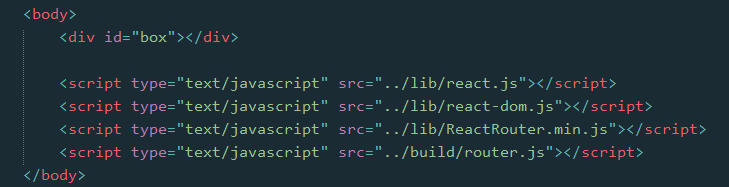
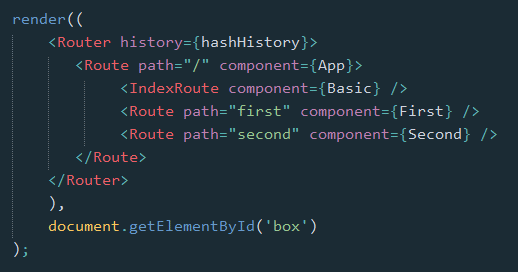
1. 它看起來像是這樣
在頁面文件中
在外部腳本文件中

2. 庫的引入
React Router庫的引入,有兩種方式
2.1 浏覽器直接引入
可以引用 這裡 的浏覽器版本,或者下載之後引入
然後就可以直接使用 ReactRouter 這個對象了,我們可能會使用到其中的幾個屬性
let {Router, Route, IndexRoute, Redirect, IndexRedirect, Link, IndexLink, hashHistory, browserHistory} = ReactRouter;
2.2 npm 安裝,通過構建工具編譯引入
npm install --save react-router
安裝好路由庫之後,在腳本文件中引入相關屬性
import {Router, Route, IndexRoute, Redirect, IndexRedirect, Link, IndexLink, hashHistory, browserHistory} from 'react-router';
因浏覽器目前還不能支持import與export命令,且babel工具不會將require命令編譯,所以我們還得需要如Webpack等構建工具編譯引入
庫引入之後,在ReactDOM的render方法中,就可以使用相關的組件了
3. 路由簡單使用
最基本的,通過URL判斷進入哪個頁面(組件部件)

class First extends Component {
 constructor(props) {
 super(props);
 }
 render() {
 return <p>First</p>
 }
}
class Second extends Component {
 constructor(props) {
 super(props);
 }
 render() {
 return <p>Second</p>
 }
}
class App extends Component {
 constructor(props) {
 super(props);
 }
 render() {
 return <div></div>
 }
}
render((
 <Router history={hashHistory}>
 <Route path="/" component={App} />
 <Route path="first" component={First} />
 <Route path="second" component={Second} />
 </Router>
 ),
 document.getElementById('box')
);
首先,Router是一個容器,history屬性定義了是用何種方式處理頁面的URL
有三種:
- browserHistory:通過URL的變化改變路由,是推薦的一種方式,但是需要在服務器端需要做一些配置(窩目前還不知怎麼配)
- hashHistory:通過#/ ,其實就像是單頁面應用中常見的hashbang方式,example.com/#/path/path.. (使用簡單,這裡暫且就用這種方式)
- createMemoryHistory:Memory history 並不會從地址欄中操作或是讀取,它能夠幫助我們完成服務器端的渲染,我們得手動創建history對象
然後,在容器中使用Route組件定義各個路由,通過path指定路徑(可以看到,是不區分大小寫的),通過component指定該路徑使用的組件
也可以直接在Router容器上直接用routes屬性定義各個路由,如
let routes =
 <div>
 <Route path="/" component={App} />
 <Route path="first" component={First} />
 <Route path="second" component={Second} />
 </div>;
render(<Router routes={routes} history={hashHistory}></Router>, document.getElementById('box'));
需要注意的是{routes}中只能有一個父級,所以這裡加了<div>標簽
另外,路由Route也可以嵌套,在上面的例子中,嵌套起來可能更符合實際情況
需要注意的是,這裡的App在父級,為了獲取子級的First與Second組件,需要在App組件中添加 this.props.children 獲取
class App extends Component {
 constructor(props) {
 super(props);
 }
 render() {
 return <div>{this.props.children}</div>
 }
}
render((
 <Router history={hashHistory}>
 <Route path="/" component={App}>
 <Route path="first" component={First} />
 <Route path="second" component={Second} />
 </Route>
 </Router>
 ),
 document.getElementById('box')
);
同樣的,可以直接在Router中用routes屬性定義路由
let routes =
 <Route path="/" component={App}>
 <Route path="first" component={First} />
 <Route path="second" component={Second} />
 </Route>;
render(<Router routes={routes} history={hashHistory}></Router>, document.getElementById('box'));
4. 路由的其他組件
除了基本的Route之外,IndexRoute、Redirect、IndexRedirect、Link、IndexLink等,顧名思義
- IndexRoute: 在主頁面會用到,如上個例子中,在路徑"/"下我們看到的是空白頁面,可以添加默認的頁面組件用於導航
- Link: 可以認為它是<a>標簽在React中的實現,使用to屬性定義路徑,還可以通過activeClass或activeStyle定義active的樣式
- IndexLink: 類似Link,推薦用來定義指向主頁面的鏈接,當然也可以隨意定義

class First extends Component {
 constructor(props) {
 super(props);
 }
 render() {
 return (
 <p>First
 <IndexLink to="/" activeStyle={{color: 'red'}}>Basic</IndexLink>
 </p>
 )
 }
}
class Second extends Component {
 constructor(props) {
 super(props);
 }
 render() {
 return <p>Second</p>
 }
}
class Basic extends Component {
 constructor(props) {
 super(props);
 }
 render() {
 return (
 <ul role="nav">
 <li><IndexLink to="/" activeStyle={{color: 'red'}}>Basic</IndexLink></li>
 <li><Link to="/first" activeStyle={{color: 'red'}}>First</Link></li>
 <li><Link to="/Second" activeClass="active">Second</Link></li>
 </ul>
 )
 }
}
class App extends Component {
 constructor(props) {
 super(props);
 }

 render() {
 return <div>
 {this.props.children}
 </div>
 }
}
render((
 <Router history={hashHistory}>
 <Route path="/" component={App}>
 <IndexRoute component={Basic} />
 <Route path="first" component={First} />
 <Route path="second" component={Second} />
 </Route>
 </Router>
 ),
 document.getElementById('box')
);
- Redirect: 從from路徑重定向到to路徑
- IndexRedirect: 在主頁面,直接重定向到to路徑

render((
 <Router history={hashHistory}>
 <Route path="/" component={App}>
 <IndexRoute component={Basic} />
 <IndexRedirect to="first" />
 <Redirect from="second" to="first" />
 <Route path="first" component={First} />
 <Route path="second" component={Second} />
 </Route>
 </Router>
 ),
 document.getElementById('box')
);
5. 路由的path規則
path定義的路由的路徑,在hashHistory中,它的主頁路徑是 #/
自定義Route路由通過與父Route的path進行合並,在與主頁路徑合並,得到最終的路徑
path的語法:
- :paramName 匹配 URL 的一個部分,直到遇到下一個/、?、#
- () 表示URL的這個部分是可選的
- * 匹配任意字符(非貪婪模式),直到模式裡面的下一個字符為止
- ** 匹配任意字符(貪婪模式),直到下一個/、?、#為止
<Route path="/hello/:name"> // 匹配 /hello/michael 和 /hello/ryan
<Route path="/hello(/:name)"> // 匹配 /hello, /hello/michael, 和 /hello/ryan
<Route path="/files/*.*"> // 匹配 /files/hello.jpg 和 /files/hello.html
<Route path="/**/*.jpg"> // 匹配 /files/hello.jpg 和 /files/path/to/file.jpg
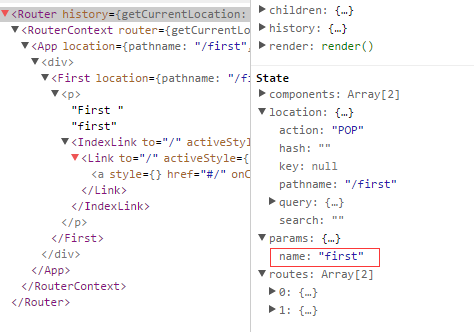
而:name可以通過 this.props.params 中取到
class First extends Component {
 constructor(props) {
 super(props);
 }
 render() {
 return (
 <p>First {this.props.params.name}
 <IndexLink to="/" activeStyle={{color: 'red'}}>Basic</IndexLink>
 </p>
 )
 }
}
.
.
<Route path="/:name" component={First} />

通過React Dev Tool也可以看到組件的相關數據
6. 路由的onEnter、onLeave鉤子
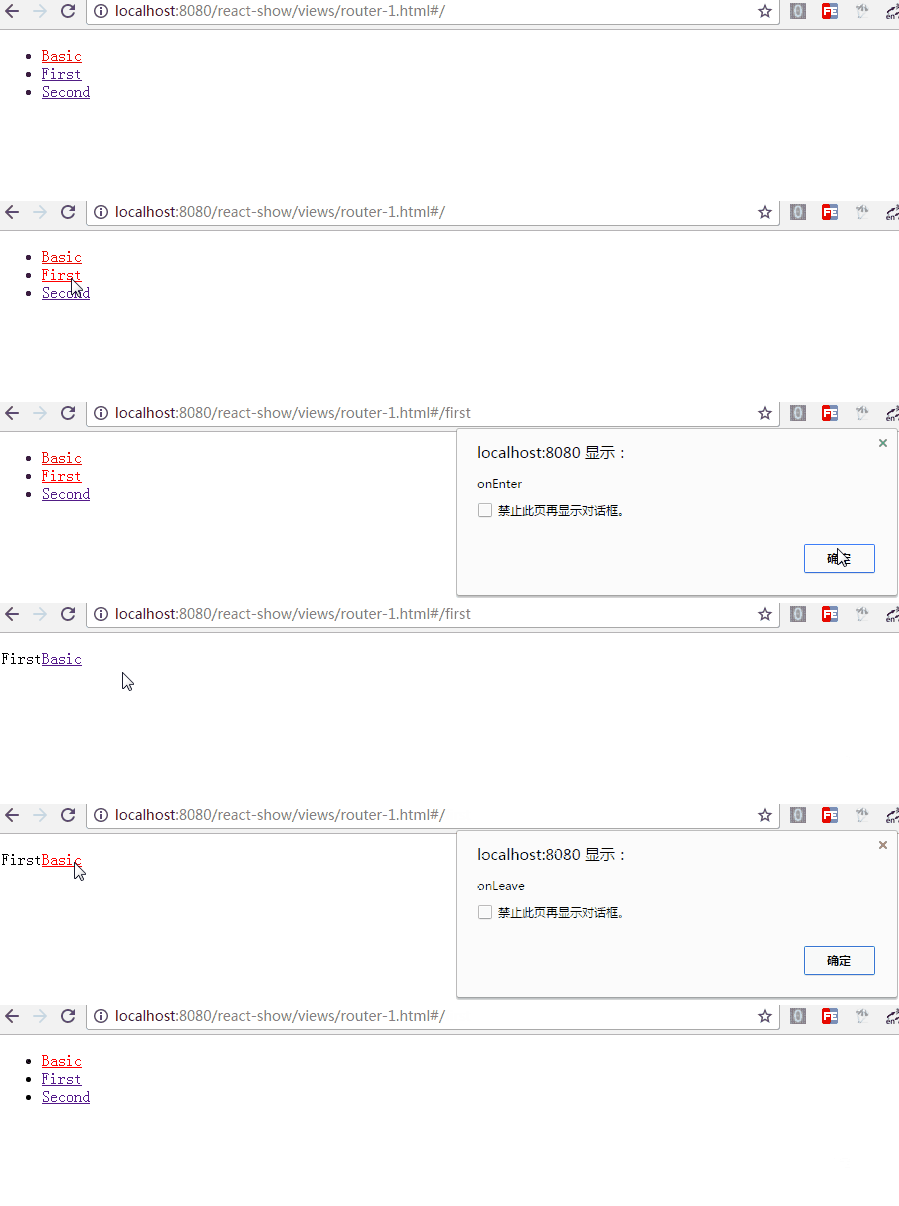
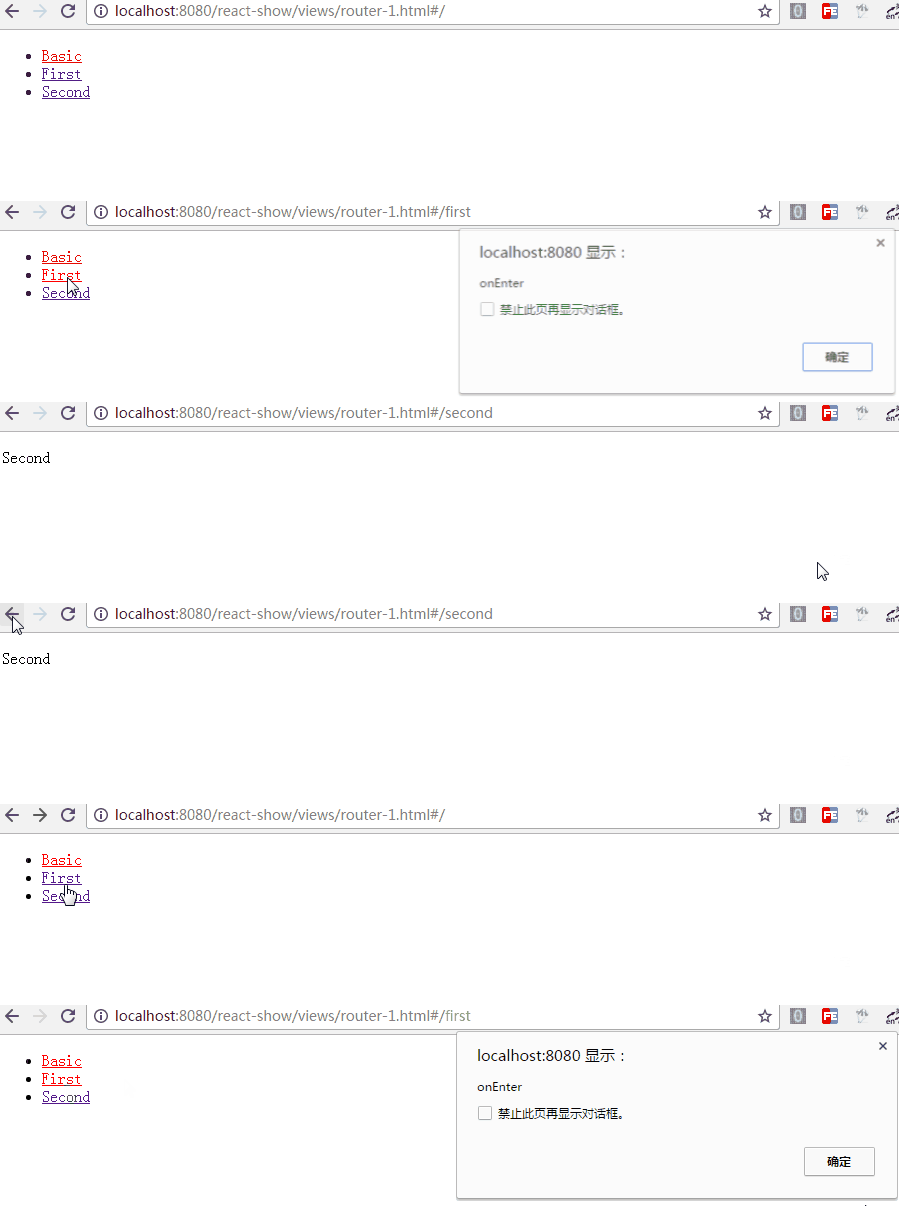
在路由的跳轉中,我們可能需要在進入頁面或離開頁面的時候做一些特殊操作,Route 通過 onEnter 與 onLeave 定義了這兩個行為
<Route path="first" component={First} onEnter={(nextState, replace) => {
 console.log(nextState);
 alert('onEnter');
 // replace('second');
 }} onLeave={() => {
 alert('onLeave');
 }}/>
如上,帶兩個參數,通過 replace 可以更新路徑,把注釋去掉後,進入"/first"時立馬跳轉值"/second",這在檢測登錄時應該比較有用
更多的使用參見 指南
以上就是本文的全部內容,希望本文的內容對大家的學習或者工作能帶來一定的幫助,同時也希望多多支持!