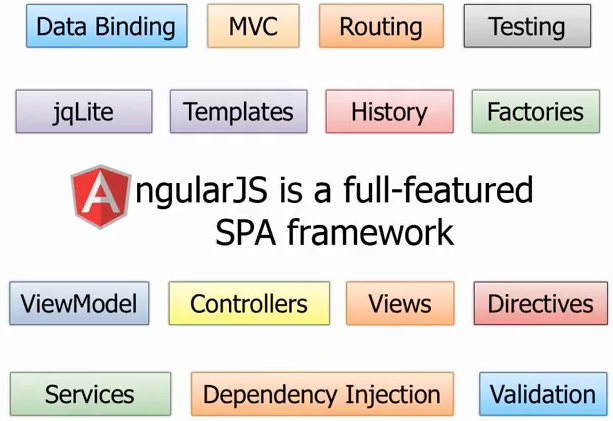
AngularJS 是開發單頁應用(SPA)的框架。SPA 只有一張 HTML 頁面,初始載入 HTML、CSS 與 JavaScript 後,所有操作都在這頁完成,由 JavaScript 控制不同 view 的呈現。本文整理自 YouTube 上的經典教程 AngularJS Fundamentals In 60-ish Minutes,聚焦四個核心概念。
這四個概念撐起了 AngularJS 的骨架:Directive、Data Binding、Filter、Module。掌握它們,對全局的把握會清晰很多。
準備環境
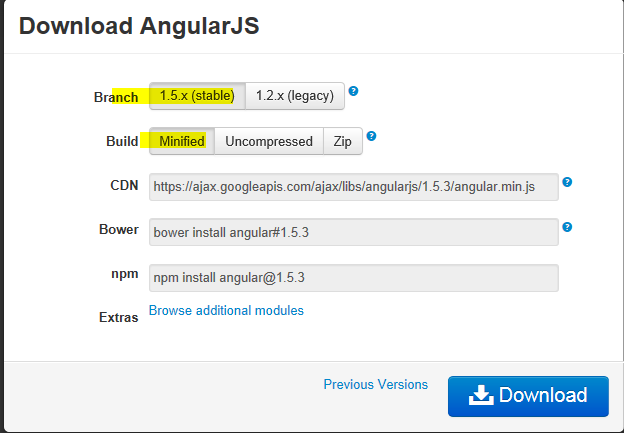
從官網下載 angular.min.js 與 angular-route.min.js(https://angularjs.org/ 或 https://code.angularjs.org/),在編輯器中建立一個空專案即可。
一、Directive 與 Data Binding
Directive 是 AngularJS 中最難理解也最重要的概念。入門階段可以把它想成「用來擴充 HTML 的自訂標籤」,AngularJS 會解析這些標籤,从而实现種種「魔法」。
對照傳統的命令式 UI(Imperative UI)來看會更清楚:
- 傳統做法:給 HTML 元素設 id,再用 JavaScript 或 jQuery 操作 DOM。HTML 元素的 id 本身不攜帶任何行為資訊。
- AngularJS 聲明式:不需要 id,而是用 Directive「指導」元素的行為。看到標籤與 Directive,大概就能推測運行時行為。
ng-app 與 ng-model
<!DOCTYPE html>
<html ng-app>
<head>
  <title>Using Directives and Data Binding Syntax</title>
</head>
<body>
  <div class="container">
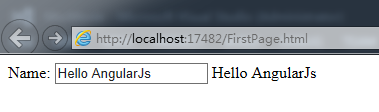
    Name: <input type="text" ng-model="name" />
    {{name}}
  </div>
  <script src="angular.min.js"></script>
</body>
</html>
ng-app:自動 bootstrap 一個 AngularJS 應用,是必須的 Directive,一般加在 HTML 根元素上。
ng-model:在 property 與 HTML 表單控件(input、select、textarea)之間建立雙向資料綁定。控件的值改變會反映到 property,反之亦然。property 透過 {{}} 呈現在視圖上。
Directive 的寫法變體
Directive 可以用 x- 或 data- 作為前綴,也可以放在元素名、屬性、class 甚至註解中:
<html data-ng-app="">
...
<input type="text" data-ng-model="name" />
ng-init 與 ng-repeat
<!DOCTYPE html>
<html data-ng-app="">
<head>
  <title>Iterating with the ng-repeat Directive</title>
</head>
<body>
  <div class="container"
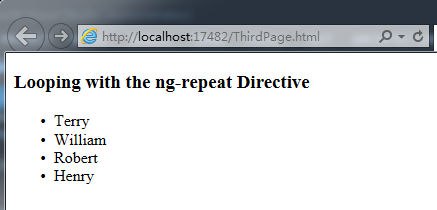
       data-ng-init="names = ['Terry','William','Robert','Henry']">
    <h3>Looping with the ng-repeat Directive</h3>
    <ul>
      <li data-ng-repeat="name in names">{{name}}</li>
    </ul>
  </div>
  <script src="angular.min.js"></script>
</body>
</html>
更多 Directive 請參閱官網 https://docs.angularjs.org/api
二、Filter
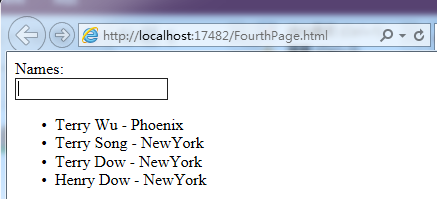
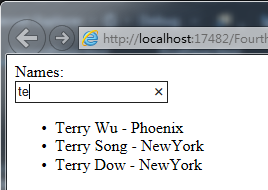
Filter 的作用模式是:接收一個輸入,依某規則處理,回傳處理後的結果。主要用於陣列過濾、元素排序、資料格式化。
AngularJS 內建九種 filter:currency(貨幣)、date(日期)、filter(子串匹配)、json(格式化 JSON)、limitTo(限制個數)、lowercase、uppercase、number、orderBy。此外還可以自己定義,彈性極大。
<!DOCTYPE html>
<html data-ng-app="">
<head>
  <title>Using Filter</title>
</head>
<body>
  <div class="container"
       data-ng-init="customers = [
         {name:'Terry Wu',  city:'Phoenix'},
         {name:'Terry Song',city:'NewYork'},
         {name:'Terry Dow', city:'NewYork'},
         {name:'Henry Dow', city:'NewYork'}
       ]">
    Names: <br />
    <input type="text" data-ng-model="name" />
    <br />
    <ul>
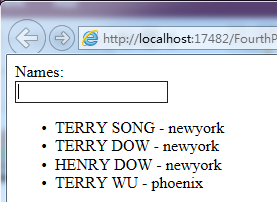
      <li data-ng-repeat="cust in customers | filter:name | orderBy:'city'">
        {{cust.name | uppercase}} - {{cust.city | lowercase}}
      </li>
    </ul>
  </div>
  <script src="angular.min.js"></script>
</body>
</html>
每個 filter 跟在資料後面,用管線符號 | 分隔,串接順序就是處理順序:先依輸入框內容過濾,再按城市排序,最後分別轉大小寫。
三、Module
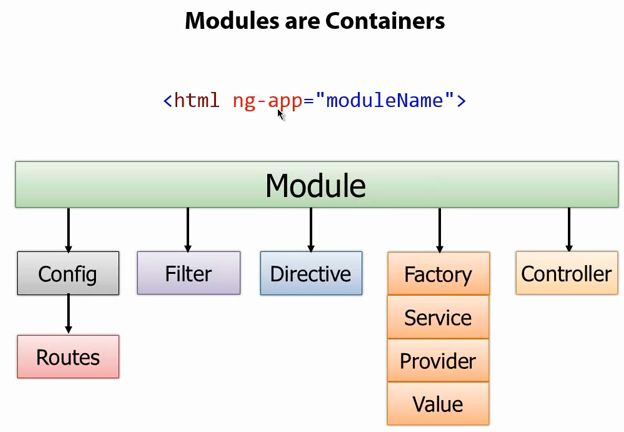
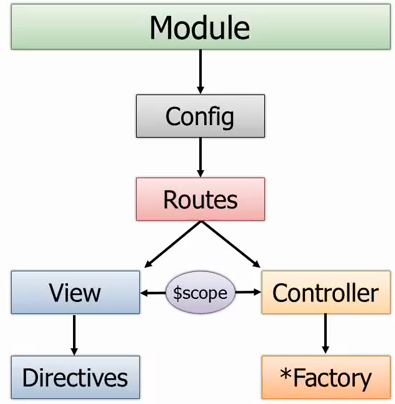
Module 是一個容器,用來管理 AngularJS 應用的各個部分。一個 AngularJS 應用就是一個 Module,作用類似 C# 裡的 Assembly。C# 透過 main 函數 bootstrap 應用,AngularJS 則透過 ng-app="moduleName"。
Module 常見組成部分:
- Config / Route:配置應用路由,類似 ASP.NET MVC 的 Config/Route
- Filter:資料過濾
- Directive:擴充 HTML,沒有 Directive 就沒有 AngularJS
- Controller:類似 MVC 的 Controller,頁面邏輯在這裡實作,透過它操作 model,再由內建的 Data Binding 綁定到 view
- Factory / Service / Provider / Value:提供資料源訪問,例如呼叫 RESTful API 完成 CRUD
用 Module + Controller 重寫
<!DOCTYPE html>
<html data-ng-app="demoApp">
<head>
  <title>Using module Controller</title>
</head>
<body>
  <div data-ng-controller="SimpleController">
    Names: <br />
    <input type="text" data-ng-model="name" />
    <br />
    <ul>
      <li data-ng-repeat="cust in customers | filter:name | orderBy:'city'">
        {{cust.name | uppercase}} - {{cust.city | lowercase}}
      </li>
    </ul>
  </div>
  <script src="angular.min.js"></script>
  <script>
    var demoApp = angular.module("demoApp", []);

    demoApp.controller("SimpleController", function ($scope) {
      $scope.customers = [
        { name: 'Terry Wu',   city: 'Phoenix' },
        { name: 'Terry Song', city: 'NewYork' },
        { name: 'Terry Dow',  city: 'NewYork' },
        { name: 'Henry Dow',  city: 'NewYork' }
      ];
    });
  </script>
</body>
</html>
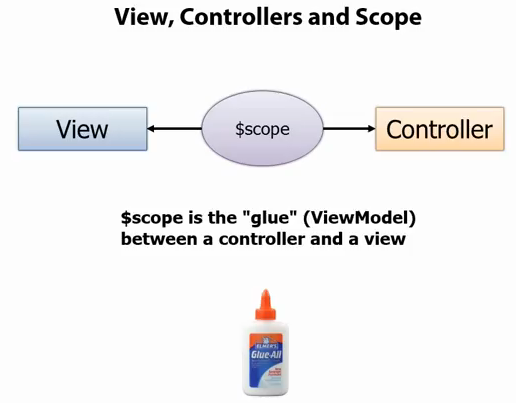
差異在於:這個版本建立了真正的 module,並在其下註冊 controller。Controller 中建立 customers(Model)並初始化,view 直接綁定到它。$scope 是所有 view model 的容器物件,Controller 必須透過 $scope 才能訪問 view model。
Controller 也可以抽成獨立物件再註冊,程式碼更乾淨:
var controllers = {};
controllers.SimpleController = function ($scope) {
  $scope.customers = [ /* ... */ ];
};
demoApp.controller(controllers);
四、路由與 SPA
用 $routeProvider 配置路由,實現真正的單頁應用。目錄結構:
app/
  index.html
  Partials/
    View1.html
    View2.html
View1.html
<div>
  <h2>View1</h2>
  Names: <br />
  <input type="text" data-ng-model="filter.name" />
  <br />
  <ul>
    <li data-ng-repeat="cust in customers | filter:filter.name | orderBy:'city'">
      {{cust.name | uppercase}} - {{cust.city | lowercase}}
    </li>
  </ul>
  <br />
  Customer Names:<br />
  <input type="text" data-ng-model="newCustomer.name" />
  <br />
  Customer City:<br />
  <input type="text" data-ng-model="newCustomer.city" />
  <br />
  <button data-ng-click="addCustomer()">Add Customer</button>
  <br />
  <a href="#/view2">View 2</a>
</div>
View2.html
<div>
  <h2>View2</h2>
  City: <br />
  <input type="text" data-ng-model="city" />
  <br />
  <ul>
    <li data-ng-repeat="cust in customers | filter:city | orderBy:'city'">
      {{cust.name | uppercase}} - {{cust.city | lowercase}}
    </li>
  </ul>
</div>
主頁面
<!DOCTYPE html>
<html data-ng-app="demoApp">
<head>
  <title>View</title>
</head>
<body>
  <div>
    <div data-ng-view=""></div>
  </div>
  <script src="angular.min.js"></script>
  <script src="angular-route.min.js"></script>
  <script>
    var demoApp = angular.module('demoApp', ['ngRoute']);

    demoApp.config(function ($routeProvider) {
      $routeProvider
        .when('/', {
          controller: 'SimpleController',
          templateUrl: 'Partials/View1.html'
        })
        .when('/view2', {
          controller: 'SimpleController',
          templateUrl: 'Partials/View2.html'
        })
        .otherwise({ redirectTo: '/' });
    });

    var controllers = {};
    controllers.SimpleController = function ($scope) {
      $scope.customers = [ /* ... */ ];
      $scope.addCustomer = function () {
        $scope.customers.push({
          name: $scope.newCustomer.name,
          city: $scope.newCustomer.city
        });
      };
    };
    demoApp.controller(controllers);
  </script>
</body>
</html>
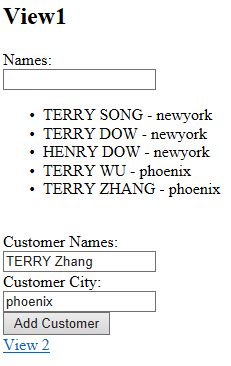
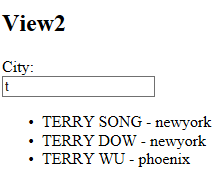
這裡有兩個關鍵點:view1 與 view2 會渲染在標註了 ng-view 的位置;透過 config 設定路由,我們把 controller 與 HTML 標籤解耦了——不必再在每個標籤上寫 ng-controller,而是集中配置。
五、加入 Factory
最後一個版本更接近實際工程:把資料初始化抽到 Factory,Controller 透過它取得資料。真實專案中這裡通常會呼叫 Web API。
<!DOCTYPE html>
<html data-ng-app="demoApp">
<head>
  <title>Using Factory</title>
</head>
<body>
  <div><div data-ng-view=""></div></div>
  <script src="angular.min.js"></script>
  <script src="angular-route.min.js"></script>
  <script>
    var demoApp = angular.module('demoApp', ['ngRoute']);

    demoApp.config(function ($routeProvider) {
      $routeProvider
        .when('/', {
          controller: 'SimpleController',
          templateUrl: 'Partials/View1.html'
        })
        .when('/view2', {
          controller: 'SimpleController',
          templateUrl: 'Partials/View2.html'
        })
        .otherwise({ redirectTo: '/' });
    });

    demoApp.factory('simpleFactory', function () {
      var customers = [
        { name: 'Terry Wu',   city: 'Phoenix' },
        { name: 'Terry Song', city: 'NewYork' },
        { name: 'Terry Dow',  city: 'NewYork' },
        { name: 'Henry Dow',  city: 'NewYork' }
      ];
      var factory = {};
      factory.getCustomers = function () {
        return customers;
      };
      return factory;
    });

    var controllers = {};
    controllers.SimpleController = function ($scope, simpleFactory) {
      $scope.customers = [];
      init();

      function init() {
        $scope.customers = simpleFactory.getCustomers();
      }

      $scope.addCustomer = function () {
        $scope.customers.push({
          name: $scope.newCustomer.name,
          city: $scope.newCustomer.city
        });
      };
    };
    demoApp.controller(controllers);
  </script>
</body>
</html>
Factory 是單例,多個 controller 共享同一份資料,這正是把資料層與視圖層分離的價值所在。
後記
AngularJS 1.x 已進入維護狀態,官方推薦新專案改用 Angular(2+)。但本文這四個概念的意義並未消失——component 化、宣告式模板、依賴注入、路由配置,這些思想在 React、Vue 以及現代 Angular 中都以不同形式延續。理解 1.x 的設計取捨,能幫助你看懂現代前端框架為什麼長這樣。