動手做:用 HTML5 與 CSS3 打造網頁視頻播放器
編輯:CSS進階教程
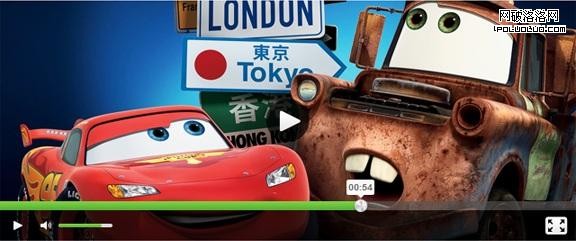
播放器最終效果預覽圖
HTML5 已是不可逆的趨勢,早在兩年前 YouTube 就開始推廣 HTML5 播放器以取代 Flash。雖然國內尚未完全普及,但在各大本土瀏覽器廠商的努力下,支援 HTML5 的市佔率不斷攀升。本教程將手把手教你,用 HTML5、CSS3 與 JavaScript 打造一個影片播放器。
1. 下載 MediaElement.js
先下載 MediaElement.js,這是一套開源的 HTML5 影音外掛。解壓後你會得到三個檔案——flashmediaelement.swf、mediaelement-and-player.min.js 與 silverlightmediaelement.xap,分別對應 Flash、JavaScript 與 SilverLight 的播放方案。新建一個 "js" 資料夾並放入(本例其實用不到 swf 與 xap,可刪除)。
2. HTML 標記
首先連結 jQuery 庫(此處使用 Google 託管版本),接著連結 mediaelement-and-player.min.js 與 CSS 檔:
<head>
<title>Video Player</title>
<script src="https://ajax.googleapis.com/ajax/libs/jquery/1.7.2/jquery.min.js"></script>
<script src="js/mediaelement-and-player.min.js"></script>
<link rel="stylesheet" href="css/style.css" media="screen">
</head>
接著加入 HTML5 的 video 標籤來建立播放器(poster 為預覽圖):
<video width="640" height="267" poster="media/cars.png">
<source src="media/cars.mp4" type="video/mp4">
</video>
再加入以下程式碼建立控制面板,可設定的功能包括:
- alwaysShowControls —— "true" 讓控制面板永遠顯示,"false" 則在滑鼠移走後隱藏。
- videoVolume —— "horizontal" 讓音量滑桿水平顯示。
- 其他功能:暫停播放、進度、聲音與全螢幕。
<script type="text/javascript">//
$(document).ready(function() {
$('video').mediaelementplayer({
alwaysShowControls: true,
videoVolume: 'horizontal',
features: ['playpause','progress','volume','fullscreen']
});
});
//</script>
更多設定請查閱 MediaElement.js 的官方文件。
3. 播放器基本樣式
先重置基本樣式:
.mejs-inner,
.mejs-inner div,
.mejs-inner a,
.mejs-inner span,
.mejs-inner button,
.mejs-inner img {
margin: 0;
padding: 0;
border: none;
outline: none;
}
接著為 video container 加上佈局樣式(這部分只用來控制佈局,不改變播放器外觀):
.mejs-container {
position: relative;
background: #000000;
}
.mejs-inner {
position: relative;
width: inherit;
height: inherit;
}
.me-plugin { position: absolute; }
.mejs-container-fullscreen .mejs-mediaelement,
.mejs-container-fullscreen video,
.mejs-embed,
.mejs-embed body,
.mejs-mediaelement {
width: 100%;
height: 100%;
}
.mejs-embed,
.mejs-embed body {
margin: 0;
padding: 0;
overflow: hidden;
}
.mejs-container-fullscreen {
position: fixed;
left: 0;
top: 0;
right: 0;
bottom: 0;
overflow: hidden;
z-index: 1000;
}
.mejs-background,
.mejs-mediaelement,
.mejs-poster,
.mejs-overlay {
position: absolute;
top: 0;
left: 0;
}
.mejs-poster img { display: block; }

4. 控制面板樣式
先從「播放按鈕」開始:
.mejs-overlay-play { cursor: pointer; }
.mejs-inner .mejs-overlay-button {
position: absolute;
top: 50%;
left: 50%;
width: 50px;
height: 50px;
margin: -25px 0 0 -25px;
background: url(../img/play.png) no-repeat;
}
接著加上控制列佈局:置於影片底部,高 34px,並用 RGBA 設定半透明背景,最後為按鈕加上基本樣式與圖元:
.mejs-container .mejs-controls {
position: absolute;
width: 100%;
height: 34px;
left: 0;
bottom: 0;
background: rgb(0,0,0);
background: rgba(0,0,0, .7);
}
.mejs-controls .mejs-button button {
display: block;
cursor: pointer;
width: 16px;
height: 16px;
background: transparent url(../img/controls.png);
}

5. 視頻控制器
這一步把控制器靠右擺放,逐一調整各按鈕的寬度、位置與背景圖:
.mejs-controls div.mejs-playpause-button {
position: absolute;
top: 12px;
left: 15px;
}
.mejs-controls .mejs-play button,
.mejs-controls .mejs-pause button {
width: 12px;
height: 12px;
background-position: 0 0;
}
.mejs-controls .mejs-pause button { background-position: 0 -12px; }
.mejs-controls div.mejs-volume-button {
position: absolute;
top: 12px;
left: 45px;
}
.mejs-controls .mejs-mute button,
.mejs-controls .mejs-unmute button {
width: 14px;
height: 12px;
background-position: -12px 0;
}
.mejs-controls .mejs-unmute button { background-position: -12px -12px; }
.mejs-controls div.mejs-fullscreen-button {
position: absolute;
top: 7px;
right: 7px;
}
.mejs-controls .mejs-fullscreen-button button,
.mejs-controls .mejs-unfullscreen button {
width: 27px;
height: 22px;
background-position: -26px 0;
}
.mejs-controls .mejs-unfullscreen button { background-position: -26px -22px; }

6. 音量滑桿控制器
音量滑桿同理,設好位置與大小,再加上圓角效果:
.mejs-controls div.mejs-horizontal-volume-slider {
position: absolute;
cursor: pointer;
top: 15px;
left: 65px;
}
.mejs-controls .mejs-horizontal-volume-slider .mejs-horizontal-volume-total {
width: 60px;
background: #d6d6d6;
}
.mejs-controls .mejs-horizontal-volume-slider .mejs-horizontal-volume-current {
position: absolute;
width: 0;
top: 0;
left: 0;
}
.mejs-controls .mejs-horizontal-volume-slider .mejs-horizontal-volume-total,
.mejs-controls .mejs-horizontal-volume-slider .mejs-horizontal-volume-current {
height: 4px;
-webkit-border-radius: 2px;
-moz-border-radius: 2px;
border-radius: 2px;
}
- 上一篇文章: IE6 絕對定位錯位的成因與解法全解析
- 下一篇文章: CSS 控制圖片 img:邊框與撐破問題一次解決