撰寫 HTML 時常會遇到這樣的狀況:在 Firefox 等遵循 W3C 標準的瀏覽器裡,若外層 DIV 作為容器,而內部 DIV 設定了 float 樣式,外層容器卻因為內部沒有清除浮動而無法被撐開。本文就透過實例一步步拆解這個問題與其優雅解法。
先看一段會出問題的結構:
- <div style="width:200px;border:1px solid red;">
- <div style="float:left;width:80px;height:80px;border:1px solid blue;">TEST DIV</div>
- <div style="float:left;width:80px;height:80px;border:1px solid blue;">TEST DIV</div>
- <div style="float:left;width:80px;height:80px;border:1px solid blue;">TEST DIV</div>
- <div style="float:left;width:80px;height:80px;border:1px solid blue;">TEST DIV</div>
- <div style="float:left;width:80px;height:80px;border:1px solid blue;">TEST DIV</div>
- </div>
顯示結果如下:
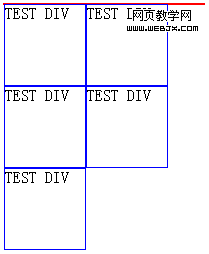
容器 DIV 沒有被撐開
可以看到,作為外層容器、邊框為紅色的 DIV 完全沒有被撐開。這是因為內部 DIV 一旦設了 float:left,就等同於失去了 clear:both 與 display:block 的效果,外層 DIV 自然不會被撐開。
那麼,該如何讓外層容器的高度隨著內部浮動元素增多而自動增長呢?
常見但略嫌笨重的舊做法
過去我習慣在所有浮動元素之後,補上一個清除浮動的空 DIV:
- <div style="width:200px;border:1px solid red;">
- <div style="float:left;width:80px;height:80px;border:1px solid blue;">TEST DIV</div>
- <div style="float:left;width:80px;height:80px;border:1px solid blue;">TEST DIV</div>
- <div style="float:left;width:80px;height:80px;border:1px solid blue;">TEST DIV</div>
- <div style="float:left;width:80px;height:80px;border:1px solid blue;">TEST DIV</div>
- <div style="float:left;width:80px;height:80px;border:1px solid blue;">TEST DIV</div>
- <div style="clear:both;"></div>
- </div>
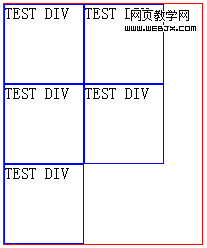
顯示正常了
也就是在容器末尾加上 <div style="clear:both"></div>,靠這一步完成清除。但問題是,白白多出一個毫無語義的標籤總讓人不太舒服。更麻煩的是,當你用 dojo 做 Drag & Drop 時,這個 DIV 作為容器節點參與拖曳,一旦它被移動,就會引發排版 Bug——若藍框 DIV 被移到它之後,就會因為 clear:both 而被強制換行。因此我一直在尋找更漂亮的解法。
在反覆搜尋之後,我找到了 How To Clear Floats Without Structural Markup 這篇文章,終於如願。
用偽元素 clearfix,不必多寫標籤
先定義這樣一段 CSS:
- .clearfix:after {
- content: ".";
- display: block;
- height: 0;
- clear: both;
- visibility: hidden;
- }
接著只要讓外層容器套用這個 class 即可:
- <div style="width:200px;border:1px solid red;" class="clearfix">
- <div style="float:left;width:80px;height:80px;border:1px solid blue;">TEST DIV</div>
- <div style="float:left;width:80px;height:80px;border:1px solid blue;">TEST DIV</div>
- <div style="float:left;width:80px;height:80px;border:1px solid blue;">TEST DIV</div>
- <div style="float:left;width:80px;height:80px;border:1px solid blue;">TEST DIV</div>
- <div style="float:left;width:80px;height:80px;border:1px solid blue;">TEST DIV</div>
- </div>
在 Firefox 裡一測,果然奏效,顯示正常,而且 dojo 的 Drag & Drop 也不再出問題。原理其實很簡單:clearfix 借助 after 這個偽元素,在套用元素的結尾插入 content 指定的內容。這裡插入一個句號「.」,將它的 display 設為 block、高度設為 0、clear 設為 both、visibility 設為隱藏,如此便達到了撐開容器的目的。
兼顧舊版 IE 的相容寫法
文章也提到,Windows IE 並不支援上述做法。要讓 IE 也完美呈現,就得在 clearfix 定義後補上專門給 IE 的 HACK:
- .clearfix:after {
- content: ".";
- display: block;
- height: 0;
- clear: both;
- visibility: hidden;
- }
- /* Hides from IE-mac \*/
- * html .clearfix {height: 1%;}
- /* End hide from IE-mac */
由於轉義字元「\」的關係,Mac IE 會忽略這段 Hack,而 Windows IE 不會,它會套用 * html .clearfix {height: 1%;} 來撐開容器(Mac IE 這類老古董實在難救,好在使用者已經極少,能兼顧 Safari 就夠了)。測試之後,大功告成。
- 上一篇文章: CSS Sprite 實戰:用雪碧圖縮短網站載入時間的幾個要訣
- 下一篇文章: CSS 實戰教學:打造「彈性背景+固定寬度」的自適應版面