提示:如果大家覺得本篇實現的彈窗效果有用,可持續關注。接下會添加更多效果並且封裝成插件,這樣使用就方便了。
CSS3特殊效果
CSS3為用戶添加了三個特殊效果的處理方式:過渡、動畫、變化。當用戶和界面元素交互時,使用這些特殊樣式可大大改善用戶的體驗效果。這些效果直接由浏覽器引擎處理,可以節省開銷。盡管如此,它們也會耗費大量的處理能力,尤其是一些復雜的WEB頁面上。即使是最基本的效果,也是如此。本篇的目的只是熟悉下這三種CSS處理效果,不推薦在實際系統中大篇幅使用。
溫馨提示:請謹慎大篇幅使用這些特殊效果。
另外一方面,由於在CCS3標准化之前,主流浏覽器都是通過添加廠商前綴方式提供樣式支持。所以要解決浏覽器兼容問題,使用這些樣式,我們不得不為每一個樣式添加各個產商前綴,例如添加一個過度延遲屬性transition-delay,不得不這樣寫:
-webkit-transition-delay: 300ms;
-o-transition-delay: 300ms;
-moz-transition-delay: 300ms;
-ms-transition-delay: 300ms;
transition-delay: 300ms;
代碼量增加,不利於閱讀。
最終效果
先看看最終實現的效果:
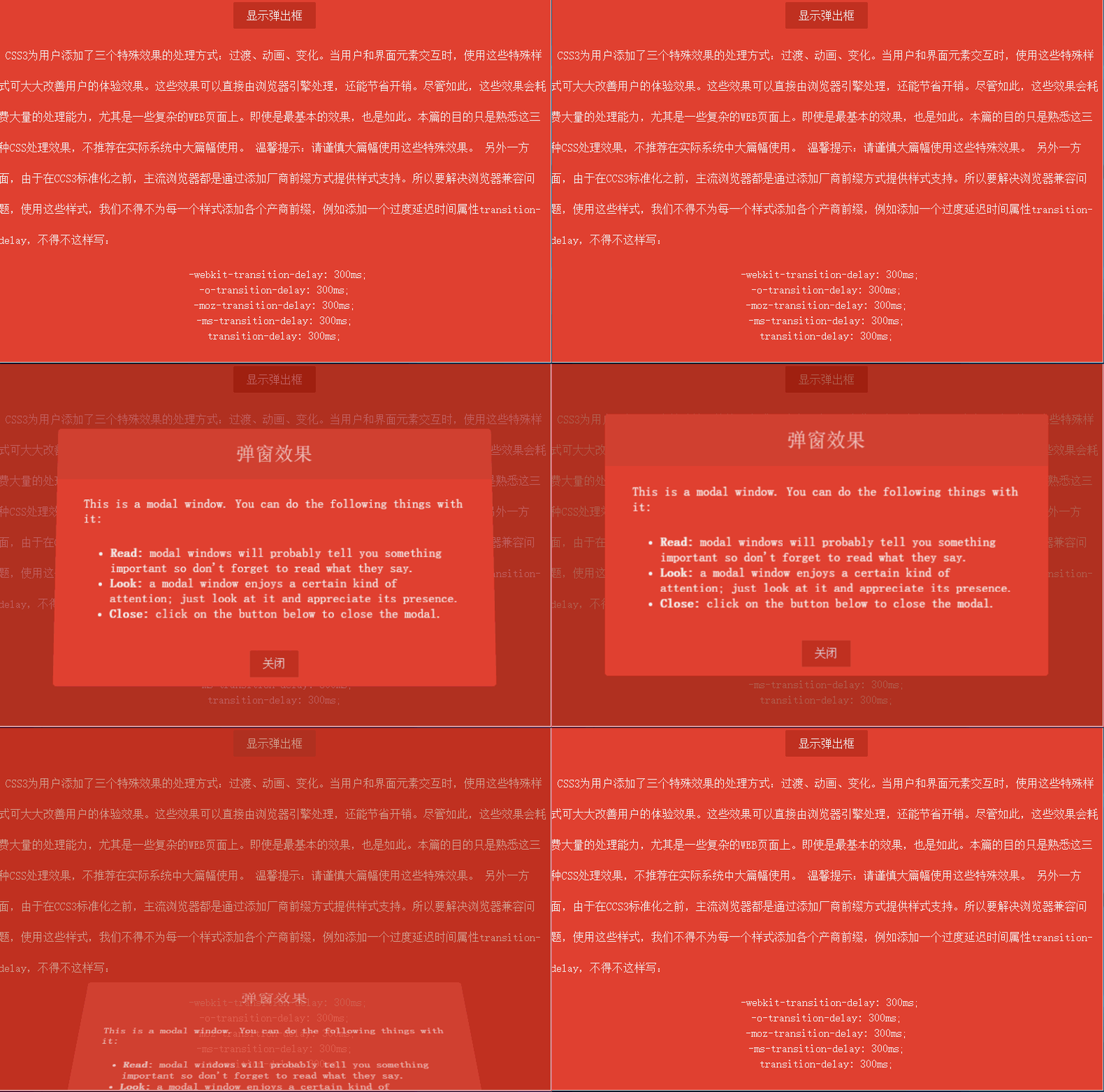
效果比較簡單,包括以下幾點:
窗口透明度發生變化,從最初的0漸變到1。
窗口位置從浏覽器底部漸變到浏覽器居中位置。
窗口有一個90度的翻轉效果。
窗口有遮擋層,彈窗時,遮擋層透明度從0漸變到0.7。
窗口關閉時所有動畫反向執行。
彈窗布局
首先實現彈出窗口樣式,彈窗在浏覽器可見窗口顯示,所有需要設置position為fixed。窗口容器樣式如下:
.dialog-root{
            position: fixed;
            z-index: 2000;
            left: 50%;
            top: 50%;
            transform: translate(-50%, -50%);
        }
直接設置left和top為50%可讓元素左上角原點在浏覽器居中,但是我們要以窗口的中心位置作為原點,使用CSS變換特效(transform)的平移translate函數可達到目的。這裡補充下變換效果有哪些函數:
translate(x, y)(長度值或者百分比):在水平方向、垂直方向平移元素。
translateX(value):水平方向平移。
translateY(value):垂直方向平移。
scale(x, y)、scaleX(value)、scaleY(value):在水平方向、垂直方向或者兩個方向上縮放元素。
rotate()、rotateX()、rotateY()、rotateZ():rotate支持3D效果,可在x、y、z軸上旋轉元素。
skew()、skewX()、skewY():在水平方向、垂直方向或者兩個方向傾斜一定的角度。
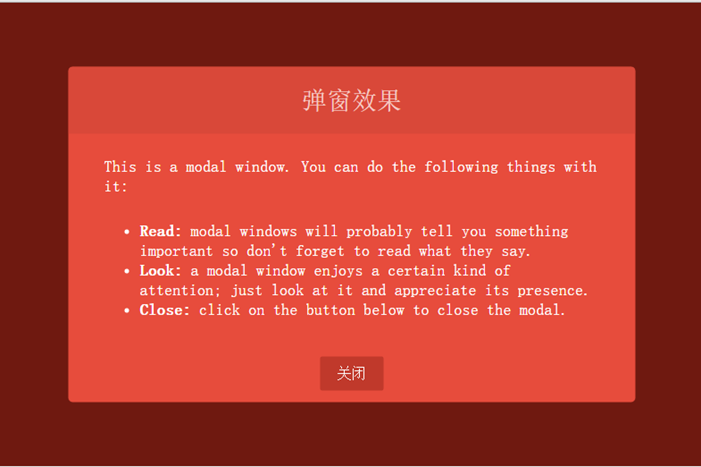
窗口布局完整樣式:
<html lang="en">
<head>
    <meta charset="UTF-8">
    <title>CSS特殊效果</title>
    <style tpe="text/css">
        /* ---------------------公共樣式 -------------------*/
        body{
            background: #000;
        }

        p {
            display: block;
            -webkit-margin-before: 1em;
            -webkit-margin-after: 1em;
            -webkit-margin-start: 0px;
            -webkit-margin-end: 0px;
        }

        a, button{
            outline: none;
        }

        button {
            border: none;
            padding: 0.6em 1.2em;
            background: #c0392b;
            color: #fff;
            font-size: 1em;
            cursor: pointer;
            display: block;
            margin: 3px auto;
            border-radius: 2px;
        }

        button:hover, button:active, button:focus{
            border: none;
        }

        /* ---------------------彈窗樣式 -------------------*/
        /* 遮擋層樣式 */
        .dialog-face{
            position: fixed;
            background: #A02418;
            height: 100%;
            width: 100%;
            z-index: 1000;
            top: 0;
            left: 0;

            opacity: 0.7;
        }
        /* 彈窗布局樣式 */
        .dialog-root{
            position: fixed;
            z-index: 2000;
            left: 50%;
            top: 50%;
            transform: translate(-50%, -50%);
        }
        /* 彈窗容器 */
        .dialog-wrapper{
            background: #E74C3C;
            width: 635px;
            height: 375px;
            overflow: hidden;
            -webkit-border-radius: 5px;
            -moz-border-radius: 5px;
            border-radius: 5px;
        }
        /* 彈窗標題 */
        .dialog-header{
            height: 75px;
            background: #d94839;
            text-align: center;
        }

        .dialog-header span{
            font-size: 28px;
            line-height: 75px;
            color:#F6CBC6;
        }
        /* 彈窗內容 */
        .dialog-content{
            font-weight: 300;
            font-size: 1.15em;
            color: #fff;
            padding: 15px 40px 20px 40px;
            margin: 0;
        }

        .dialog-content p{
            margin: 0;
            padding: 10px 0;
        }
    </style>
</head>
<body>
    <div id="dialog-face" class="dialog-face">
    </div>
    <div id="dialog" class="dialog-root">
        <div id="dialog-wrapper" class="dialog-wrapper">
            <div class="dialog-header">
                <span>彈窗效果</span>
            </div>
            <div class="dialog-content">
                <p>This is a modal window. You can do the following things with it:</p>
                <ul>
                    <li><strong>Read:</strong> modal windows will probably tell you something important so don't forget to read what they say.</li>
                    <li><strong>Look:</strong> a modal window enjoys a certain kind of attention; just look at it and appreciate its presence.</li>
                    <li><strong>Close:</strong> click on the button below to close the modal.</li>
                </ul>
            </div>
            <div class="dialog-footer">
                <button>關閉</button>
            </div>
        </div>
    </div>
</body>
</html>
效果如下:
動畫實現
先看看CSS3為我們提供了的動畫屬性:
animation-delay:設置動畫開始前的延遲時間。
animation-direction:設置動畫循環播放的時候是否方向播放,包含normal和alternate兩個值。
animation-duration:設置動畫播放持續的時間。
animation-interacion-count:設置動畫的播放次數,可以為具體數據或者無限循環關鍵字infinite。
animation-name:指定動畫名稱。
animation-play-state:允許動畫暫停和重新播放,包含running、paused。
animation-timing-function:指定如何計算中間動畫值,
CSS3動畫為我們提供了關鍵幀設置,我們可以按百分比設置動畫。首先彈窗是從窗口底部向上平移到中間位置。設置的關鍵幀如下:
       @keyframes dialogSlipToUp  {
            0%{
                top: 100%;
                opacity: 0.3;
            }
            100%{
                top: 50%;
                opacity: 1;
            }
        }

        @keyframes dialogSlipToBottom  {
            0%{
                top: 50%;
                opacity: 1;
                -webkit-transform: translate(-50%, -50%);
                -moz-transform: translate(-50%, -50%);
                -ms-transform: translate(-50%, -50%);
                -o-transform: translate(-50%, -50%);
                transform: translate(-50%, -50%);
            }
            100%{
                top: 100%;
                opacity: 0.3;
                -webkit-transform: translate(-50%, 0);
                -moz-transform: translate(-50%, 0);
                -ms-transform: translate(-50%, 0);
                -o-transform: translate(-50%, 0);
                transform: translate(-50%, 0);
            }
        }
上面就是關鍵幀的定義代碼,dialogSlipToBottom和dialogSlipToUp是關鍵幀名稱,元素類可通過animation-name屬性使用。dialogSlipToUp是彈窗時的動畫效果,透明度從0.3漸變到1並且元素從浏覽器底部位置漸變到居中位置。在關閉窗口時使用dialogSlipToBottom作為動畫,效果和dialogSlipToUp反向,另外,還使用了變換效果的tranlate函數,因為窗口的中心點在窗口中心,移到窗口底部時有1/2的高度沒有隱藏掉,所以使用translate(-50%, 0)讓中心點移到頂部,這樣整個窗口就可以完全隱藏了。
彈窗有一個3D旋轉效果,使用CSS3的3D動畫,我們必須選擇一個容器作為透視容器,只有在這個容器中設置動畫才有效。通過添加perspective屬性設置容器為透視容器,我們把dialog-root作為3D動畫容器,樣式如下:
.dialog-root{
    position: fixed;
    z-index: 2000;
    left: 50%;

    -webkit-animation-duration: 500ms;
    -moz-animation-duration: 500ms;
    -o-animation-duration: 500ms;
    animation-duration: 500ms;
    -webkit-perspective: 1300px;
    -moz-perspective: 1300px;
    perspective: 1300px;
}
通過perspective屬性設置透視容器透視舉例為1300像素,另外動畫的周期(animation-duration)為500毫秒。
彈窗的旋轉實現是從浏覽器由內向外90度旋轉,設置transform-origin: 50% 100%,讓窗口以底線作為旋轉軸。旋轉容器樣式如下:
.dialog-wrapper{
            background: #E74C3C;
            width: 635px;
            height: 375px;
            overflow: hidden;
            -webkit-border-radius: 5px;
            -moz-border-radius: 5px;
            border-radius: 5px;

            -webkit-animation-duration: 500ms;
            -moz-animation-duration: 500ms;
            -o-animation-duration: 500ms;
            animation-duration: 500ms;
            -webkit-transform-origin: 50% 100%;
            -moz-transform-origin: 50% 100%;
            -ms-transform-origin: 50% 100%;
            -o-transform-origin:50% 100%;
            transform-origin: 50% 100%;
        }

        .dialog-wrapper.slipUp{
            -webkit-transform: rotateX(0deg);
            -moz-transform: rotateX(0deg);
            -ms-transform: rotateX(0deg);
            -o-transform: rotateX(0deg);
            transform: rotateX(0deg);
            -webkit-animation-name: contentSlipToUp;
            -moz-animation-name: contentSlipToUp;
            -o-animation-name: contentSlipToUp;
            animation-name: contentSlipToUp;
        }

        .dialog-wrapper.slipBottom{
            -webkit-transform: rotateX(90deg);
            -moz-transform: rotateX(90deg);
            -ms-transform: rotateX(90deg);
            -o-transform: rotateX(90deg);
            transform: rotateX(90deg);
            -webkit-animation-name: contentSlipToBottom;
            -moz-animation-name: contentSlipToBottom;
            -o-animation-name: contentSlipToBottom;
            animation-name: contentSlipToBottom;
        }
添加彈出或關閉窗口函數函數:toggleDialog,傳入一個布爾值,true表示彈窗,false表示關閉窗口。代碼如下:
function toggleDialog(show){
    var animationClass = show ? "slipUp" : "slipBottom";
    var animation = function(){
        var ele = document.getElementById("dialog-face");
        ele.className = "dialog-face " + animationClass;
        ele = document.getElementById("dialog");
        ele.className = "dialog-root " + animationClass;
        ele = document.getElementById("dialog-wrapper");
        ele.className = "dialog-wrapper " + animationClass;
    };

    setTimeout(animation, 100);
}
完整代碼
<!DOCTYPE html>
<html lang="en">
<head>
    <meta charset="UTF-8">
    <title>CSS特殊效果</title>
    <style tpe="text/css">
        /* ---------------------公共樣式 -------------------*/
        body{
            background: #000;
        }

        .none{
            display: none;
        }

        .layout-root{
            position: fixed;
            background: #E74C3C;
            height: 100%;
            width: 100%;
            z-index: 1000;
            top: 0;
            left: 0;
        }

        .layout-content{
            line-height: 44px;
            font-weight: 300;
            font-size: 1em;
            color: #fff;
            text-indent: 10px;
        }

        .layout-content .code{
            line-height: 22px;
            text-align: center;
        }

        p {
            display: block;
            -webkit-margin-before: 1em;
            -webkit-margin-after: 1em;
            -webkit-margin-start: 0px;
            -webkit-margin-end: 0px;
        }

        a, button{
            outline: none;
        }

        button {
            border: none;
            padding: 0.6em 1.2em;
            background: #c0392b;
            color: #fff;
            font-size: 1em;
            cursor: pointer;
            display: block;
            margin: 3px auto;
            border-radius: 2px;
        }

        button:hover, button:active, button:focus{
            border: none;
        }

        /* ---------------------彈窗樣式 -------------------*/
        .dialog-face{
            position: fixed;
            background: #A02418;
            height: 100%;
            width: 100%;
            z-index: 1000;
            top: 0;
            left: 0;

            -webkit-animation-duration: 500ms;
            -moz-animation-duration:500ms;
            -o-animation-duration:500ms;
            animation-duration: 500ms;
        }

        .dialog-face.slipBottom[opacity="0"]{
            display: none;
        }

        .dialog-face.slipUp{
            opacity: 0.7;
            -webkit-animation-name: dialogFaceSlipToUp;
            -moz-animation-name: dialogFaceSlipToUp;
            -o-animation-name: dialogFaceSlipToUp;
            animation-name: dialogFaceSlipToUp;
        }

        .dialog-face.slipBottom{
            opacity: 0;
            visibility: hidden;
            -webkit-animation-name: dialogFaceSlipToBottom;
            -moz-animation-name: dialogFaceSlipToBottom;
            -o-animation-name: dialogFaceSlipToBottom;
            animation-name: dialogFaceSlipToBottom;
        }

        .dialog-root{
            position: fixed;
            z-index: 2000;
            left: 50%;

            -webkit-animation-duration: 500ms;
            -moz-animation-duration: 500ms;
            -o-animation-duration: 500ms;
            animation-duration: 500ms;
            -webkit-perspective: 1300px;
            -moz-perspective: 1300px;
            perspective: 1300px;
        }

        .dialog-root.slipUp{
            top: 50%;
            opacity: 1;

            -webkit-animation-name: dialogSlipToUp;
            -moz-animation-name: dialogSlipToUp;
            -o-animation-name: dialogSlipToUp;
            animation-name: dialogSlipToUp;
            -webkit-transform: translate(-50%, -50%);
            -o-transform: translate(-50%, -50%);
            -moz-transform: translate(-50%, -50%);
            -ms-transform: translate(-50%, -50%);
            transform: translate(-50%, -50%);
        }

        .dialog-root.slipBottom{
            top: 100%;
            opacity: 0.3;
            -webkit-animation-duration: 500ms;
            -moz-animation-duration: 500ms;
            -o-animation-duration: 500ms;
            animation-duration: 500ms;
            -webkit-animation-name: dialogSlipToBottom;
            -moz-animation-name: dialogSlipToBottom;
            -o-animation-name: dialogSlipToBottom;
            animation-name: dialogSlipToBottom;
            -webkit-transform: translate(-50%, 0);
            -o-transform: translate(-50%, 0);
            -moz-transform: translate(-50%, 0);
            -ms-transform: translate(-50%, 0);
            transform: translate(-50%, 0);
        }

        .dialog-wrapper{
            background: #E74C3C;
            width: 635px;
            height: 375px;
            overflow: hidden;
            -webkit-border-radius: 5px;
            -moz-border-radius: 5px;
            border-radius: 5px;

            -webkit-animation-duration: 500ms;
            -moz-animation-duration: 500ms;
            -o-animation-duration: 500ms;
            animation-duration: 500ms;
            -webkit-transform-origin: 50% 100%;
            -moz-transform-origin: 50% 100%;
            -ms-transform-origin: 50% 100%;
            -o-transform-origin:50% 100%;
            transform-origin: 50% 100%;
        }

        .dialog-wrapper.slipUp{
            -webkit-transform: rotateX(0deg);
            -moz-transform: rotateX(0deg);
            -ms-transform: rotateX(0deg);
            -o-transform: rotateX(0deg);
            transform: rotateX(0deg);
            -webkit-animation-name: contentSlipToUp;
            -moz-animation-name: contentSlipToUp;
            -o-animation-name: contentSlipToUp;
            animation-name: contentSlipToUp;
        }

        .dialog-wrapper.slipBottom{
            -webkit-transform: rotateX(90deg);
            -moz-transform: rotateX(90deg);
            -ms-transform: rotateX(90deg);
            -o-transform: rotateX(90deg);
            transform: rotateX(90deg);
            -webkit-animation-name: contentSlipToBottom;
            -moz-animation-name: contentSlipToBottom;
            -o-animation-name: contentSlipToBottom;
            animation-name: contentSlipToBottom;
        }

        .dialog-header{
            height: 75px;
            background: #d94839;
            text-align: center;
        }

        .dialog-header span{
            font-size: 28px;
            line-height: 75px;
            color:#F6CBC6;
        }

        .dialog-content{
            font-weight: 300;
            font-size: 1.15em;
            color: #fff;
            padding: 15px 40px 20px 40px;
            margin: 0;
        }


        .dialog-content p{
            margin: 0;
            padding: 10px 0;
        }

        .dialog-footer{
        }
        /* ---------------------動畫關鍵幀 -------------------*/

        @keyframes dialogFaceSlipToUp  {
            0%{
               opacity: 0;
            }
            100%{
                opacity: 0.7;
            }
        }

        @keyframes dialogFaceSlipToBottom {
            0%{
                opacity: 0.7;
                visibility:visible;
            }
            100%{
                visibility: hidden;
                opacity: 0;
            }
        }

        @keyframes dialogSlipToUp  {
            0%{
                top: 100%;
                opacity: 0.3;
            }
            100%{
                top: 50%;
                opacity: 1;
            }
        }

        @keyframes dialogSlipToBottom  {
            0%{
                top: 50%;
                opacity: 1;
                -webkit-transform: translate(-50%, -50%);
                -moz-transform: translate(-50%, -50%);
                -ms-transform: translate(-50%, -50%);
                -o-transform: translate(-50%, -50%);
                transform: translate(-50%, -50%);
            }
            100%{
                top: 100%;
                opacity: 0.3;
                -webkit-transform: translate(-50%, 0);
                -moz-transform: translate(-50%, 0);
                -ms-transform: translate(-50%, 0);
                -o-transform: translate(-50%, 0);
                transform: translate(-50%, 0);
            }
        }

        @keyframes contentSlipToUp  {
            0%{
                -webkit-transform: rotateX(90deg);
                -moz-transform: rotateX(90deg);
                -ms-transform: rotateX(90deg);
                -o-transform: rotateX(90deg);
                transform: rotateX(90deg);
            }
            100%{
                -webkit-transform: rotateX(0deg);
                -moz-transform: rotateX(0deg);
                -ms-transform: rotateX(0deg);
                -o-transform: rotateX(0deg);
                transform: rotateX(0deg);
            }
        }

        @keyframes contentSlipToBottom  {
            0%{
                -webkit-transform: rotateX(0deg);
                -moz-transform: rotateX(0deg);
                -ms-transform: rotateX(0deg);
                -o-transform: rotateX(0deg);
                transform: rotateX(0deg);
            }
            60%{
                -webkit-transform: rotateX(60deg);
                -moz-transform: rotateX(60deg);
                -ms-transform: rotateX(60deg);
                -o-transform: rotateX(60deg);
                transform: rotateX(60deg);
            }
            100%{
                -webkit-transform: rotateX(90deg);
                -moz-transform: rotateX(90deg);
                -ms-transform: rotateX(90deg);
                -o-transform: rotateX(90deg);
                transform: rotateX(90deg);
            }
        }
    </style>
</head>
<body>
    <div class="fixed layout-root">
        <div class="layout-content">
            <button onclick="toggleDialog(true)">顯示彈出框</button>
        </div>
        <div class="layout-content">
            <p>
                CSS3為用戶添加了三個特殊效果的處理方式:過渡、動畫、變化。當用戶和界面元素交互時,使用這些特殊樣式可大大改善用戶的體驗效果。這些效果可以直接由浏覽器引擎處理,還能節省開銷。盡管如此,這些效果會耗費大量的處理能力,尤其是一些復雜的WEB頁面上。即使是最基本的效果,也是如此。本篇的目的只是熟悉這三種CSS處理效果,不推薦在實際系統中大篇幅使用。

                溫馨提示:請謹慎大篇幅使用這些特殊效果。

                另外一方面,由於在CCS3標准化之前,主流浏覽器都是通過添加廠商前綴方式提供樣式支持。所以要解決浏覽器兼容問題,使用這些樣式,我們不得不為每一個樣式添加各個產商前綴,例如添加一個過度延遲時間屬性transition-delay,不得不這樣寫:

            </p>
            <p class="code">
                -webkit-transition-delay: 300ms;<br>
                -o-transition-delay: 300ms;<br>
                -moz-transition-delay: 300ms;<br>
                -ms-transition-delay: 300ms;<br>
                transition-delay: 300ms;
            </p>
        </div>
    </div>
    <div id="dialog-face" class="none">
    </div>
    <div id="dialog" class="none">
        <div id="dialog-wrapper">
            <div class="dialog-header">
                <span>彈窗效果</span>
            </div>
            <div class="dialog-content">
                <p>This is a modal window. You can do the following things with it:</p>
                <ul>
                    <li><strong>Read:</strong> modal windows will probably tell you something important so don't forget to read what they say.</li>
                    <li><strong>Look:</strong> a modal window enjoys a certain kind of attention; just look at it and appreciate its presence.</li>
                    <li><strong>Close:</strong> click on the button below to close the modal.</li>
                </ul>
            </div>
            <div class="dialog-footer">
                <button onclick="toggleDialog(false)">關閉</button>
            </div>
        </div>
    </div>
    <script type="text/javascript">
        function toggleDialog(show){
            var animationClass = show ? "slipUp" : "slipBottom";
            var animation = function(){
                var ele = document.getElementById("dialog-face");
                ele.className = "dialog-face " + animationClass;
                ele = document.getElementById("dialog");
                ele.className = "dialog-root " + animationClass;
                ele = document.getElementById("dialog-wrapper");
                ele.className = "dialog-wrapper " + animationClass;
            };

            setTimeout(animation, 100);
        }
    </script>
</body>
</html>
如果本篇內容對大家有幫助,請點擊頁面右下角的關注。如果覺得不好,也歡迎拍磚。你們的評價就是博主的動力!下篇內容,敬請期待!
- 上一頁:css3彈性盒模型(Flexbox)
- 下一頁:CSS布局基礎——BFC