CSS定位和居中問題
編輯:CSS特效代碼
定位和居中問題是CSS中經常遇到的。對於一個定長定高的元素,實現其在父元素中的垂直水平居中,可通過position屬性實現。當元素大小可變時,這種方法就失效了,我們可以通過flex和table實現居中,這兩種方法今後會細致研究,這裡只使用position方法。
任務需要完成的效果圖如下:
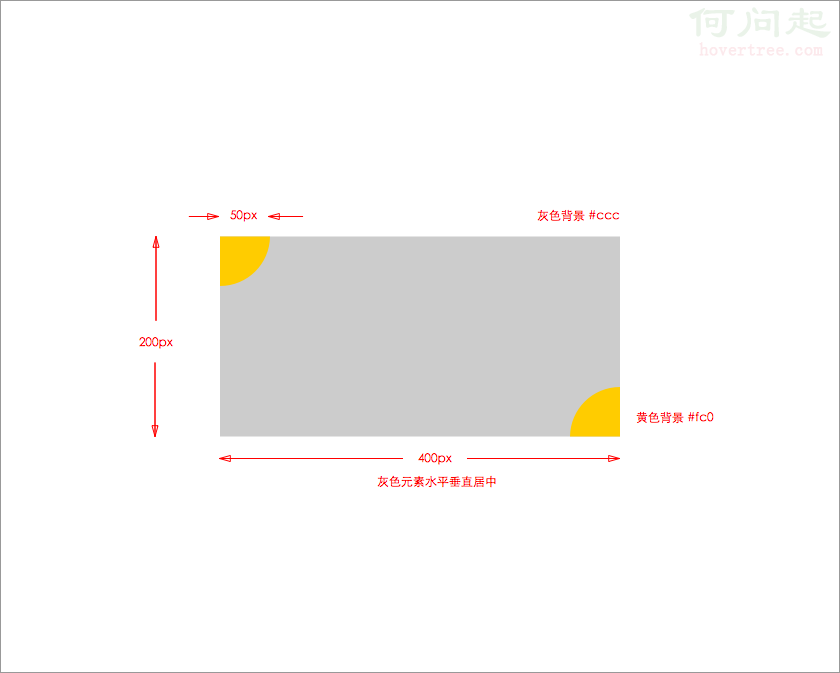
相應代碼如下:
 .main{
     position: absolute;
     top: 50%;
     left: 50%;
     width: 400px;
     height: 200px;
     margin: -100px 0 0 -200px;
     background-color: #ccc;
 }
 .corner{
     position: absolute;
     width: 50px;
     height: 50px;
     background-color: #fc0;
 }
 .top-left{
     top: 0;
     left: 0;
     border-radius: 0 0 50px 0;
 }
 .bottom-right{
     bottom: 0;
     right: 0;
     border-radius: 50px 0 0 0;
 }
對應的html代碼為:
 <div class="container">
         <div class="main">
             <div class="top-left corner"></div>
             <div class="bottom-right corner"></div>
         </div>
 </div>
為實現灰色長方形的居中,我們將其position屬性設置為absolute,在最開始,我使用的是relative,發現top:50%失效,這是因為50%是相對其父元素高度來說的,而其父元素高度為零。於是我將body和父元素高度設置為100%,依然沒有效果(這個疑問還沒有解決)。改為absolute後,灰色長方形的偏移是相對頁面來說的,實現了垂直居中。
最後的兩個黃色圓角,道理相似,設置完absolute後,進一步為其設置top,bottom,right,left屬性即可。
- 上一頁:css display:box 新屬性
- 下一頁:CSS3寫背景圖片疊加了
小編推薦
熱門推薦