22 個你一定用得到的實用 CSS 技巧
編輯:CSS詳解
把日常開發中反覆用到的片段整理成一份清單,涵蓋文字樣式、相容處理、版面置中與表單美化,遇到時直接抄過去就能用。
1. 自訂選取文字時的底色
::selection{ /* Safari and Opera */
   background:#c3effd;
   color:#000;
}
::-moz-selection{ /* Firefox */
   background:#c3effd;
   color:#000;
}
2. 防止 Firefox 滾動條左右跳動
html{ overflow-y:scroll; }
3. 分頁列印
.page-break{ page-break-before:always; }
4. 善用 !important
.page { background-color:blue !important; background-color:red; }
5. 用圖片取代文字
.header{
   text-indent:-9999px;
   background:url('someimage.jpg') no-repeat;
   height: 100px; /*等於圖片高度*/
   width:500px;
}
text-indent:-9999px; 的作用是把首行往左推到看不見的地方,同時保留文字以利 SEO 與無障礙閱讀。
6. 跨瀏覽器的最小高度
#container{
   height:auto !important;/*除 IE6 以外的瀏覽器都認 !important*/
   min-height:500px;
   height:500px;/*值要和 min-height 相同*/
}
7. 標示在新視窗開啟的連結
a[target="_blank"]:before,
a[target="new"]:before {
   margin:0 5px 0 0;
   padding:1px;
   outline:1px solid #333;
   color:#333;
   background:#ff9;
   font:12px "Zapf Dingbats";
   content: "\279C";
}
8. 美化清單序號
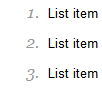
ol {
   font: italic 1em Georgia, Times, serif;
   color: #999999;
}
ol p {
   font: normal .8em Arial, Helvetica, sans-serif;
   color: #000000;
}
9. 首字下沉
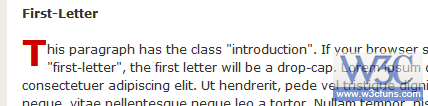
p:first-letter{
display:block;
margin:5px 0 0 5px;
float:left;
color:#FF3366;
font-size:3.0em;
font-family:Georgia;
}
10. 跨瀏覽器的 opacity
.transparent_class {
   filter:alpha(opacity=50);
   -moz-opacity:0.5;
   -khtml-opacity: 0.5;
   opacity: 0.5;
}
11. 用 line-height 做垂直置中
line-height:30px;
12. 整體置中
body{
   width:1000px;
   margin:0 auto;
}
13. 移除 IE 文字框的垂直滾動條
textarea{ overflow:auto; }
14. 移除超連結的虛線框
a:active, a:focus{ outline:none; }
15. 處理 IE 下元素消失
幫該元素加上 position:relative;
16. 依連結類型加上不同圖示
a[href$='.doc'] {
   padding:0 20px 0 0;
   background:transparent url(/graphics/icons/doc.gif) no-repeat center right;
}
17. 手型游標
input[type=submit],label,select,.pointer { cursor:pointer; }
18. 單字首字母大寫
text-transform: capitalize;
19. 小型大寫字母
font-variant:small-caps;
20. 輸入框聚焦時高亮
input[type=text]:focus, input[type=password]:focus{ border:2px solid #000; }
21. 移除圖片邊框
a img{ border:none; }
22. 用 label 排出無表格表單
<form method="post" action="#" >
<p><label for="username" >Username</label>
<input type="text" id="username" name="username" /> </p>
<p><label for="password" >Password</label>
<input type="password" id="password" name="pass" /> </p>
<p><input type="submit" value="Submit" /></p>
</form>
p label{ width:100px; float:left; margin-right:10px; text-align:right; }
label 浮動到左側並固定寬度、文字靠右,輸入框自然排在右邊,就得到一個對齊整齊、又完全語意化的表單。
- 上一篇文章: 用 CSS 打造自訂外觀的 select 下拉選單
- 下一篇文章: CSS 透明度全攻略:從舊版私有屬性到 RGBA 與 HSLA