CSS 浮動的三個核心特性(進階者可略過)
編輯:CSS詳解
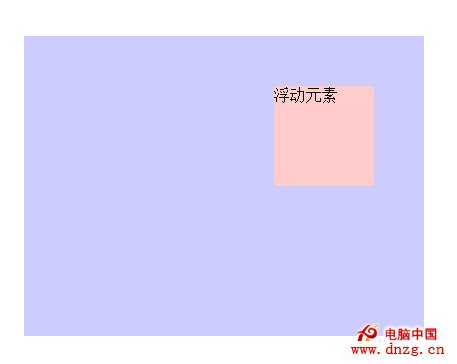
浮動是 CSS 版面設計的基礎,但它的行為細節常被誤解。以下三條特性搭配程式碼與示意圖說明。
特性一:浮動元素脫離正常文檔流
浮動元素會脫離正常的文檔流,依照其外邊距指定的位置,相對於它的上一個塊級元素(或父元素)顯示。
<!DOCTYPE HTML >
<html>
<head>
<meta charset='utf-8'/>
<title>浮動元素的性質</title>
<style type="text/css">
*{
margin:0;
padding:0;
}
.box{
width: 300px;
height: 200px;
padding: 50px;
margin: 50px;
background: #ccf;
}
.inner{
width: 100px;
height: 100px;
background: #fcc;
float: right;
}
</style>
</head>
<body>
<div class='box'>
<div class='inner'>浮動元素</div>
</div>
</body>
</html>
特性二:後續塊級元素的內容會讓位,邊框與背景卻不會
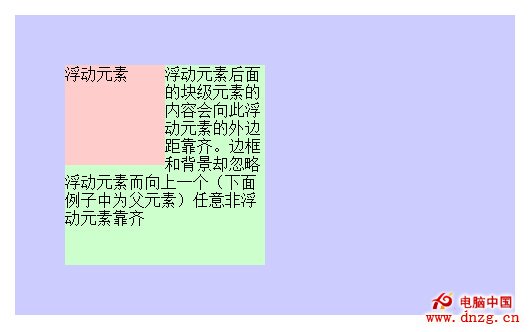
浮動元素後面的塊級元素,其內容會向浮動元素的外邊距靠齊;但這個塊級元素的邊框與背景會忽略浮動元素,逕自向上一個非浮動元素(本例中是父元素)靠齊。這是很多人搞不清楚「文字被擠開、方塊卻沒縮」的原因。
<!DOCTYPE HTML >
<html>
<head>
<meta charset='utf-8'/>
<title>浮動元素的性質</title>
<style type="text/css">
*{
margin:0;
padding:0;
}
.box{
width: 400px;
height: 200px;
padding: 50px;
margin: 50px;
background: #ccf;
}
.inner{
width: 100px;
height: 100px;
background: #fcc;
float: left;
}
.notfloat{
width: 200px;
height: 200px;
background: #cfc;
}
</style>
</head>
<body>
<div class='box'>
<div class='inner'>浮動元素</div>
<div class='notfloat'>浮動元素後面的塊級元素的內容會向此浮動元素的外邊距靠齊。
邊框和背景卻忽略浮動元素而向上一個(此處為父元素)任意非浮動元素靠齊 </div>
</div>
</body>
</html>
特性三:後續內聯元素會向浮動元素的外邊距靠齊
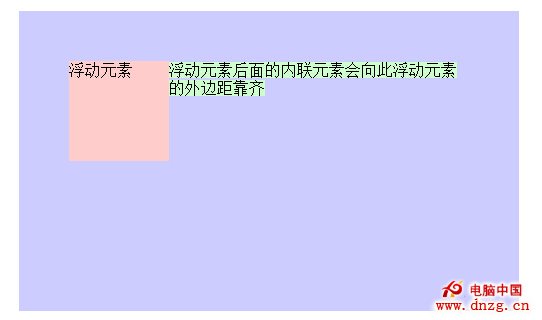
內聯元素的行為比塊級元素單純,無論是文字還是背景,都會乖乖讓位給浮動元素。
<!DOCTYPE HTML >
<html>
<head>
<meta charset='utf-8'/>
<title>浮動元素的性質</title>
<style type="text/css">
*{
margin:0;
padding:0;
}
.box{
width: 400px;
height: 200px;
padding: 50px;
margin: 50px;
background: #ccf;
}
.inner{
width: 100px;
height: 100px;
background: #fcc;
float: left;
}
.notfloat{
background: #cfc;
}
</style>
</head>
<body>
<div class='box'>
<div class='inner'>浮動元素</div>
<span class='notfloat'>
浮動元素後面的內聯元素會向此浮動元素的外邊距靠齊
</span>
</div>
</body>
</html>
把這三條記牢,浮動帶來的絕大多數「靈異現象」都能找到解釋:為什麼文字繞行、方塊卻重疊,為什麼清除浮動是必要的,以及為什麼父元素會塌陷。