純 CSS 打造垂直時間軸版面
編輯:CSS詳解
時間軸特別適合呈現開發日誌、任務進度、產品沿革這類帶有先後順序的內容。這份實作完全不依賴 JavaScript,靠偽元素畫出中軸線、三角形與圓形圖示底座,並附響應式處理。
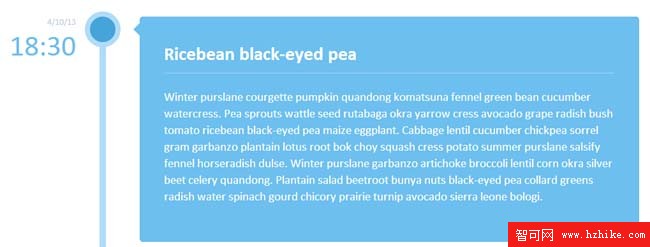
HTML 結構
整條時間軸就是一個 ul,每個 li 內含時間、圖示與內容三塊:
<ul class="cbp_tmtimeline">
  <li>
    <time class="cbp_tmtime" datetime="2013-04-10 18:30">
      <span>4/10/13</span> <span>18:30</span>
    </time>
    <div class="cbp_tmicon cbp_tmicon-phone"></div>
    <div class="cbp_tmlabel">
      <h2>標題</h2>
      <p>這一段是事件內容。</p>
    </div>
  </li>
  <!-- 其餘項目結構相同 -->
</ul>
關鍵樣式:中軸線
.cbp_tmtimeline {
  margin: 30px 0 0 0;
  padding: 0;
  list-style: none;
  position: relative;
}
.cbp_tmtimeline::before {
  content: '';
  position: absolute;
  top: 0; bottom: 0;
  width: 10px;
  background: #afdcf8;
  left: 20%;
  margin-left: -10px;
}
關鍵樣式:卡片與指示三角
.cbp_tmtimeline > li .cbp_tmlabel {
  margin: 0 0 15px 25%;
  background: #3594cb;
  color: #fff;
  padding: 2em;
  font-size: 1.2em;
  font-weight: 300;
  line-height: 1.4;
  position: relative;
  border-radius: 5px;
}
.cbp_tmtimeline > li .cbp_tmlabel::after {
  content: " ";
  position: absolute;
  right: 100%;
  top: 10px;
  height: 0; width: 0;
  pointer-events: none;
  border: solid transparent;
  border-width: 10px;
  border-right-color: #3594cb;
}
三角形是靠「四邊透明、只留一邊填色、寬高歸零」的老技巧做出的,用 pointer-events: none 確保它不吃掉滑鼠事件。
交錯配色與圓形圖示
.cbp_tmtimeline > li:nth-child(odd) .cbp_tmlabel {
  background: #6cbfee;
}
.cbp_tmtimeline > li .cbp_tmicon {
  position: absolute;
  left: 20%;
  top: 0;
  margin: 0 0 0 -25px;
  width: 40px; height: 40px;
  color: #fff;
  background: #46a4da;
  border-radius: 50%;
  box-shadow: 0 0 0 8px #afdcf8;
  text-align: center;
  line-height: 40px;
}
用 nth-child(odd) 讓相鄰項目深淺交替,節奏感就出來了;box-shadow 那圈光暈讓圖示與中軸線自然融合。
響應式收斂
視窗窄於約 47em 時,把中軸線隱藏、時間改為相對定位並靠左對齊、卡片改為單欄堆疊,三角指示的方向也從朝左改成朝上:
@media screen and (max-width: 47.2em) {
  .cbp_tmtimeline::before { display: none; }
  .cbp_tmtimeline > li .cbp_tmtime {
    width: 100%; position: relative; padding: 0 0 20px 0;
  }
  .cbp_tmtimeline > li .cbp_tmlabel {
    margin: 0 0 30px 0; padding: 1em;
  }
  .cbp_tmtimeline > li .cbp_tmlabel::after {
    right: auto; left: 20px; top: -20px;
    border-right-color: transparent;
    border-bottom-color: #3594cb;
  }
  .cbp_tmtimeline > li .cbp_tmicon {
    position: relative; float: right;
    left: auto; margin: -55px 5px 0 0;
  }
}
整份實作的精神在於:所有視覺元素都能用偽元素與邊框技巧取代圖片,維護時只要改幾個色值就能換主題。
- 上一篇文章: hideFocus:如何去掉點擊連結後出現的虛線框
- 下一篇文章: CSS 計數器完整指南:讓序號自動遞增與嵌套