HTML 5 Web Sockets 應用初探(4)
編輯:CSS詳解
第八步:關閉 Socket
關閉 Socket 操作相當簡單,只需為斷開連接按鈕添加 click 事件監聽即可。
- $('#disconnect').click(function(){
- socket.close();
- });
完整 JavaScript 代碼
- $(document).ready(function() {
- if(!("WebSocket" in window)){
- $('#chatLog, input, button, #examples').fadeOut("fast");
- $('<p>Oh no, you need a browser that supports Web Sockets. How about <a href="https://www.google.com/Chrome">Google Chrome</a>?</p>').appendTo('#container');
- }else{
- connect();
- function connect(){
- var socket;
- var host = "ws://localhost:8000/socket/server/startDaemon.php";
- try{
- var socket = new WebSocket(host);
- message('<p class="event">Socket Status: '+socket.readyState);
- socket.onopen = function(){
- message('<p class="event">Socket Status: '+socket.readyState+' (open)');
- }
- socket.onmessage = function(msg){
- message('<p class="message">Received: '+msg.data);
- }
- socket.onclose = function(){
- message('<p class="event">Socket Status: '+socket.readyState+' (Closed)');
- }
- } catch(exception){
- message('<p>Error'+exception);
- }
- function send(){
- var text = $('#text').val();
- if(text==""){
- message('<p class="warning">Please enter a message');
- return ;
- }
- try{
- socket.send(text);
- message('<p class="event">Sent: '+text)
- } catch(exception){
- message('<p class="warning">');
- }
- $('#text').val("");
- }
- function message(msg){
- $('#chatLog').append(msg+'</p>');
- }
- $('#text').keypress(function(event) {
- if (event.keyCode == '13') {
- send();
- }
- });
- $('#disconnect').click(function(){
- socket.close();
- });
- }
- }
- });
第九步:運行 Web Socket 服務器
XAMPP 提供了方便的 shell 選項,點擊控制面板的 shell 按鈕並輸入:
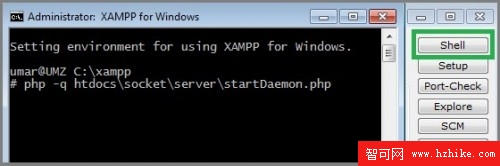
- php -q path\to\server.php
現在你已經運行了 Web Socket 服務器!
大功告成!
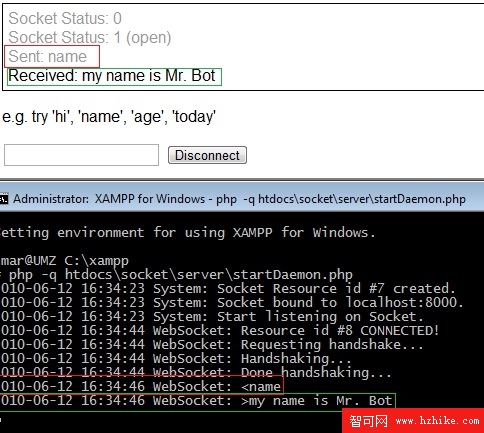
當頁面讀取後,會嘗試建立一個 Web Socket 連接,之後用戶就能輸入信息並從服務器接收信息。想了解更多,可參考 The Web Socket API 的最新動態。
- 上一篇文章: DIV CSS 居中常見方法解析
- 下一篇文章: HTML 5 Web Sockets 應用初探(3)