用 CSS 的 map 標籤實現單圖多區域點擊
編輯:布局實例
map 標籤
用來定義一個客戶端圖像映射。圖像映射(image-map)指帶有可點擊區域的一幅圖像。area 元素永遠嵌套在 map 元素內部,用來定義圖像映射中的區域。
img 標籤的 usemap 屬性可以引用 map 標籤中的 id 或 name 屬性(取決於瀏覽器),所以我們應同時給 map 標籤添加 id 和 name 屬性。
示例
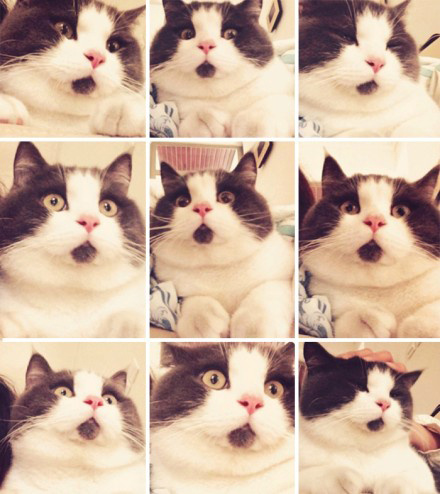
比如我們想在下面這張圖上實現九個熱點區域,又不切圖,就可以用 map 標籤:
首先用 PS 量出幾個坐標:
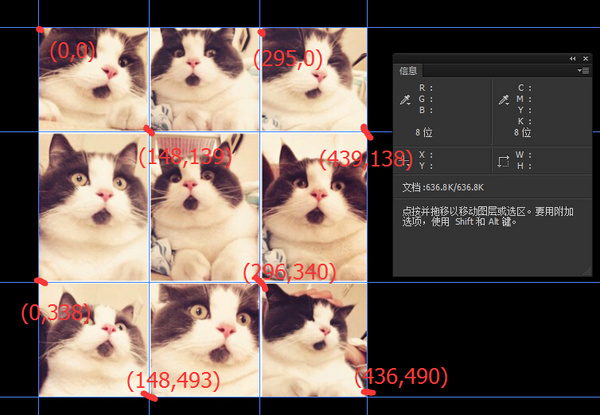
然後代碼實現:
- <!DOCTYPE html>
- <html lang="en">
- <head>
- <meta charset="UTF-8">
- <title>Document</title>
- </head>
- <body>
- <img src="cat.jpg" alt="" usemap="#catmap" >
- <map name="catmap">
- <area shape="rect" coords="0,0,148,139" href ="https://www.baidu.com" target ="_blank" alt="">
- <area shape="rect" coords="148,139,295,0" href ="https://www.sina.com" target ="_blank" alt="">
- <area shape="rect" coords="295,0,439,140" href ="https://www.qq.com" target ="_blank" alt="">
- <area shape="rect" coords="148,139,0,340" href ="https://www.163.com" target ="_blank" alt="">
- <area shape="rect" coords="148,139,296,340" href ="https://www.soso.com" target ="_blank" alt="">
- <area shape="rect" coords="296,340,439,140" href ="https://sf.gg" target ="_blank" alt="">
- <area shape="rect" coords="0,340,148,493" href="https://www.zhihu.com" target ="_blank" alt="">
- <area shape="rect" coords="148,493,296,340" href="https://z.cn" target ="_blank" alt="">
- <area shape="rect" coords="296,340,436,490" href="https://jd.com" target ="_blank" alt="">
- </map>
- </body>
- </html>
就是這麼簡單。
關於 area
area 可以是圓形(circle)、多邊形(polygon)或矩形(rect),不同形狀要選取不同的坐標(coords):
圓形:shape="circle",coords="x,y,z",其中 x,y 為圓心坐標,z 為圓的半徑;
多邊形:shape="polygon",coords="x1,y1,x2,y2,x3,y3,...",每一對 x,y 坐標定義多邊形的一個頂點((0,0) 是圖像左上角坐標)。定義三角形至少需要三組坐標,邊數越多則需要越多頂點;
矩形:shape="rectangle",coords="x1,y1,x2,y2",第一對坐標是矩形一個角的頂點,另一對是對角頂點,(0,0) 是圖像左上角坐標。也就是說,只要知道對角兩點的坐標即可——定義矩形其實是定義帶四個頂點的多邊形的一種簡化方法。
- 上一篇文章: CSS 背景編程完全教程:顏色、圖片、漸變與多背景
- 下一篇文章: 詳解 CSS 中的規則聲明:文本值、數字值與顏色值