用純 CSS 實作百分比進度條
編輯:布局實例
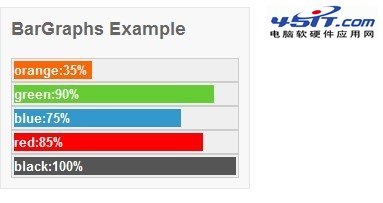
要顯示百分比或比例,很多人直覺就想到 JS 或圖表庫。其實只要一個外框加上一個寬度可變的 span,CSS 就能勝任。
<style>
#graphbox{
border:1px solid #e7e7e7;
padding:10px;
width:250px;
background-color:#f8f8f8;
margin:5px 0;
}
#graphbox h2{
color:#666666;
font-family:Arial;
font-size:18px;
font-weight:700;
}
.graph{
position:relative;
background-color:#F0EFEF;
border:1px solid #cccccc;
padding:2px;
font-size:13px;
font-weight:700;
}
.graph .orange, .green, .blue, .red, .black{
position:relative;
text-align:left;
color:#ffffff;
height:18px;
line-height:18px;
font-family:Arial;
display:block;
}
.graph .orange{background-color:#ff6600;}
.graph .green{background-color:#66CC33;}
.graph .blue{background-color:#3399CC;}
.graph .red{background-color:red;}
.graph .black{background-color:#555;}
</style>

<div id="graphbox">
 <h2>BarGraphs Example</h2>
 <div class="graph"><span class="orange" style="width:35%;">orange:35%</span></div>
 <div class="graph"><span class="green" style="width:90%;">green:90%</span></div>
 <div class="graph"><span class="blue" style="width:75%;">blue:75%</span></div>
 <div class="graph"><span class="red" style="width:85%;">red:85%</span></div>
 <div class="graph"><span class="black" style="width:100%;">black:100%</span></div>
</div>
原理拆解
結構只有兩層:.graph 是灰色底槽,代表 100% 的總量;裡面的 span 是實際進度,寬度用百分比指定。因為外層沒有固定寬高,span 的 width:35% 就是相對外層的 35%,視窗縮放時比例自動維持。
span 必須設 display:block,否則行內元素的寬度宣告不會生效——這是最常出錯的一步。文字用 line-height:18px 配合 height:18px 做垂直居中,並設為白色,疊在色塊上剛好可讀。
五種顏色各自獨立成 class,實際使用時只改 inline 的 width 值即可,不必重寫樣式。
可以再加強的地方
若想要平滑的增長動畫,加上 transition 就好:
.graph span{ transition: width 0.6s ease-out; }
要讓數字真正「跑到」某個百分比,用一點 JS 改寫 width 即可,視覺上的補間交給 CSS 處理。此外,為了讓螢幕閱讀器能唸出正確數值,建議替外層加上 role="progressbar" 與 aria-valuenow 等 ARIA 屬性,這點在原始範例中並未處理。
- 上一篇文章: CSS 版面入門:搞懂瀏覽器的文件流與載入順序
- 下一篇文章: CSS 中 em 與 px 到底差在哪