CSS 如何移除下劃線?text-decoration:none 用法
編輯:布局基本知識
移除底線、上標線與刪除線,用的是同一個屬性:text-decoration,只要把值設為 none。
一、語法
text-decoration: none;
這一行會同時移除底線、上標線與刪除線三種裝飾。
u { text-decoration: none; }
這段讓所有 <u> 標籤內的文字不再顯示底線——標籤還在,樣式被 CSS 取消了。
二、實作範例
<!DOCTYPE html>
<html>
<head>
<meta http-equiv="Content-Type" content="text/html; charset=utf-8" />
<title>移除底線範例</title>
<style>
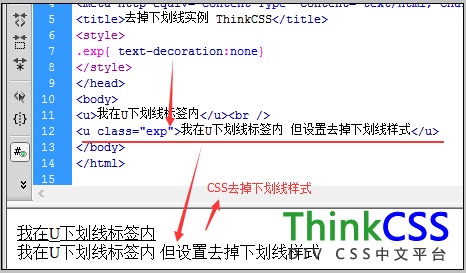
.exp { text-decoration: none; }
</style>
</head>
<body>
<u>我在 u 標籤內,有底線</u><br />
<u class="exp">我在 u 標籤內,但底線被移除了</u>
</body>
</html>
三、最常見的用途:超連結
a { text-decoration: none; }
a:hover { text-decoration: underline; }
導覽列幾乎都用這個寫法:靜態時乾淨,互動時給回饋。
四、移除底線後別忘了這件事
底線是使用者辨識「這裡可以點」的重要線索。拿掉它之後,必須用其他方式補回可辨識性,否則會影響可用性與無障礙:
a {
color: #0645AD;              /* 與內文有足夠對比 */
text-decoration: none;
}
a:hover, a:focus {
text-decoration: underline;  /* 互動與鍵盤聚焦都要有回饋 */
}
特別注意 :focus——只用滑鼠的使用者靠 hover,鍵盤使用者靠 focus。少了它,就等於把鍵盤操作的人排除在外。
在導覽列、按鈕這類「周邊環境已明顯是互動元件」的地方移除底線沒問題;但在段落內文中,建議保留底線或至少維持足夠的顏色對比。
- 上一篇文章: CSS 下劃線設定:用 text-decoration 替文字加底線
- 下一篇文章: CSS border-top 上邊框樣式設定