div css margin-top:設定元素上側外邊距
編輯:布局基本知識
本文帶你認識 margin-top,並用實作範例示範它怎麼設定元素與上一個元素之間的間距。
margin-top 是設定元素距離上一個物件的間距,屬於邊框以外的距離樣式。
一、margin-top 語法
.thinkcss{margin-top:10px}
這段程式碼把「.thinkcss」的上邊間距設為 10px。
相關文章:margin
二、margin-top 應用範例
為了方便觀察,建立三個 DIV 盒子,寬度、高度、邊框都相同,幫第二個設 margin-top:10px、第三個設 margin-top:20px,比較效果。三個盒子分別命名為「.div1」「.div2」「.div3」。
1、完整 HTML+CSS:
 <!DOCTYPE html>
<html>
<head>
<meta charset="utf-8" />
<title>margin-top在線實例 thinkcss</title>
<style>
.div1,.div2,.div3{ width:300px; height:80px; border:1px solid #F00}
/* 三個物件相同的寬度、高度、紅色邊框 */
.div2{ margin-top:10px}/* 距離上方物件 10px */
.div3{ margin-top:20px}/* 距離上方物件 20px */
</style>
</head>
<body>
<div class="div1"></div>
<div class="div2"></div>
<div class="div3"></div>
</body>
</html>
2、範例截圖:
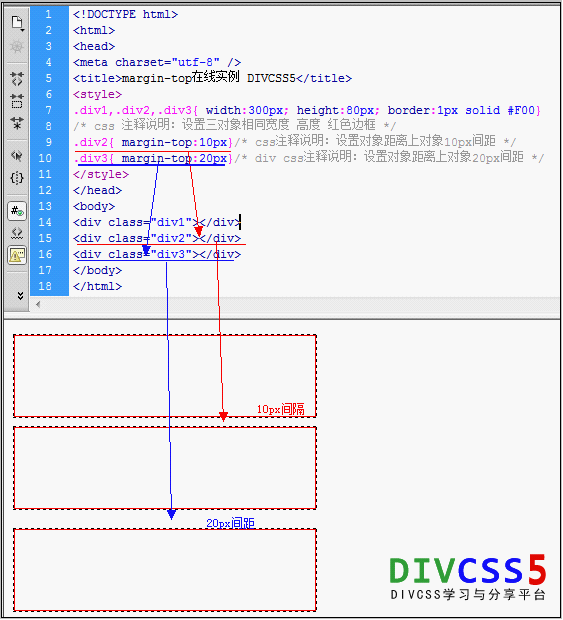
margin-top 應用範例
3、線上演示:查看案例
4、打包下載:
立即下載 (0.917KB)
5、小結:margin-top 是設定元素與上方物件的距離。如果元素沒有設背景或邊框,也可以用 padding-top 來替代。
- 上一篇文章: div 屬性有哪些?DIV 標籤常用屬性與設定方法
- 下一篇文章: DIV CSS 邊框寬度怎麼設?HTML 邊框寬度實作教學