詳解CSS五種方式實現Footer置底
編輯:關於CSS
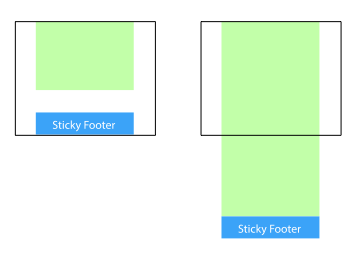
頁腳置底(Sticky footer)就是讓網頁的footer部分始終在浏覽器窗口的底部。
當網頁內容足夠長以至超出浏覽器可視高度時,頁腳會隨著內容被推到網頁底部;但如果網頁內容不夠長,置底的頁腳就會保持在浏覽器窗口底部。
方法一:將內容部分的margin-bottom設為負數
<div class="wrapper">
    <!-- content -->
    <div class="push"></div>
</div>
<div class="footer">footer</div>
html, body {
  margin: 0;
  padding: 0;
  height: 100%;
}
.wrapper {
  min-height: 100%;
  margin-bottom: -50px; /* 等於footer的高度 */
}
.footer, .push {
  height: 50px;
}
1、這個方法需要容器裡有額外的占位元素(div.push)。
2、div.wrapper的margin-bottom需要和div.footer的-height值一樣,注意是負height。
方法二:將頁腳的margin-top設為負數
給內容外增加父元素,並讓內容部分的padding-bottom與頁腳的height相等。
<div class="content">
  <div class="content-inside">
    <!-- content -->
  </div>
</div>
<div class="footer">footer</div>
html, body {
  margin: 0;
  padding: 0;
  height: 100%;
}
.content {
  min-height: 100%;
}
.content-inside {
  padding: 20px;
  padding-bottom: 50px;
}
.footer {
  height: 50px;
  margin-top: -50px;
}
方法三:使用calc()設置內容高度
<div class="content">
  <!-- content -->
</div>
<div class="footer">footer</div>
.content {
  min-height: calc(100vh - 70px);
}
.footer {
  height: 50px;
}
這裡假設div.content和div.footer之間有20px的間距,所以70px=50px+20px
方法四:使用flexbox彈性盒布局
以上三種方法的footer高度都是固定的,如果footer的內容太多則可能會破壞布局。
<div class="content">
  <!-- content -->
</div>
<div class="footer">footer</div>
html {
  height: 100%;
}
body {
  min-height: 100%;
  display: flex;
  flex-direction: column;
}
.content {
  flex: 1;
}
方法五:使用Grid網格布局
<div class="content">
  <!-- content -->
</div>
<div class="footer">footer</div>
html {
  height: 100%;
}
body {
  min-height: 100%;
  display: grid;
  grid-template-rows: 1fr auto;
}
.footer {
  grid-row-start: 2;
  grid-row-end: 3;
}
以上就是本文的全部內容,希望對大家的學習有所幫助,也希望大家多多支持。
- 上一頁:利用CSS3實現進度條的兩種姿勢詳解
- 下一頁:CSS3實現頭像旋轉效果
小編推薦
熱門推薦