用React加CSS3實現微信拆紅包動畫效果
編輯:關於CSS
微信紅包曾經引爆過一系列的營銷熱潮,相信大家對於這種紅包形式並不陌生,這裡本著娛樂至上的精神用React簡單地實現了拆紅包的動畫效果,供大家一起交流學習
用CSS3繪制紅包
.redpack {
  height: 450px;
  background: #A5423A;
  width: 300px;
  left: 0;
  top: 0;
  border-radius: 10px;
  margin: 0 auto;
}
.topcontent {
    height: 300px;
    border: 1px solid #BD503A;
    background-color: #BD503A;
    border-radius: 10px 10px 50% 50% / 10px 10px 15% 15%;
    box-shadow: 0px 4px 0px -1px rgba(0,0,0,0.2);
}
#redpack-open {
    width: 100px;
    height: 100px;
    border: 1px solid #FFA73A;
    background-color: #FFA73A;
    border-radius: 50%;
    color: #fff;
    font-size: 20px;
    display: inline-block;
    margin-top: -50px;
    box-shadow: 0px 4px 0px 0px rgba(0, 0, 0, 0.2);
}
<div class='redpack'>
  <!--  紅包的頂部蓋子 -->
  <div class="topcontent"></div>
  <!-- 拆紅包的按鈕 -->
  <div id="redpack-open"></div>
</div>
效果如圖:
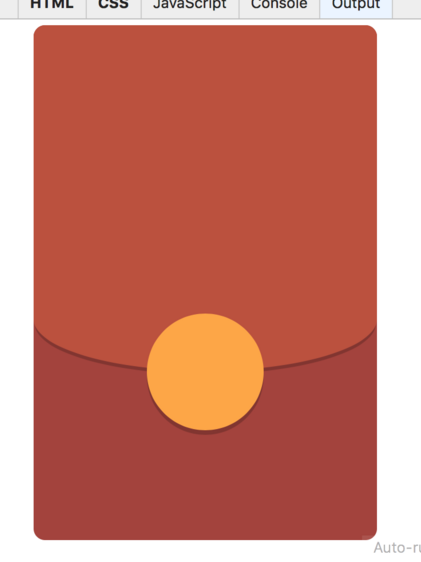
用React來區分不同的狀態的轉換
用React.js來實現的話,主要通過判斷state來控制紅包現在是等待拆開還是已經拆開過,具體的代碼如下
import React from 'react';

class ReadPacket extends React.Component {
    constructor(props) {
        super(props);
        this.state = {
            animation: false,
            status: 0  // 0: 等待拆開 1: 拆開後
        };
    }

    render() {
        var bonus = this.props.thanks ? 0 : parseFloat(this.props.surveyInfo.bonus);

        if(this.state.status == 0) {
            return (
                <div className='redpack-container' id='redpack-container'>
                    <div className='redpack'>
                        <div className='topcontent'>
                            <div id='redpack-opened'>
                              <div className='redpack-avatar'>
                                <img src='http://placehold.it/80x80' alt='頭像' width='80' height='80'/>
                              </div>
                            </div>
                            <h2 style={{marginTop: 80, color: 'white'}}>獎勵</h2>
                            <span className='redpack-text'>點擊下方按鈕領取紅包</span>
                            <div className='redpack-description white-text'>恭喜發財 大吉大利</div>
                        </div>

                        <div id='redpack-open' className={this.state.animation ? 'rotate' : ''}
                             onClick={this.openRedPacket.bind(this)}
                        >
                            <span>拆紅包</span>
                        </div>
                    </div>
                </div>
            );
        } else if (bonus == 0) {
            // 謝謝參與
            return (
                <div className='redpack-container' id='redpack-container'>
                    <div className='redpack'>
                        <div className='topcontent-open'>
                            <div className='redpack-avatar'>
                                <span id='close'></span>
                            </div>
                            <h1 style={{marginTop: 180, color: 'white'}}> 謝謝參與 </h1>
                            <span className='redpack-text'>多多參與的獎勵的機會更多哦</span>
                            <br/>
                            <a onClick={this._toWallet.bind(this)}
                               style={{cursor:'pointer',textDecoration: 'underline', color: 'white'}}>
                                去我的賬戶查看
                            </a>
                        </div>

                        <div id='redpack-opened'>
                          <div className='redpack-avatar'>
                            <img src='http://placehold.it/80x80' alt='頭像' width='80' height='80'/>
                          </div>
                        </div>
                    </div>
                </div>
            );
        } else {
            // 顯示獎勵金額
            return (
                <div className='redpack-container' id='redpack-container'>
                    <div className='redpack'>
                        <div className='topcontent-open'>
                            <div className='redpack-avatar'>
                                <span id='close'></span>
                            </div>
                            <h1 className='white-text' style={{marginTop: 180}}> {bonus.toFixed(2)} </h1>
                            <span className='redpack-text'>獎勵積分已經存入您的賬戶</span>
                            <a className='btn-flat white-text' onClick={this._toWallet.bind(this)}
                               style={{textDecoration: 'underline'}}>
                                去我的賬戶查看積分
                            </a>
                        </div>

                        <div id='redpack-opened'>
                          <div className='redpack-avatar'>
                            <img src='http://placehold.it/80x80' alt='頭像' width='80' height='80'/>
                          </div>
                        </div>
                    </div>
                </div>
            );
        }
    }

    stopAnimation() {
        this.setState({animation: false});
    }

    showResult() {
        this.setState({status: 1});
    }

    openRedPacket() {
        this.setState({animation: true});
        setTimeout(this.stopAnimation.bind(this), 3000);
        setTimeout(this.showResult.bind(this), 4000);
    }

    _toWallet() {
      // 跳轉到錢包
      window.location.hash = '/wallet';
    }
}

export default ReadPacket;
demo下載地址:redpacket_jb51.rar
以上就是本文的全部內容,希望對大家的學習有所幫助,也希望大家多多支持。
小編推薦
熱門推薦