一、基本概念
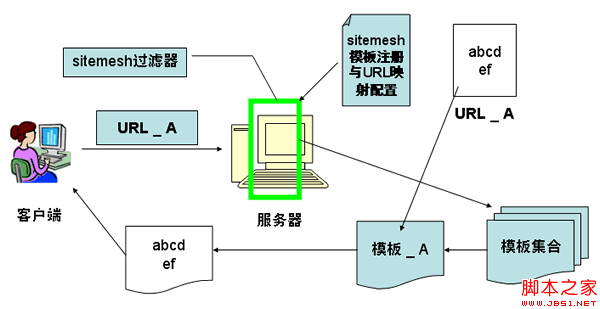
1. Sitemesh 是一種頁面裝飾技術。它的工作流程是:
① 通過過濾器(filter)攔截頁面訪問;
② 依被訪問頁面的 URL 找到合適的裝飾模板;
③ 提取被訪問頁面的內容,放進裝飾模板中合適的位置;
④ 最終把裝飾後的頁面發送給客戶端。
2. 在 Sitemesh 中,頁面分為兩類:裝飾模板(用於修飾其他頁面的頁面)與普通頁面(各類應用頁面)。
3. 接下來用一個簡單的例子說明 Sitemesh 修飾網頁的基本原理。
二、模板修飾網頁的原理
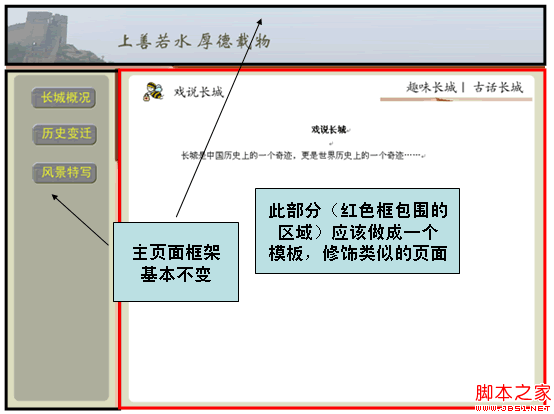
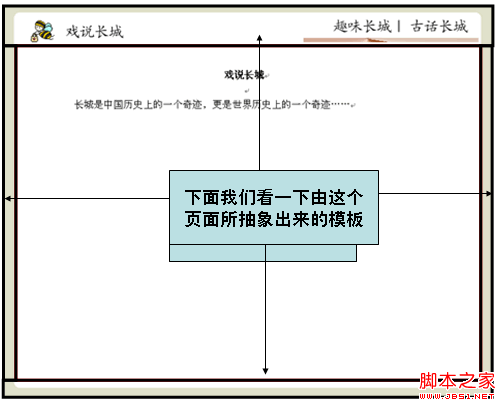
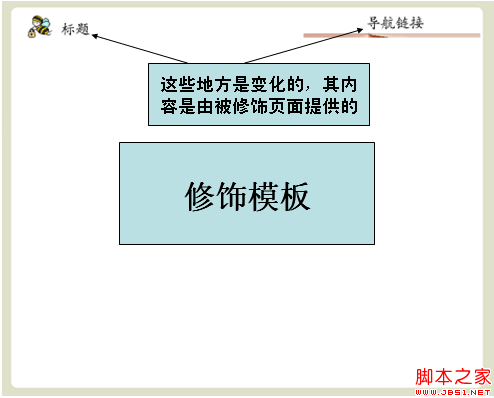
通過 Sitemesh 的註冊機制告訴它:訪問該路徑時,使用指定的裝飾模板(這裡假定用前面那個模板)來修飾被訪問頁面。
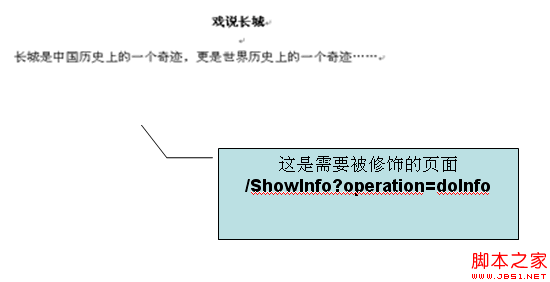
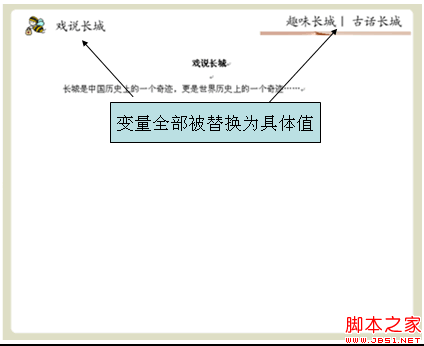
當用戶在左側導航欄點擊「戲說長城」(/ShowGreatWall.do)時,右側的「戲說長城」頁面便會被指定模板修飾。
歸納上述過程,Sitemesh 修飾網頁的基本原理可以概括為:
三、Sitemesh 的配置與使用
1)在 WEB-INF/web.xml 中加入 filter 定義與 taglib 定義
<filter>
 <filter-name>sitemesh</filter-name>
 <filter-class>com.opensymphony.module.sitemesh.filter.PageFilter</filter-class>
</filter>
<filter-mapping>
 <filter-name>sitemesh</filter-name>
 <url-pattern>/*</url-pattern>
</filter-mapping>
<taglib>
 <taglib-uri>sitemesh-decorator</taglib-uri>
 <taglib-location>/WEB-INF/sitemesh-decorator.tld</taglib-location>
</taglib>
<taglib>
 <taglib-uri>sitemesh-page</taglib-uri>
 <taglib-location>/WEB-INF/sitemesh-page.tld</taglib-location>
</taglib>
2)創建 WEB-INF/decorators.xml,在其中配置有哪些模板、每個模板修飾哪些 URL,也可以指定哪些 URL 不需要模板控制:
<excludes>
<pattern>/Login*</pattern>
</excludes>
<decorators defaultdir="/decorators">
 <decorator name="main" page="DecoratorMainPage.jsp">
 <pattern>/*</pattern>
 </decorator>
 <decorator name="pop" page="PopPage.jsp">
 <pattern>/showinfo.jsp*</pattern>
 <pattern>
 /myModule/GreatWallDetailAction.do*
 </pattern>
 </decorator>
</decorators>
3)一個裝飾模板的例子
<%@page contentType="text/html;charset=GBK"%>
<%@taglib uri="sitemesh-decorator" prefix="decorator" %>
<html>
 <head>
 <title> <decorator:title/> </title>
 <decorator:head/>
 </head>
 <body>
 Hello World <hr/>
 <decorator:body/>
 </body>
</html>
4)一個被修飾頁面的例子
<%@ page contentType="text/html;charset=GBK"%>
<html>
 <head>
 <title>Hello World</title>
 </head>
 <body>
 <p>Decorated page goes here.</p>
 </body>
</html>
5)裝飾模板中可用的 Sitemesh 標籤
<decorator:head />
取出被裝飾頁面 head 標籤中的內容。
<decorator:body />
取出被裝飾頁面 body 標籤中的內容。
<decorator:title default="" />
取出被裝飾頁面 title 標籤中的內容,default 為預設值。
<decorator:getProperty property="" default="" writeEntireProperty="" />
取出被裝飾頁面相關標籤的屬性值。writeEntireProperty 用來控制顯示的是屬性值本身,還是「屬性=值」的完整形式。可取的屬性包括 Html 標籤的屬性、Body 標籤的屬性與 Meta 標籤的屬性。
注意:若 content 值中包含 > 或 < 會報錯,需要轉義處理,例如寫成 < 等。default 同樣表示預設值。
<decorator:usePage id="" />
將被裝飾頁面構造為一個物件,可在裝飾頁面的 JSP 中直接引用。
6)在裝飾模板中使用標籤的例子
<html lang=" <decorator:getProperty property='lang'/> ">
 <head>
 <title> <decorator:title default="你好" /> </title>
 <decorator:head />
 </head>

 <body <decorator:getProperty property="body.onload" writeEntireProperty="1"/> >
 從meta中獲取變量company的名稱:
 <decorator:getProperty property="meta.company"/>
 下面是被修飾頁面的body中的內容:
 <decorator:body />
 <decorator:usePage id="myPage" />
 <%=myPage.getRequest().getAttribute("username")%>
 </body>
</html>
7)對應的被修飾頁面
<html lang="en">
 <head>
 <title>我的sitemesh</title>
 <meta name="company" content="smartdot"/>
 <meta name="Author" content="zhangsan"/>
 <script>
 function count(){return 10;}
 </script>
 </head>
 <body onload="count()">
 <p>這是一個被修飾頁面</p>
 </body>
</html>
四、總結
1. Sitemesh 最核心的兩件事,是製作裝飾模板,以及在 decorators.xml 中配置 URL Pattern,指明哪個模板修飾哪些頁面。
2. 落地時要先分析整個工程,判斷哪些頁面值得抽象成模板——二級頁面、三級頁面、彈出窗口等往往都需要各自的模板。一般來說,一個大型 OA 系統的模板數量不會超過八個。
—— ————————
還有一個常見疑問:某個請求路徑落在過濾器範圍內,但就是不希望它被裝飾,怎麼辦?
別擔心,Sitemesh 早就想到了,decorators.xml 中的 excludes 結點正是為此準備的。下面是我的配置:
<?xml version="1.0" encoding="ISO-8859-1"?>
<decorators defaultdir="/decorators">
 <!-- Any urls that are excluded will never be decorated by Sitemesh -->
 <excludes>
 <pattern>/index.jsp*</pattern>
 <pattern>/login/*</pattern>
 </excludes>
 <decorator name="main" page="main.jsp">
 <pattern>/*</pattern>
 </decorator>
</decorators>
decorators.xml 有兩個主要結點:
decorator 結點指定模板的位置與檔名,通過其中的 pattern 指明哪些路徑引用哪個模板;excludes 結點則指定哪些路徑的請求不使用任何模板。
如上面這份配置,/index.jsp 以及所有以 /login/ 開頭的請求路徑都不套用模板。
另外要注意,decorators 結點的 defaultdir 屬性指定了模板檔案存放的目錄。
- 上一篇文章: 瀏覽器事件全覽:常用事件分類速查表
- 下一篇文章: 網站設計核心概念透解:行內元素、塊元素與浮動