HTML 與 CSS 快速入門(一):基礎概念與常用屬性
編輯:WEB前端代碼
Web 前端一直是我的相對弱項,以前常為了調整一個簡單的樣式耗掉大量時間。趁著這次參與前端開發,索性把這塊知識系統性地補一遍。內容偏工具手冊性質,目標是「熟練到不用查」。

HTML 是什麼
HTML(Hypertext Markup Language,超文本標記語言)由 Tim Berners-Lee 爵士於 1990 年設計,成為網際網路上標準的文字傳輸形式。對在這個行業工作的我們而言,這可以說是飯碗的基礎。
基本文件結構
<!DOCTYPE html>
<html>
<head>
    <meta charset="UTF-8">
    <title>cheer up, xionger</title>
</head>
<body>
    <p>first course</p>
    <br/>
    <h1>hello</h1>
    <hr/>
    <h1>world</h1>
</body>
</html>


常見 HTML 標籤
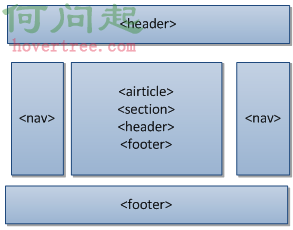
<html>…</html>:封閉整個 HTML 文件<head>…</head>:文件的頭部,位於 html 標籤內<title>…</title>:指定頁面標題<body>…</body>:文件主體<p>…</p>:段落,段落之間會空一行<br/>與<hr/>:換行與水平線<h1>到<h6>:一至六年級標題<header>:頁面或區塊的頂部<footer>:頁面或區塊的註腳<nav>:頁面或全站的導覽連結<section>:內容的主題群組<article>:一段獨立的內容,例如新聞報導<aside>:與主內容相關的輔助資訊
Tip:驗證網頁內容可用 https://validator.w3.org/ 。平時不妨用 View Source 看看常見網站的原始碼,往往能學到東西。

CSS 是什麼
CSS(Cascading Style Sheet,層級樣式表)是一種定義樣式結構的語言,用來描述字型、顏色、定位等外觀,說明如何在網頁上格式化並呈現資訊。其中的樣式規則可套用到網頁元素,例如文字段落或連結。
外部樣式表示例
/* first02.css */
body{
    font-size: 10pt;
    font-family: Verdana, Geneva, Arial, Helvetica, sans-serif;
    color: black;
    line-height: 14pt;
    padding-left: 5pt;
    padding-right: 5pt;
    padding-top: 5pt;
}
h1{
    font: 14pt Verdana, Geneva, Arial, Helvetica, sans-serif;
    font-weight: bold;
    line-height: 20pt;
}
p.subheader{ font-weight: bold; color: #593d87; }
img{ padding: 3pt; float: right; }
a{ text-decoration: none; }
a:link, a:visited{ color: #8094d6; }
a:hover, a:active{ color: #FF9933; }
footer{
    font-size: 9pt;
    font-style: italic;
    line-height: 12pt;
    text-align: center;
    padding-top: 30pt;
}
<!-- first01.html -->
<!DOCTYPE html>
<html>
<head>
<meta charset="utf-8">
<title>About Xionger</title>
<link rel="stylesheet" type="text/css" href="first02.css">
</head>
<body>
<section>
<header>
<h1>About Xionger</h1>
</header>
<p>
<img src="python.jpg" alt="Xionger logo" />
伐木工光頭強在森林中伐木賺錢。為了保衛叢林,熊兄弟一起反抗,
無數次打敗了光頭強,上演了搞笑的叢林保衛戰……
</p>
<p class="subheader">Xionger History</p>
<p>熊二一般情況下呆呆傻傻、憨態可掬,但是非常善良……</p>
<p><a href="https://www.baidu.com">[continue reading]</a></p>
</section>
<footer>
Copyright ©2016 (www.xionger.com). All rights reserved.
</footer>
</body>
</html>
基本版面屬性(display)
block:在新的一行顯示元素,如同獨立段落list-item:在新的一行顯示,並在旁邊帶上項目符號inline:在當前段落內行內顯示none:不顯示,元素隱藏
display 的行為與定位概念息息相關。除了本文提到的相對定位(relative positioning,元素相對於其他元素定位),後續還會接觸絕對定位(absolute positioning)。
Tip:常見長度單位有 in(英寸)、cm(公分)、mm(毫米)、%(百分比)、px(像素)、pt(點數)。
基本格式化屬性
- Border 系列:
border-width邊框寬度、border-color邊框顏色、border-style邊框樣式(solid 單線、double 雙線、dashed 短劃虛線、dotted 點線、groove 凹槽立體、none/hidden 無邊框),以及border-left/right/top/bottom分方向設定。 - Background-color:元素內部區域的顏色。
- Text-align:內容對齊方式,含 left、right、center、justify(左右對齊)。
- Text-indent:內容縮排。
- Font-family:字型系列,依序遞補挑選。
- Font-size / Font-weight:字級大小與粗細(normal、lighter、bold、bolder)。
- Font-style:字型風格,normal 或 italic。
- Line-height:行高,用來設定每一行文字的高度。
- Padding:為元素上下左右加上內距。
樣式類與 ID
/* 使用樣式類 */
p.subheader{ font-weight: bold; color: #593d87; }

/* 使用樣式 ID */
p#title{ font: 24pt Verdana, Geneva, Arial }

/* 引用樣式表 */
<link rel="stylesheet" type="text/css" href="first03.css">
Tip:驗證樣式表可用 https://jigsaw.w3.org/css-validator/ 。

下圖是經典的 HTML5 頁面結構示意:
參考資料
- 梅洛尼. HTML與CSS入門經典(第9版) [M]. 北京: 人民郵電出版社, 2014.
- 上一篇文章: HTML 特殊字符速查:愛心、方塊、黑桃與箭頭符號
- 下一篇文章: 前端開發者為什麼該會一點 Photoshop:環境設定與常用工具