jQuery 做出圖片列表滑鼠移入的微位移效果
編輯:網頁特效代碼
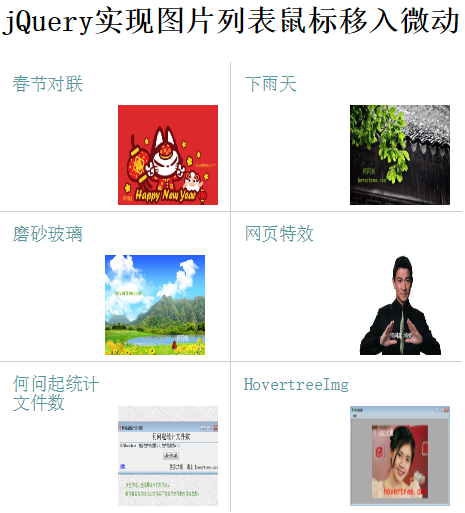
這個效果示範了如何以 jQuery 搭配 CSS,做出一組圖文並列的列表;當滑鼠移入某一項時,右側的縮圖會向左微微滑動,移出後自動復原。細小的位移就能為靜態列表增添不少靈活感。
效果圖:
關鍵技術點
事件選用的是 mouseenter 與 mouseleave 而非 mouseover/mouseout,因為前者不會因游標在子元素間移動而重複觸發,效果更穩定。事件綁定則採用較新推薦的 on 方法,並以 .on('mouseenter').on('mouseleave') 的鏈式寫法一次掛上兩個事件。動畫部分呼叫 stop(true) 清除佇列中的舊動畫,避免快速劃過時出現位移錯亂。
程式碼
<!DOCTYPE html>
<html>
<head>
<meta name="viewport" content="width=device-width, initial-scale=1" />
<title>jQuery 實現圖片列表滑鼠移入微動</title>
<meta http-equiv="Content-Type" content="text/html; charset=UTF-8">
<style type="text/css">
body, div, li, p, img, a { margin: 0; padding: 0; }

.hovertreecontainer { width: 370px; margin: 50px auto; }
.hovertreecontainer a { text-decoration: none; }

.hovertree-item-box {
    height: 120px;
    width: 185px;
    position: relative;
    padding: 10px;
    box-sizing: border-box;
    float: left;
}

.hovertree-item-box .title {
    width: 80px;
    height: 100%;
    color: #4998a1;
    font-size: 14px;
}

.hovertree-item-box.odd {
    border-bottom: 1px solid #CCC;
    border-right: 1px solid #CCC;
}

.hovertree-item-box.even { border-bottom: 1px solid #CCC; }
.hovertree-item-box.nobottom { border-bottom: none; }

.hovertree-item-box .hovertree-img-box {
    width: 80px;
    height: 80px;
    overflow: hidden;
    position: absolute;
    right: 10px;
    bottom: 5px;
}

.hovertree-img-box img { width: 100%; height: 100%; }

.hovertreecontainer:after {
    content: "";
    display: block;
    clear: both;
}
</style>
</head>
<body>

<div class="hovertreecontainer">
<h2>jQuery 實現圖片列表滑鼠移入微動</h2>

<a href="https://hovertree.com/texiao/css/20/">
    <div class="hovertree-item-box odd">
        <div class="title">春節對聯</div>
        <div class="hovertree-img-box"><img src="https://hovertree.com/hvtimg/201512/o9qashmi.gif"></div>
    </div>
</a>

<a href="https://hovertree.com/hvtart/bjae/a6w6e2qg.htm">
    <div class="hovertree-item-box even">
        <div class="title">下雨天</div>
        <div class="hovertree-img-box"><img src="https://hovertree.com/hvtimg/201512/f748s0ko.jpg"></div>
    </div>
</a>

<a href="https://hovertree.com/h/bjae/0st5ww13.htm">
    <div class="hovertree-item-box odd">
        <div class="title">磨砂玻璃</div>
        <div class="hovertree-img-box"><img src="https://hovertree.com/hvtimg/201512/agagq0or.jpg"></div>
    </div>
</a>

<a href="https://hovertree.com/menu/texiao/">
    <div class="hovertree-item-box even">
        <div class="title">網頁特效</div>
        <div class="hovertree-img-box"><img src="https://hovertree.com/hvtimg/201512/r51a22uy.gif"></div>
    </div>
</a>

<a href="https://hovertree.com/h/bjaf/hwqtjwjs.htm">
    <div class="hovertree-item-box odd nobottom">
        <div class="title">何問起統計文件數</div>
        <div class="hovertree-img-box"><img src="https://hovertree.com/hvtimg/bjafjd/iofopnro.png"></div>
    </div>
</a>

<a href="https://hovertree.com/h/bjaf/hovertreeimg.htm">
    <div class="hovertree-item-box even nobottom">
        <div class="title">HovertreeImg</div>
        <div class="hovertree-img-box"><img src="https://hovertree.com/hvtimg/201601/p3t2ldyr.png"></div>
    </div>
</a>

<div>
    <a href="https://hovertree.com/h/bjaf/4mv4wgmj.htm">原文</a>
    <a href="https://hovertree.com">首頁</a>
    <a href="https://hovertree.com/menu/texiao/">特效</a>
</div>
</div>

<script type="text/javascript" src="https://down.hovertree.com/jquery/jquery-1.11.3.min.js"></script>
<script type="text/javascript">
$(function () {
    $('.hovertreecontainer .hovertree-item-box')
        .on('mouseenter', function () {
            var oImgBox = $(this).find('.hovertree-img-box');
            $(oImgBox).stop(true).animate({ right: '20px' }, "normal");
        })
        .on('mouseleave', function () {
            var oImgBox = $(this).find('.hovertree-img-box');
            $(oImgBox).stop(true).animate({ right: '10px' }, "normal");
        });
});
</script>
</body>
</html>
這裡有個細節值得注意:位移是靠改變 right 的值(10px 到 20px)來達成,而不是 left,因為圖片區塊是以 position: absolute; right: 10px 定位的,改 right 才能讓它「向左」移動。若要進一步優化效能,可改用 transform: translateX() 搭配 CSS transition,能觸發 GPU 合成、避免重排。
- 上一篇文章: 用 JS 做一個多彩糖果風格的數字時鐘
- 下一篇文章: 原生 JS 讓圖片左右不停往返移動