Localstorage 主要用於瀏覽器與本地之間的數據持久化交互。本文從「為什麼不用 cookie」講起,一直講到一套可直接複用的封裝方案。
為什麼不用 cookie
此前在一個老項目裡看到有人用 cookie 緩存資訊,目的是避免在 URL 上傳參數。想法沒錯,但忽略兩個問題:
1. cookie 容量限制在 4K 左右,不適合存放業務數據;
2. cookie 每次都會伴隨 HTTP 請求一起發送,白白浪費帶寬。
移動項目裡更合適的技術是 localstorage,它可以看作對 cookie 的優化:方便地在客戶端存儲數據,且不會隨 HTTP 傳輸。但它也有自己的邊界:
1. 容量限制在 5MB 字符左右,各瀏覽器不完全一致;
2. 隱私模式下不可讀寫;
3. 本質是讀寫文件,數據量大時會卡頓(Firefox 會一次性把數據導入記憶體);
4. 不能被爬蟲抓取,所以不能完全取代 URL 傳參。
瑕不掩瑜,這些問題基本都能規避,重點還是在於正確使用。
基礎知識
localstorage 相關的存儲對象有兩種:
sessionStorage:session 即會話,指用戶從進入網站到關閉網站這段時間,對象的有效期就這麼長。
localStorage:數據保存在客戶端設備上,下次打開電腦時數據仍然存在。
兩者的區別就是:一個臨時保存,一個長期保存。
基本用法示例:
<div id="msg" style="margin: 10px 0; border: 1px solid black; padding: 10px; width: 300px; height: 100px;"></div><input type="text" id="text" /><select id="type"><option value="session">sessionStorage</option><option value="local">localStorage</option></select><button onclick="save();">保存數據</button><button onclick="load();">讀取數據</button>
<script type="text/javascript">var msg = document.getElementById('msg'),text = document.getElementById('text'),type = document.getElementById('type');function save() {var str = text.value;var t = type.value;if (t == 'session') {sessionStorage.setItem('msg', str);} else {localStorage.setItem('msg', str);}}function load() {var t = type.value;if (t == 'session') {msg.innerHTML = sessionStorage.getItem('msg');} else {msg.innerHTML = localStorage.getItem('msg');}}</script>
真實業務場景的需求
實際工作中,對 localstorage 的使用通常有這幾類訴求:
1. 緩存一般資訊,如搜索頁的出發城市、目的地城市、非實時定位資訊;
2. 緩存城市列表等體量較大的數據;
3. 每條緩存需要可追蹤——比如伺服器通知城市數據已更新,最近一次訪問時要自動設置過期;
4. 每條資訊需要帶過期時間,過期後由伺服器重新拉取。
原生 API 只提供 setItem / getItem,並不支持過期,因此需要自己封裝。下面這層抽象解決了四件事:過期時間、容量寫滿時的淘汰策略、簽名校驗,以及鍵值與過期時間的映射維護。
define([], function () {var Storage = _.inherit({propertys: function () {this.sProxy = window.localStorage; // 代理對象this.defaultLifeTime = 2592000000; // 默認30天this.keyCache = 'SYSTEM_KEY_TIMEOUT_MAP'; // 鍵值與過期時間映射this.removeNum = 5; // 寫滿時每次刪除的條數},assert: function () {if (this.sProxy === null) throw 'not override sProxy property';},initialize: function (opts) {this.propertys();this.assert();},set: function (key, value, timeout, sign) {var _d = new Date();var indate = _d.getTime();var entity = null;if (!timeout) {_d.setTime(_d.getTime() + this.defaultLifeTime);timeout = _d.getTime();}this.setKeyCache(key, timeout);entity = this.buildStorageObj(value, indate, timeout, sign);try {this.sProxy.setItem(key, JSON.stringify(entity));return true;} catch (e) {if (e.name == 'QuotaExceededError') {if (!this.removeLastCache()) throw '本次數據存儲量過大';this.set(key, value, timeout, sign);}console && console.log(e);}return false;},// 刪除所有過期緩存removeOverdueCache: function () {var tmpObj, i, len;var now = new Date().getTime();var cacheStr = this.sProxy.getItem(this.keyCache);var cacheMap = [], newMap = [];if (!cacheStr) return;cacheMap = JSON.parse(cacheStr);for (i = 0, len = cacheMap.length; i < len; i++) {tmpObj = cacheMap[i];if (tmpObj.timeout < now) {this.sProxy.removeItem(tmpObj.key);} else {newMap.push(tmpObj);}}this.sProxy.setItem(this.keyCache, JSON.stringify(newMap));},// 容量寫滿時,刪除距離過期最近的若干條removeLastCache: function () {var i, len;var num = this.removeNum || 5;var cacheStr = this.sProxy.getItem(this.keyCache);var cacheMap = [], delMap = [];if (!cacheStr) return false;cacheMap.sort(function (a, b) { return a.timeout - b.timeout; });delMap = cacheMap.splice(0, num);for (i = 0, len = delMap.length; i < len; i++) {this.sProxy.removeItem(delMap[i].key);}this.sProxy.setItem(this.keyCache, JSON.stringify(cacheMap));return true;},setKeyCache: function (key, timeout) {if (!key || !timeout || timeout < new Date().getTime()) return;var i, len, tmpObj;var oldstr = this.sProxy.getItem(this.keyCache);var oldMap = [];var flag = false;var obj = { key: key, timeout: timeout };if (oldstr) {oldMap = JSON.parse(oldstr);if (!_.isArray(oldMap)) oldMap = [];}for (i = 0, len = oldMap.length; i < len; i++) {tmpObj = oldMap[i];if (tmpObj.key == key) {oldMap[i] = obj;flag = true;break;}}if (!flag) oldMap.push(obj);this.sProxy.setItem(this.keyCache, JSON.stringify(oldMap));},buildStorageObj: function (value, indate, timeout, sign) {return { value: value, timeout: timeout, sign: sign, indate: indate };},get: function (key, sign) {var result, now = new Date().getTime();try {result = this.sProxy.getItem(key);if (!result) return null;result = JSON.parse(result);if (result.timeout < now) return null; // 已過期if (sign) {if (sign === result.sign) return result.value;return null;} else {return result.value;}} catch (e) {console && console.log(e);}return null;},getSign: function (key) {var result, sign = null;try {result = this.sProxy.getItem(key);if (result) {result = JSON.parse(result);sign = result && result.sign;}} catch (e) {console && console.log(e);}return sign;},remove: function (key) { return this.sProxy.removeItem(key); },clear: function () { this.sProxy.clear(); }});Storage.getInstance = function () {if (this.instance) return this.instance;return this.instance = new this();};return Storage;});
這層封裝要點有三個:一是把「鍵值—過期時間」映射單獨維護在一個 key 裡,便於批量清理;二是寫入拋出 QuotaExceededError 時,不是清空全部,而是刪除最接近過期的那批數據後重試;三是支持 sign 簽名,同一個 key 在不同請求參數下可以返回不同數據,參數變了簽名對不上,自動視為失效。
再抽象一層:面向業務的 Store
實際項目中,業務代碼不應該直接操作 localstorage,而是基於上面那層再做一層針對業務對象的封裝:每個對象有自己的 key、自己的生命週期(如 '30M' 表示30分鐘),並支持單個屬性的讀寫。
define(['AbstractStorage'], function (AbstractStorage) {var Store = _.inherit({propertys: function () {this.key = null; // 每個對象必須有唯一存儲鍵this.lifeTime = '30M'; // S秒 M分 H時 D天this.sProxy = new AbstractStorage();},setOption: function (options) { _.extend(this, options); },assert: function () {if (this.key === null) throw 'not override key property';if (this.sProxy === null) throw 'not override sProxy property';},initialize: function (opts) {this.propertys();this.setOption(opts);this.assert();},_getLifeTime: function () {var str = this.lifeTime;var unit = str.charAt(str.length - 1).toUpperCase();var num = parseInt(str.substring(0, str.length - 1), 10);var Map = { D: 86400, H: 3600, M: 60, S: 1 };var timeout = Map[unit] || 0;return num * timeout * 1000; // 毫秒},set: function (value, sign) {var timeout = new Date();timeout.setTime(timeout.getTime() + this._getLifeTime());this.sProxy.set(this.key, value, timeout.getTime(), sign);},setAttr: function (name, value, sign) {var key, obj;if (_.isObject(name)) {for (key in name) {if (name.hasOwnProperty(key)) this.setAttr(key, name[key], value);}return;}if (!sign) sign = this.getSign();obj = this.get(sign) || {};if (!obj) return;obj[name] = value;this.set(obj, sign);},getSign: function () { return this.sProxy.getSign(this.key); },remove: function () { this.sProxy.remove(this.key); },removeAttr: function (attrName) {var obj = this.get() || {};if (obj[attrName]) delete obj[attrName];this.set(obj);},get: function (sign) {var result = [], isEmpty = true, a;var obj = this.sProxy.get(this.key, sign);var type = typeof obj;var o = { 'string': true, 'number': true, 'boolean': true };if (o[type]) return obj;if (_.isArray(obj)) {for (var i = 0, len = obj.length; i < len; i++) result[i] = obj[i];} else if (_.isObject(obj)) {result = obj;}for (a in result) { isEmpty = false; break; }return !isEmpty ? result : null;},getAttr: function (attrName, tag) {var obj = this.get(tag);return obj ? obj[attrName] : null;}});Store.getInstance = function () {if (this.instance) return this.instance;return this.instance = new this();};return Store;});
測試通過後,後續請求就不用再走網路了。
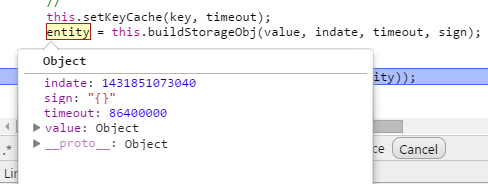
一個實測踩到的坑
在 Android 的 Hybrid 環境中還有一個「返回」按鈕,按下後會回到上一個頁面,此時 localstorage 可能讀取失效。一個簡單但不算嚴謹的應對方式是在 webapp 中加入:
window.onunload = function () { }; // 適合單頁應用
具體原理我也沒有完全查證清楚,僅作為一種可行的規避手段記錄下來。
結語
localstorage 是移動開發中無法迴避的一塊知識,值得深入理解。實際業務中除了本文提到的過期與淘汰策略,還要留意跨標籤頁同步(storage 事件)、資料結構設計(盡量扁平、避免存儲過深對象)以及敏感資訊不要明文存放等問題。
- 上一篇文章: 京東H5實戰合集:12個項目背後的創意與踩坑記錄
- 下一篇文章: 別再把HTML5叫成「H5」:一個簡稱背後的技術誤導