HTML5 Canvas 畫圓點虛線:擴充 CanvasRenderingContext2D
編輯:HTML5教程
Canvas 原生的 setLineDash() 只能畫「線段—空白」交替的虛線,畫不出等距的圓點。Stack Overflow 上有幾種繞道實作,其中 Phrogz 提供了一個點劃線版本(我個人也覺得 Rod MacDougall 的簡化版更好讀)。那麼,要畫出像下面這樣一列圓點組成的虛線該怎麼辦?
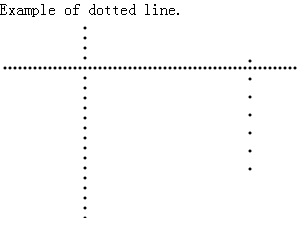
思路
既然無法用 stroke 一次畫完,就改成「沿路徑每隔一段距離畫一個小圓」。做法是量出起點到終點的長度,用迴圈每次前進一個間距,在該位置呼叫 arc() 畫半徑 1 的圓再 fill(),直到走完全程。
直接擴充原型
把這個行為掛到 CanvasRenderingContext2D.prototype 上,之後任何 context 都能直接呼叫 ctx.dottedLine(...),寫起來最順手。
var canvasPrototype = window.CanvasRenderingContext2D
    && CanvasRenderingContext2D.prototype;

canvasPrototype.dottedLine = function (x1, y1, x2, y2, interval) {
    if (!interval) {
        interval = 5;                       // 預設間距
    }

    var isHorizontal = true;
    if (x1 === x2) {
        isHorizontal = false;               // 垂直線
    }

    var len = isHorizontal ? x2 - x1 : y2 - y1;
    this.moveTo(x1, y1);

    var progress = 0;
    while (len > progress) {
        progress += interval;
        if (progress > len) {
            progress = len;                 // 最後一段不要超出終點
        }

        if (isHorizontal) {
            this.moveTo(x1 + progress, y1);
            this.arc(x1 + progress, y1, 1, 0, 2 * Math.PI, true);
            this.fill();
        } else {
            this.moveTo(x1, y1 + progress);
            this.arc(x1, y1 + progress, 1, 0, 2 * Math.PI, true);
            this.fill();
        }
    }
};
使用方式
var ctx = document.getElementById("canvas").getContext("2d");
ctx.dottedLine(20, 20, 380, 20, 8);      // 水平圓點虛線
ctx.dottedLine(20, 60, 20, 260, 8);      // 垂直圓點虛線
限制與改進方向
這個實作只處理水平與垂直線。若要支援斜線,就不能再用「x 或 y 單軸累加」的方式,而應該改用向量:先算出方向單位向量 (dx/len, dy/len),再沿著它逐步推進,同時把 moveTo 的干擾去掉。
另外還有兩個實務上的考量。一是間距太小、線條太長時會產生大量 arc 與 fill 呼叫,效能不佳;改成先 beginPath() 把所有圓加進同一條路徑,最後再一次 fill(),速度會好很多。二是若點半徑需要可調,把寫死的 1 改成參數即可。
最後補充一個現況:現代瀏覽器大多已支援原生的 ctx.setLineDash(),配合 lineCap = 'round' 也能做出接近圓點的效果。若你的目標環境較新,優先評估原生方案會比自行實作更省事。