由於公司最近項目不是很忙,所以,自己利用閒暇的時間來研究了一陣子的htm5和CSS3,正巧,公司最近要對以前的項目進行一次統一的升級,而我被告知時,主要是在以前的版本中加入一些頁面動畫。有4人參與了動畫特效的編寫,我很幸運自己也被選中。
第一次做動效還是用css3,心裡好激動。雖然自己對css3不是很了解,但是,我還是有信心自己能夠勝任這次的任務。接下來近2個月的時間裡,我 都在做CSS3動效,由於自己只是擅長Javascript和JQuery,對css了解也不是很熟悉,所以,做css3動畫上還是很吃力的。中途遇到很 多問題,自己也虛心請教了很多同事。(博主突然發現,我在現在的公司還是很歷練人的。)經過那短短的近2個月的時間,我對CSS也有了進一步的了解。正好 今天是周末,自己整理一下自己用到的知識。順便做了些例子。
canvas這次沒有用到項目中,而是我業余的研究。有寫錯的地方,還請高手指點~
廢話不多說了,直接上效果圖:
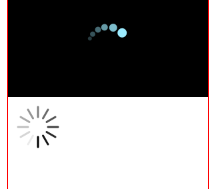
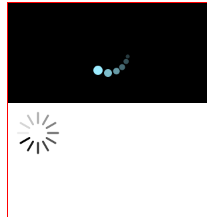
Html代碼:
<Html>
<head>
<meta charset="UTF-8">
<title></title>
<script type="text/Javascript" src="./loading.JS"></script>
</head>
<body>
<div style="border:1px solid red; width:200px;height:400px; margin-left:10px;float:left;">
<canvas id="loading1" style="width:200px;padding:0;margin:0;display:block;">
</canvas>
<canvas id="loading2" style="width:200px;padding:0;margin:0;display:block;">
</canvas>
</div>
<script type="text/Javascript">
loading1();
new loading2({"id":"loading2"});
</script>
</body>
</Html>
Javascript代碼:
function loading1(){
    var canvas = document.getElementById("loading1"),
        ctx = canvas.getContext("2d"),
        w = canvas.width,
        h = canvas.height,
        x = w/2,
        y = h/2,
        radius = 30;
        ctx.fillStyle = "#000";
        ctx.fillRect(0,0,w,h);

        var r = [3,4,4.5,5,6,7];
        var angle = [10,25,45,65,90,120];
        var alpha = [0.25,0.35,0.45,0.65,0.8,1];
        var x1=[],y1=[];

        setInterval(function(){
            ctx.fillStyle = "#000";
            ctx.fillRect(0,0,w,h);
            x1 = [];
            y1 = [];
            for(var i = 0; i < r.length; i ++){
                if(angle[i] >= 360) angle[i] = 0;
                ctx.beginPath();
                ctx.font = "1rem sans-serif";
                ctx.fillStyle = "rgba(156,236,255,"+alpha[i]+")";
                x1.push( x + radius*Math.cos(angle[i]*Math.PI/180));
                y1.push( y + radius*Math.sin(angle[i]*Math.PI/180));
                ctx.arc(x1[i],y1[i],r[i],0,2*Math.PI, true);
                ctx.closePath();
                ctx.fill();
                angle[i] += 5;
            }
        },25);
}

function isEmpty(obj){
    var name;
    for(name in obj){
        return false;
    }
    return true;
}

function loading2(arg){
    this.init(arg);
}
loading2.prototype = {
    constructor:loading2,
    init: function (arg) {
        var isConsist = !isEmpty(arg);
        this.block = isConsist ? arg.block ? arg.block : 12 : 12;
        this.height = isConsist ? arg.height ? arg.height : 15 : 15;
        this.width = isConsist ? arg.width ? arg.width : 3 : 3;
        this.time = isConsist ? arg.time ? arg.time : 100 : 100;

        this.cvs = document.getElementById(arg.id),
        this.ctx = this.cvs.getContext("2d");
        this.ctx.width = this.height*6;
        this.ctx.height = this.height*6;

        this.ctx.translate(this.ctx.width/2, this.ctx.height/2);
        var radius = 2;
        this.view(radius);
    },
    loop: function(alpha){
        this.ctx.rotate(Math.PI*2/this.block);
        this.ctx.beginPath();
        this.ctx.fillStyle = "rgba(0,0,0,"+alpha+")";
        this.ctx.arc(0, this.ctx.width/2-this.height*2,this.width/2, 0 ,Math.PI, true);
        this.ctx.arc(0, this.ctx.width/2-this.height, this.width/2, Math.PI, 0, true);
        this.ctx.closePath();
        this.ctx.fill();
    },
    view: function(radius){
        var that = this;
        this.ctx.rotate(Math.PI*2/this.block);
        for(var i = 1; i <= this.block; i ++){
            this.loop(i/this.block);
        }
        setTimeout(function(){
            that.ctx.clearRect(-that.ctx.width/2, -that.ctx.height/2, that.ctx.width, that.ctx.height);
            radius >= that.block? radius = 1:radius += 1;
            that.vIEw(radius);
        }, that.time);

    }
}
整段Javascript中,我認為最難懂的是loop中的代碼,這段代碼也是canvas中的畫圖的重點。
首先,canvas對象通過getContext("2d");返回一個context對象。canvas對象所有的畫圖,旋轉,轉變,縮放等功能全是通過context對象實現的。
canvas對象有width和height屬性,默認的width、height值為300px; 可通過context.width,context.height重新設值;
canvas畫矩形:
context.fillRect(x,y,width,height)設置canvas被填充的矩形,以相canvas中坐標點(x,y)為起 點,寬度為width,高位height的矩形進行填充。在填充矩形前,可以通過context.fillStyle可以設置填充的樣式(CSS);
canvas畫圓:
context.beginPath(); //起始一條路徑,或重置當前路徑
context.fillStyle;//可以設置canvas要填充的樣式
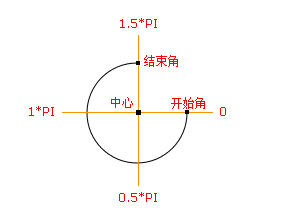
context.arc(x,y,radius,startAngle,endAngle,flag); //以canvas內坐標點(x,y)為圓心radius為半徑,起始弧度為startAngle,終止弧度為endAngle,flag為bool值, 當flag值為true時,表示逆時針旋轉,當flag為false,表示以順時針旋轉;
context.closePath();
context.fill();//填充當前繪圖路徑;
canvas旋轉rotate:
在loading2中vIEw方法的代碼中,有用到context.rotate()方法,rotate(angle)方法是用來旋轉當前繪圖,接收一個參數,以弧度計,表示旋轉角度;
canvas重新映射畫布(0,0)坐標點:
context.translate(x,y)表示將canvas的左上角平移到點(x,y)處;
值得注意的有
- canvas中的弧度表示:默認你逆時針旋轉。這和數學中默認的弧度旋轉方向相反;
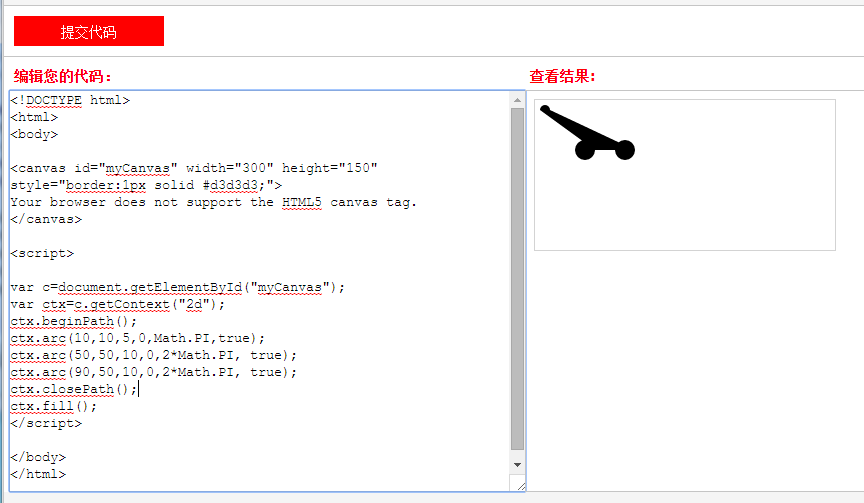
- 畫弧。在canvas中畫圓弧時候,可以在context.beginPath()和context.closePath()中畫多個圓弧。當圓弧不是閉合狀態時,所畫的圓弧會相互連接起來。loading效果圖中每一個旋轉的塊都是這樣畫出來的。
好了,以上就是我對canvas畫loading圖的了解,我說的不到位的,或是說的不准確、不正確的。歡迎大家指正